
Here’s the short version: Monarch Money is the best budgeting app for most people in 2026 — it’s the closest thing to a full replacement for Mint, with automatic bank syncing, a clean dashboard, and solid tools for couples. If you don’t want to pay anything, Rocket Money’s free tier is the strongest no-cost starting point, thanks to its subscription tracking and automatic categorization. Below, we compare 11 of the best budgeting apps of 2026 by price, free options, bank syncing, and budgeting method, so you can pick the one that fits your life — not someone else’s.
If you’re here because Mint vanished, you’re not alone. Intuit shut Mint down in March 2024 and steered its users to Credit Karma, which never really offered real budgeting (Engadget, November 2023). Millions of former Mint users have been hunting for a replacement ever since — and honestly, it’s a good time to be shopping. The field is stronger than it’s been in years.
One quick note before we dive in: app prices change constantly. Every price below was listed on the app’s own pricing page in October 2026, but double-check before you subscribe.
Related Guides
- 📩 Envelope budgeting fan? Goodbudget is the digital version of the method — but first, see how the system itself works (and its downsides) in our guide to the envelope budgeting method pros and cons.
- 💰 Budgeting toward a savings goal? Once your budget is set, park the money you’re saving somewhere it actually grows. Compare the best high-yield savings accounts of 2026.
Helpful Official Resources
- 🏛️ CFPB — Budgeting: How to create a budget and stick with it — the Consumer Financial Protection Bureau’s official walkthrough for building a budget that survives real life: consumerfinance.gov
- 🏛️ FDIC — Getting Beyond the Tough Times — the FDIC’s consumer guide to building a financial plan and budget, including how personal finance apps can help you stick with it: fdic.gov
The 11 Best Budgeting Apps of 2026 Compared
| App | Key Feature | Best For | Price (Oct 2026)* |
|---|---|---|---|
| Monarch Money | Full-picture dashboard, net worth | Couples & former Mint users | $14.99/mo or $99.99/yr; 7-day trial |
| Rocket Money | Subscription tracking & cancellation | Free-tier seekers | Free; Premium ~$7–$14/mo |
| YNAB | Zero-based budgeting education | Hands-on budgeters, debt payoff | $14.99/mo or $109/yr; 34-day trial |
| Quicken Simplifi | Cash-flow forecast, beginner setup | Beginners on a budget | From ~$3.99/mo billed annually |
| EveryDollar | Dave Ramsey zero-based method | Baby Steps followers | Free (manual); Premium $17.99/mo or $79.99/yr |
| Goodbudget | Digital envelope budgeting | Envelope-method users | Free (20 envelopes); Plus $10/mo or $80/yr |
| PocketGuard | “Safe to spend” number | Chronic overspenders | $12.99/mo, $74.99/yr, or $149.99 lifetime |
| Empower | Net worth + investment tracking | Investors who also budget | Free dashboard |
| Copilot | AI-powered tracking for Apple | iPhone/Mac users | $95/yr |
| Honeydue | Couples-first design | Couples | Free |
| Cleo | AI chatbot budgeting | Younger beginners | Free; Plus from ~$5.99/mo |
*Prices were listed on each company’s own site in October 2026. Apps change pricing often — verify before you subscribe.
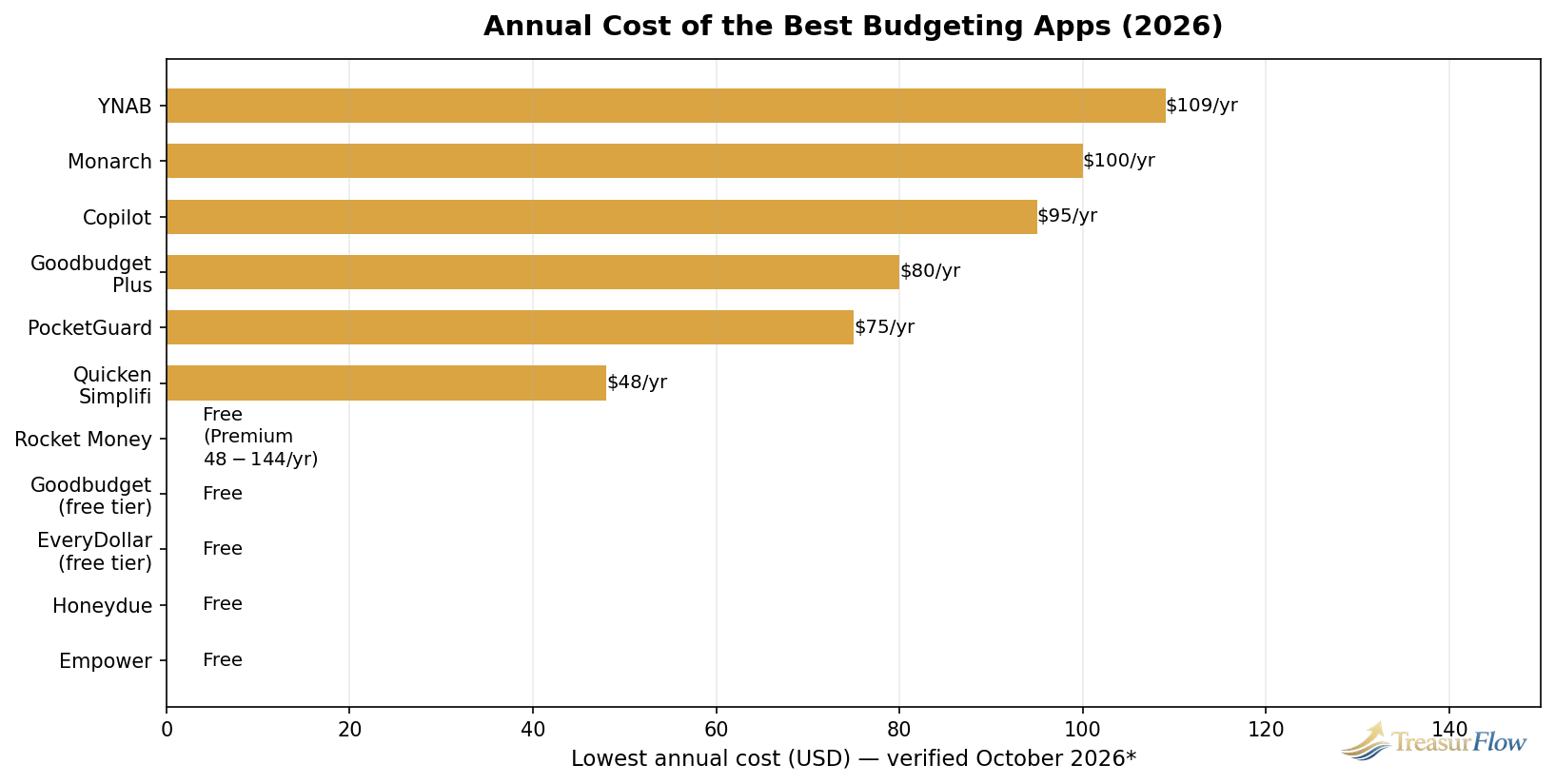
The chart above makes the big divide obvious: several genuinely useful apps are free, while the premium tier of the best paid apps runs roughly $48–$109 a year. A paid app pays for itself if it helps you find even $10 a month of waste — one forgotten subscription usually covers that.
What Are Budgeting Apps?
A budgeting app is a mobile or web tool that helps you plan and track your money: it connects to your bank accounts to import transactions automatically, sorts spending into categories, and shows whether you’re staying within the limits you set. The best ones also flag subscriptions, forecast your cash flow, and track savings goals — turning “where did my money go?” into a question you can answer in seconds.
Our 11 Top Picks, Reviewed
1. Monarch Money — Best Overall
Verdict: The strongest all-around pick — the most complete Mint replacement with the best dashboard in the category.
Monarch is the app most former Mint users land on, and for good reason. It syncs your accounts automatically, tracks net worth alongside your budget, and handles couples well with separate logins and shared accounts. Its flexible budgeting works whether you like strict category budgets or a looser spending plan. At $14.99/month or $99.99/year (with a 7-day free trial), it’s priced the same as YNAB — and most people who want “Mint, but better and still maintained” stop their search here.
2. Rocket Money — Best Free Budgeting App
Verdict: The free tier does the most real work — start here if you don’t want to pay.
Rocket Money earns its spot because its free tier isn’t a teaser: it includes account syncing, basic spending categorization, and the subscription tracker that made the app famous. If you’ve ever wondered how many subscriptions you’re actually paying for, this is the fastest way to find out. Premium (roughly $7–$14/month) adds bill negotiation, unlimited budgets, and more automation. For most people, the free tier alone is enough to get a clear picture of where money goes.
3. YNAB (You Need a Budget) — Best for Zero-Based Budgeting
Verdict: The best app if you want to change your behavior, not just watch your spending.
YNAB runs on a strict philosophy: give every dollar a job before the month begins. It’s the most hands-on app on this list, and that’s the point — fans credit it with breaking paycheck-to-paycheck cycles and paying off serious debt. The trade-off is effort and price: $14.99/month or $109/year, with a generous 34-day free trial (free year for college students, per the company’s own site). If you’ve tried free apps and nothing stuck, YNAB’s method is the most likely to actually change how you spend.
4. Quicken Simplifi — Best for Beginners
Verdict: The easiest paid app to start, at the lowest price of the premium tier.
Simplifi is Quicken’s modern, streamlined app, and it’s built for people who want automation without a learning curve. Its standout feature is the cash-flow forecast — it shows what’s safe to spend after upcoming bills, which is genuinely useful if your balance swings during the month. Pricing runs from about $3.99/month billed annually (often a promotional first-year rate) up to $6.99/month, so check the current offer. If Monarch feels like too much app, Simplifi is the gentler on-ramp.
5. EveryDollar — Best for Dave Ramsey Followers
Verdict: The natural pick if you’re working the Baby Steps — free to start, paid for automation.
EveryDollar is Dave Ramsey’s zero-based budgeting app, and its free tier is one of the best genuinely-free options: you build a full zero-based budget, but you enter transactions manually. That friction is either a feature or a dealbreaker depending on your personality. Premium ($17.99/month or $79.99/year, with a 14-day trial) adds bank syncing, custom reports, and the rest of the automation. If you’re following Ramsey’s plan, the method alignment matters more than the app’s polish.
6. Goodbudget — Best for Envelope Budgeting
Verdict: The closest digital version of cash-envelope budgeting — and the best free option if you won’t link your bank.
Goodbudget takes the envelope method digital: you divide your income into virtual envelopes (groceries, gas, fun money) and spend from each. It’s deliberately manual — no bank connection required — which makes it the top pick for anyone nervous about linking accounts. The free tier covers 20 envelopes, one account, and two devices; Plus ($10/month or $80/year) adds unlimited envelopes and bank syncing for US banks. New to the method? Read our guide to the envelope budgeting method pros and cons first — the app makes a lot more sense once you understand the system.
7. PocketGuard — Best for Overspenders
Verdict: One number — “here’s what you can safely spend” — for people who blow budgets.
PocketGuard’s whole pitch is simplicity: after bills, goals, and necessities, it shows you a single “In My Pocket” number. If you can spend only that, you’re fine. It’s the least intimidating app here for people who’ve failed at detailed budgets. Pricing: $12.99/month, $74.99/year, or a $149.99 lifetime plan, with a 7-day trial. If granular categories make your eyes glaze over, this is your app.
8. Empower — Best Free Net Worth Tracker
Verdict: Free, excellent for investments and net worth — but it’s a tracker, not a true budget.
Empower (formerly Personal Capital) gives you a genuinely free dashboard: net worth tracking, a retirement planner, an investment fee analyzer, and cash-flow tracking. It’s the closest free replacement for Mint users who also wanted investment tracking. Two caveats: it’s a spending tracker more than a budgeting tool, and the free tools exist partly to upsell Empower’s wealth management service (which requires a $100,000 minimum). Still, for a free all-in-one money dashboard, it’s hard to beat.
9. Copilot — Best for Apple Users
Verdict: The prettiest, smartest tracker — if you live in the Apple ecosystem.
Copilot is iPhone- and Mac-only, and it shows: the design and AI-powered categorization are a cut above. It syncs your accounts, builds category budgets, and surfaces spending insights with minimal setup. At $95/year with a free trial, it’s priced between Simplifi and Monarch. The Apple-only limitation is the whole story — Android and Windows users should look at Monarch or Simplifi instead.
10. Honeydue — Best Free App for Couples
Verdict: Built for two — the best free way to manage money with a partner.
Honeydue is designed around couples: shared and individual accounts, per-account privacy controls, bill reminders, and even in-app messaging about transactions (“hey, what was this $40 charge?”). It’s completely free, which makes it the easiest couple-budgeting experiment to try. Monarch is the more powerful couples option overall, but Honeydue wins on price and simplicity for pairs who just want to stop arguing about money.
11. Cleo — Best for Beginners Who Hate Spreadsheets
Verdict: Budgeting through a sassy AI chatbot — surprisingly effective for younger users.
Cleo replaces the traditional dashboard with a chat interface: you ask where your money went, and it answers (with attitude). It offers spending insights, savings goals, and a free tier, with Plus starting around $5.99/month. It won’t suit everyone — the tone is playful by design — but for users who find conventional budgeting apps intimidating or boring, Cleo’s conversational approach actually gets them to open the app, which is half the battle.
What Replaced Mint?
Short answer: No single app replaced Mint — but Monarch Money, Rocket Money, Empower, and Quicken Simplifi absorbed most of its users.
Here’s what happened: Intuit announced Mint’s shutdown in November 2023 and pulled the plug on March 23, 2024, directing roughly 25 million users to Credit Karma (TallyFi, May 2026). The problem is that Credit Karma is built around credit-score monitoring and financial product offers — it dropped the category budgets, custom alerts, and historical net-worth tracking that made Mint useful for actual budgeting.
So what should a former Mint user pick? Match your old Mint habits:
- You mostly tracked spending automatically: Monarch Money or Rocket Money. Both sync accounts the way Mint did.
- You loved that Mint was free: Rocket Money’s free tier or Empower’s free dashboard.
- You used Mint’s budgets seriously: YNAB or Monarch — both are stricter and better than Mint’s budgets ever were.
- You want investments + budgeting in one place: Empower.
One honest upgrade in the transition: Mint made money by advertising financial products based on your data. Most paid replacements charge you instead — usually $48–$109 a year — which means you’re the customer, not the product. That’s a trade worth making.
What Is the Best Free Budgeting App?
Rocket Money is the best free budgeting app for most people. Its free tier covers account syncing, automatic categorization, and subscription tracking — the three features most users actually need — without requiring an upgrade.
But “best free” depends on your situation:
- Best free for investors: Empower (free net worth + investment dashboard)
- Best free for the envelope method: Goodbudget (20 envelopes, no bank link needed)
- Best free for Ramsey-style budgeting: EveryDollar (manual zero-based budgeting)
- Best free for couples: Honeydue
- Best free with a credit score: Rocket Money and several others include basic score monitoring
The honest warning: some “free” apps are really just free trials. YNAB, Monarch, and Simplifi all offer trials — not free tiers. The apps above have permanent free plans that don’t expire.
Is YNAB Better Than Rocket Money?
They’re built for different jobs, so the better app depends on what you need. YNAB is better for strict, hands-on, zero-based budgeting — you assign every dollar a job and actively manage categories through the month. Rocket Money is better for automation and low effort: it syncs, categorizes, and tracks subscriptions with minimal input from you, and it has a real free tier.
Choose YNAB if you want to change your spending behavior and don’t mind putting in 15–20 minutes a week. At $14.99/month or $109/year, it’s an investment in the method, and its users are famously loyal for a reason. Choose Rocket Money if you want the clearest possible picture of your money with the least work — start free, and only pay for Premium (roughly $7–$14/month) if you want bill negotiation and unlimited budgets.
Can’t decide? Try Rocket Money free for a month. If you find yourself wanting more control, YNAB’s 34-day trial is long enough to know whether the method clicks.
Is It Safe to Link Your Bank Account to a Budgeting App?
Yes — with established apps, it’s generally safe. Reputable budgeting apps connect through aggregators like Plaid or Finicity using read-only access: they can see your transactions, but they cannot move your money. Connections are encrypted in transit and at rest.
That said, “safe” has two parts — security and privacy:
- Security: Download only from official app stores, use a strong unique password, and turn on two-factor authentication. Never link accounts over public Wi-Fi.
- Privacy: This is the real question. Free apps have to make money somehow — some do it through product recommendations based on your data. Paid apps (YNAB, Monarch, Simplifi) have a cleaner model: you pay, so you’re the customer.
If bank-linking still makes you uncomfortable, you have options: Goodbudget and EveryDollar’s free tier work entirely with manual entry — no connection required. The CFPB also offers free budgeting worksheets if you’d rather start on paper.
How to Pick the Right Budgeting App for You
Forget the feature lists for a minute. Answer three questions:
- Do you want automation or control? If you want the app to do the work, pick Rocket Money, Monarch, or Simplifi. If you want to be hands-on with every dollar, pick YNAB, EveryDollar, or Goodbudget.
- What’s your actual budget for a budgeting app? (Yes, that’s a real question.) Free is fine — Rocket Money, Empower, Goodbudget, and Honeydue all have permanent free tiers. But a $48–$109/year app pays for itself if it kills one forgotten subscription or stops one overdraft.
- Who’s budgeting? Solo budgeters can pick anything. Couples should shortlist Monarch, Honeydue, or Goodbudget’s shared envelopes.
Then do the thing most people skip: use the free trial like a test drive. Connect your real accounts, run one full month, and check whether you actually opened the app in week three. The best budgeting app is the one you’ll still be using in six months — and 58% of Americans living paycheck to paycheck (The Penny Hoarder’s State of Savings survey, reported October 2026) can’t afford a tool that only works in January.
Once your budget is running, put the money you’re saving to work. A budget tells your dollars where to go — a high-yield savings account makes sure the dollars you save actually grow while they wait.
The Verdict
There are more good budgeting apps in 2026 than ever before — which is both the good news and the problem. Start with the shortlist: Monarch Money if you want the best overall dashboard, Rocket Money if you want the best free start, YNAB if you want a method that changes behavior, and Simplifi if you want the gentlest on-ramp. Pick one, run it for a full month, and give it an honest chance. Your future self — the one with an emergency fund and no mystery subscriptions — will thank you.
Prices and features change often. Verify current details on each app’s website before subscribing. This article is for informational purposes and is not financial advice.

Muhammad Zakir is the founder of Treasurflow and the author of its personal finance guides. He researches consumer banking, credit, and personal loans, and every guide cites primary sources such as the CFPB, FDIC, FTC, and IRS. His content is educational and is not personalized financial advice.
1 thought on “The 11 Best Budgeting Apps of 2026: Free + Paid Picks”