
Best Bookkeeping Software 2026: The Tools That Make the Weekly Work Disappear
Your books do not fall apart at tax time. They fall apart on ordinary Tuesdays — the bank transaction you meant to categorize later, the receipt that stayed in a truck console, the invoice you sent but never matched to the payment, the bill you paid twice because nobody marked it paid. By December, those small misses have become a year of messy books, and no software demo in the world can retroactively fix them.
That is why this guide judges the best bookkeeping software 2026 the way your business will actually experience it: by the weekly jobs. Not by the longest feature list, not by the prettiest dashboard, and not by a promotional price that expires in three months. We organized every tool around six jobs you repeat all year — bank feeds and auto-categorization, reconciliation, invoicing and bill tracking, receipt capture, sales-tax tracking, and handing clean books to a CPA or bookkeeper — and then asked a simple question for each one: does this tool make that job faster, more accurate, and harder to forget?
The short answer is that there is no single winner for every business, and any roundup that pretends otherwise is selling you something. Wave is genuinely free for a micro-business willing to enter transactions by hand. Zoho Books is the value pick, with a real free plan under a revenue threshold and paid plans that undercut almost everyone. FreshBooks is the invoicing-first choice for service businesses that live and die by getting paid. QuickBooks Online remains the United States default, largely because your CPA probably already works in it — but its prices rose twice in 2026, and you need to see the new numbers before you budget. Xero is the team pick, with unlimited users on every plan and strong multi-currency handling. ZipBooks is the simple starter for owners who want clean, basic books without learning accounting vocabulary first.
Every price in this guide is a United States list price as of October 2026, taken from vendor pricing pages or dated October 2026 roundups that read those pages directly. Promotional prices are always labelled as promotions, with the regular price next to them, because a promotion is a first-year discount — it is not your cost. Where sources conflicted on a price, we say so in the text instead of quietly picking the number we liked. Read the pricing section carefully before the tool reviews: in 2026, the plan limits matter more than the headline price.
Related Guides
- Best Budgeting Apps 2026 — personal budgeting tools for the household side of your finances.
- Food Truck Finance: Costs, Margins and Bookkeeping Basics — a real-world example of daily transaction work in a cash-heavy small business.
- How to Use ChatGPT to Make a Budget — a practical workflow for building a budget you will actually follow.
- Best Expense Tracking Methods for Students — simple receipt and expense habits that translate directly to a one-person business.
Helpful Official Resources
- IRS Topic No. 305 — Recordkeeping — what business records to keep, and for how long, straight from the IRS.
- U.S. Small Business Administration — Manage Your Finances — the SBA’s guide to bookkeeping, balance sheets, and managing business money.
- NerdWallet — Best Accounting Software for Small Business — an independent roundup whose plan pricing we cross-checked for this guide.
- FreshBooks — 2026 Price Change FAQ — FreshBooks’ own explanation of its current Lite, Plus, and Premium list prices.
- QuickBooks Online Pricing Analysis, October 2026 — plan-by-plan pricing read from Intuit’s official pricing page on October 8, 2026.
- Xero Pricing and the October 1, 2026 Increase — what changed when Xero raised United States prices on October 1, 2026.
Our Picks at a Glance: Match the Tool to Your Business Stage
If you read nothing else, read this section. Bookkeeping software fails most often not because it is bad software, but because it was bought for the business you hope to have in three years instead of the business you run this month — or because you outgrew a starter tool six months ago and never admitted it.
Just starting, revenue under $50,000, working alone: start free. Wave Starter costs $0 and covers unlimited invoicing and real double-entry bookkeeping with manual transaction entry. Zoho Books is also free under $50,000 in annual revenue, allows up to 1,000 invoices per year, and includes one user plus one accountant. Between the two, pick Wave if you want the simplest possible invoicing workflow, and pick Zoho Books if you think you will want automatic bank feeds, sales-tax tracking, and a paid upgrade path that stays cheap. Do not pay for software in your first month of business just because a pricing page made the free plan sound risky. Free is a legitimate strategy at this stage.
Freelancer or service business that bills clients constantly: FreshBooks or Zoho Books. FreshBooks was built around the invoice. Time tracking, proposals, recurring invoices, payment reminders, and client-facing polish are its home ground. Budget for the Plus plan at $43 per month rather than Lite, for reasons explained in detail below — Lite’s limits are easy to miss and they sit exactly on the bookkeeping features you need. Zoho Books is the alternative if your client count is high, your budget is tight, or you already use other Zoho products.
Growing business with a CPA, employees, or inventory in the picture: QuickBooks Online. QuickBooks Online is the default for a reason. Most United States accountants and bookkeepers already know it, the app ecosystem is the deepest in this guide, and the higher plans add budgeting, inventory, and class tracking that smaller tools simply do not offer. The trade-off is price and user caps. As of October 2026 you will pay $38 per month for one user on Simple Start, and the plan most growing businesses actually need — Plus, the first tier with inventory, budgeting, and class tracking — is $140 per month. That is a real budget line now, not a rounding error.
Team access, multiple currencies, or clients and vendors outside the United States: Xero. Xero includes unlimited users on every plan, which sounds like a small detail until you compare it with paying per seat or jumping a whole tier just to add your business partner. Its Established plan is the one with multi-currency, project tracking, and expense claims. The catch is volume: the Early plan at $27 per month limits you to 20 invoices and 5 bills per month, so most active businesses should price the Growing plan at $59 per month from the start.
You want the simplest possible starter and you are allergic to complexity: ZipBooks. ZipBooks Starter is free, Smarter is $15 per month, and Sophisticated is $35 per month as of September 2026 reporting. It will not scale as far as QuickBooks Online or Xero, it has no inventory story, and its mobile app has been discontinued in favor of the browser — but for a solo service business that needs invoices sent, expenses recorded, and one bank account connected, simple is a feature, not a flaw.
What Bookkeeping Software Costs in October 2026
Prices in this category moved a lot in 2026, and older roundups — including some still ranking on page one — are quoting numbers that no longer exist. Two changes matter most. Intuit raised QuickBooks Online prices on August 1, 2026, the second increase that year: Essentials went from $75 to $85 per month, Plus from $115 to $140 per month, and Advanced from $275 to $340 per month, while Simple Start held at $38 per month. Xero raised United States prices on October 1, 2026: Early went from $25 to $27 per month, Growing from $55 to $59 per month, and Established from $90 to $97 per month. If a comparison you read elsewhere shows the old numbers, its conclusions about which tool is cheaper may no longer hold.
The table below uses regular list prices, billed monthly, in United States dollars, as of October 2026. Promotions are shown separately and labelled, because budgeting on a promotional price is how owners end up surprised in month four.
| Tool | Free option | Entry paid plan (list) | Mid / growth plan (list) | Top small-business plan (list) | Promotion as of October 2026 (labelled promo) |
|---|---|---|---|---|---|
| Wave | Starter, $0 | Pro, $19/month | — | — | No percentage promo listed |
| Zoho Books | Free, $0 under $50,000 annual revenue | Standard, $20/month ($15 billed annually) | Professional, $50/month ($40 billed annually) | Premium, $70/month ($60 billed annually); Elite $150; Ultimate $275 | 14-day free trial of Premium; no percentage promo listed |
| FreshBooks | No free plan; 30-day trial | Lite, $23/month, 5 billable clients | Plus, $43/month, 50 billable clients | Premium, $70/month, unlimited clients; Select is custom-priced | Promo: Lite $1/month for the first year (Solopreneur Offer, read October 7, 2026); Plus and Premium 80% off for 3 months ($8.60 and $14.00) — regular prices apply after the promo |
| QuickBooks Online | No free plan for most businesses; 30-day trial | Simple Start, $38/month, 1 user | Essentials, $85/month, 3 users; Plus, $140/month, 5 users | Advanced, $340/month, 25 users | Promo: 50% off for 3 months (for example, Simple Start at $19/month during the promo) or a 30-day free trial — regular prices apply after the promo |
| Xero | No free plan; 30-day trial | Early, $27/month | Growing, $59/month | Established, $97/month | Promo: 80% off for 3 months in October 2026 reporting. Note: older roundups quoted 90% off for 6 months — promo terms changed, so check the live offer and budget on list price |
| ZipBooks | Starter, $0 | Smarter, $15/month | Sophisticated, $35/month | Accountant plan, custom-priced | No promo listed in September 2026 reporting |
A note on sources and conflicts, because you deserve to know where these numbers came from. QuickBooks Online and Xero prices above reflect the post-increase October 2026 list prices reported from the vendors’ own pricing pages on October 8, 2026 and October 3–5, 2026 respectively. NerdWallet’s widely cited table still showed the pre-August QuickBooks tiers and the pre-October Xero tiers in some versions, which is why you may see $75, $115, and $275 for QuickBooks or $25, $55, and $90 for Xero quoted elsewhere. Those were real prices earlier in 2026; they are not the current list prices. FreshBooks list prices of $23, $43, and $70 are confirmed in FreshBooks’ own 2026 price-change FAQ. Zoho Books prices are consistent across NerdWallet and September 2026 vendor-page reporting. Wave Pro at $19 per month (or $190 per year) and ZipBooks at $0, $15, and $35 are consistent across multiple 2026 reviews reading the vendor pages. Payment processing, payroll, and add-ons are extra everywhere unless stated, and every vendor can change prices again — confirm the live price before you buy, and always budget on the regular rate.
The true first-year cost: why the promo column lies politely
A promotion does not change what a tool costs. It changes what you pay in year one, and it changes it by wildly different amounts depending on the tool, which makes promo-first comparisons actively misleading. The chart in this article compares the true first-year cost of five representative entry plans two ways: twelve months at list price, and the first year with the October 2026 promotion applied where one was offered. The figures were calculated directly from the list and promo prices above.
At list price for a full year, QuickBooks Online Simple Start costs $456, Xero Early costs $324, FreshBooks Lite costs $276, Zoho Books Standard on monthly billing costs $240, and ZipBooks Smarter costs $180. With promotions applied, the first year drops to $399 for QuickBooks Online (three months at half price, then nine months at $38), $259.20 for Xero Early (three months at 80% off, then nine months at $27), and just $12 for FreshBooks Lite under its $1-per-month first-year offer. Zoho Books and ZipBooks show no percentage promotion in our sources, so their first-year cost equals their list cost.
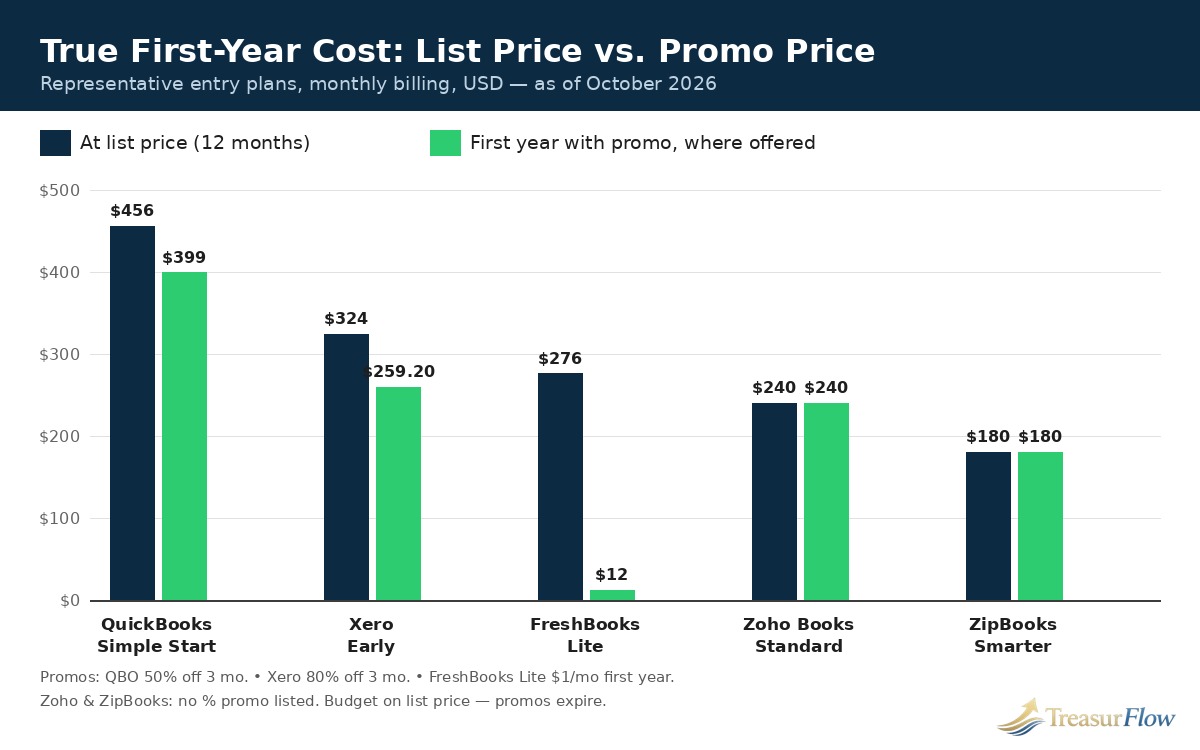
Read that chart the right way. FreshBooks Lite at $12 for year one is a genuine bargain if Lite actually fits your business — but as the next sections show, most service businesses need Plus, not Lite, and Plus at list price is $516 per year. The promotion that matters is the promotion on the plan you will actually stay on, in month thirteen, when every tool in this guide is billing you the regular rate. Choose the tool on its list-price value. Let the promotion be a pleasant discount on a decision you already made for the right reasons.
Bookkeeping Software vs. Accounting Software: The Distinction That Saves You a Duplicate Purchase
Treasurflow also covers accounting software, and readers reasonably ask whether they need both, or whether these are two names for the same product wearing different prices. They are not the same job, even though modern small-business products increasingly bundle both jobs into one subscription.
Bookkeeping is the daily recording work. It is importing every bank and credit-card transaction, categorizing it correctly, attaching the receipt, sending the invoice, recording the bill, matching the payment, and reconciling the account so the balance in your system equals the balance at the bank. Bookkeeping answers the question: what actually happened, transaction by transaction, and can we prove it? It is high-frequency, detail-heavy work, and it is where businesses fall behind.
Accounting builds on top of clean bookkeeping. It is adjusting entries at period-end, accruals, depreciation, financial statements, tax planning, and the judgment calls — is this expense deductible, how should this asset be treated, what do these margins actually mean? Accounting answers the question: what does what happened mean, and what should we do about it? It is lower-frequency, judgment-heavy work, and it is why CPAs exist.
Here is the practical consequence for your purchase. Every tool in this guide is sold, at least partly, as accounting software, but you will live in its bookkeeping workflow every week. A tool with magnificent year-end reports and a miserable bank feed will make you miserable fifty weeks a year to make your accountant happy for two. So buy on the bookkeeping workflow first — feeds, categorization, reconciliation, invoicing, receipts — and treat reporting depth as the tiebreaker, not the headline. Conversely, if a tool handles your daily work beautifully but cannot produce the reports your CPA needs, or cannot give your CPA proper access, that is a real ceiling and you should know where it is before you hit it. FreshBooks on its Lite plan and ZipBooks at the top of its range are the two places in this guide where that ceiling arrives earliest.
One more distinction worth keeping straight: none of these tools files your taxes for you, and none of them replaces a tax professional’s judgment. They organize the evidence. The IRS does not require any particular bookkeeping system, but it does require a method that clearly and accurately reflects your gross income and expenses, with records that substantiate both — see the IRS recordkeeping guidance in the resources box above. Good bookkeeping software is how a small business meets that standard without heroic effort in March.
How We Judged: The Six Weekly Bookkeeping Jobs
Most software comparisons score features in the abstract. We scored workflows in the concrete, because a feature you have to remember to use is only half a feature. For each of the six jobs below, we asked three questions. How much manual typing does the tool eliminate? How does it stop the job from being forgotten — feeds that arrive on their own, reminders that go out on their own, rules that categorize on their own? And what breaks first as your transaction count, client count, or team grows? The plan gates and limits in this section come from the same October 2026 pricing sources as the table above, and they are the details that decide whether a cheap plan is cheap for you.
Job 1: Bank feeds and auto-categorization
This is the foundation job. If transactions do not flow into the system reliably, every other job becomes manual data entry, and manual data entry is where bookkeeping goes to die. A good feed imports bank and credit-card transactions automatically, learns from your corrections, and applies rules — this vendor is always office supplies, this deposit pattern is always that client — so your weekly work becomes reviewing and approving rather than typing.
QuickBooks Online and Xero are the strongest here in depth and reliability of connections, and both learn categorization patterns over time. Zoho Books includes automatic bank feeds from its Standard plan at $20 per month — note carefully that the free plan requires manual import of bank statements, which is the single biggest workflow difference between Zoho’s free and paid tiers. Wave draws the same line in the same place: Starter is manual entry, and automatic bank import sits on Pro at $19 per month. FreshBooks imports bank transactions, but categorization and reconciliation depth are thinner than in QuickBooks or Xero, and full bank reconciliation starts on Plus, not Lite. ZipBooks connects one bank account on its free Starter plan and unlimited connections on Smarter at $15 per month, which is a fair trade at its price — just know the automation rules are simpler than the leaders’.
The lesson generalizes beyond any single tool: in 2026, automatic bank feeds are the feature vendors most often place behind the first paid tier or the second plan. When you compare a free plan against a paid plan, this is usually the real difference you are paying for. Price it honestly. If you process a handful of transactions a month, manual entry costs you minutes. If you process hundreds, it costs you hours every single week, and the paid tier pays for itself — the worked example later in this guide puts numbers on exactly that trade-off.
Job 2: Reconciliation
Reconciliation is the job that proves your books are true: matching every transaction in the system to the bank statement, hunting down duplicates, missing entries, and amounts that almost match but do not. It is unglamorous, it is monthly at minimum, and skipping it is how small errors compound into a year-end cleanup bill. The SBA’s finance guidance lists bank reconciliation among the core functions a business must manage, alongside accounts receivable, accounts payable, and payroll — it is not optional bookkeeping garnish.
QuickBooks Online and Xero both offer mature reconciliation workflows, with suggested matches, bank rules, and clear outstanding-item reporting; Xero’s higher plans add bulk reconciliation, which matters once volume grows. Zoho Books includes bank reconciliation and transaction rules even on its free plan, which is genuinely generous, though you will be reconciling against manually imported statements until you move to a paid plan with live feeds. FreshBooks is the cautionary tale in this section: reconciliation is a Plus-plan feature, so a Lite user is doing the most important accuracy job in bookkeeping outside the system or not at all — one of the main reasons we steer most FreshBooks buyers to Plus from day one. Wave includes basic reconciliation concepts in its bookkeeping core, but the automated import that makes reconciliation fast is a Pro feature. ZipBooks lists easy bank reconciliation on its Sophisticated plan at $35 per month, not on Starter or Smarter, so a ZipBooks user who wants proper reconciliation should budget for the top tier and compare that $35 honestly against Zoho Professional or Xero Growing before deciding.
Ask one question of any tool you trial: show me last month’s unreconciled items, in one screen, with ages. If the tool makes that easy, your monthly close will happen. If it buries it, it will not — and that will be true no matter how good your intentions are in January.
Job 3: Invoicing and bill tracking
Getting paid and paying others is the cash-flow job, and it is where the tools in this guide differ most in personality. FreshBooks is built for it: polished invoices, time tracking that flows into invoices, recurring billing, automatic payment reminders, late fees, proposals, and client retainers on Plus. Its meter, however, is billable clients — 5 on Lite, 50 on Plus, unlimited on Premium — so a business with many small clients can be pushed up a tier by client count alone, even with modest revenue. Count your clients before you count FreshBooks a bargain.
QuickBooks Online offers solid invoicing with payment links, status tracking, and reminders, plus proper bills and accounts-payable tracking, with bill management arriving on Essentials and above. Xero invoices well, handles bills cleanly, and now includes free standard ACH bill payments on every plan in the United States according to its October 2026 pricing notes — a small feature that saves real money if you currently pay vendors by check — but remember the Early plan’s ceiling of 20 invoices and 5 bills per month. Zoho Books is quietly excellent here, with recurring invoicing, automatic payment reminders, a client portal, and up to 1,000 invoices per year even on the free plan, scaling to 5,000 on Standard. Wave’s unlimited invoicing on the free Starter plan remains one of the best deals in small-business software, full stop; you will pay payment-processing fees when clients pay by card, as you would anywhere, but the invoicing itself costs nothing. ZipBooks includes unlimited invoicing on Starter and recurring invoices with auto-bill on Smarter.
For bill tracking specifically — the unglamorous accounts-payable side — the order reverses a little. Product and vendor-heavy businesses should weight QuickBooks Online (especially Plus, with purchase orders and inventory) and Zoho Books Professional (purchase orders, vendor management, inventory) more heavily, and should treat FreshBooks, Wave, and ZipBooks as invoice-first tools whose bill side is basic. If your weekly pain is unpaid customer invoices, optimize for invoicing. If your weekly pain is knowing which vendor bills are due, optimize for bills. They are different pains and the best tool for each is not the same tool.
Job 4: Receipt capture
Receipts are the evidence layer of your books. Without them, a categorized transaction is a claim; with them, it is a substantiated expense. The IRS recordkeeping guidance is clear that supporting documents — receipts, invoices, statements — are what back up the income and deductions on your return, and employment tax records in particular must be kept for at least four years. Receipt capture is how you build that evidence without a shoebox.
The modern standard is simple: photograph the receipt with your phone, let the software read the amount, date, and vendor, and match it to the bank transaction automatically. QuickBooks Online, Xero (with its included receipt-capture tooling), and Zoho Books all do versions of this well. Zoho includes receipt scanning even on its free plan, which is unusual at $0. FreshBooks gates receipt capture behind Plus — on Lite you are attaching evidence the manual way — and adds an email-in address for receipts on Plus and automated receipt data capture on Premium. Wave moved receipt scanning to Pro, so Starter users should pair Wave with a disciplined phone-photo folder habit or budget the $19. ZipBooks is the weakest here as a long-term evidence system, and its discontinued mobile app makes on-the-go capture a browser workflow rather than a one-tap habit. For a business whose owner is often in a truck, on a job site, or at a supplier counter, test receipt capture in your trial with ten real receipts before you test anything else. The tool whose capture flow you actually use beats the tool with the better brochure, every time.
Job 5: Sales-tax tracking
If you sell taxable goods or services in more than one place, sales tax is the job most likely to create a liability you did not know you had. Bookkeeping software will not file every return for you, but the right tool will apply the correct rate at invoice time, track tax collected separately from revenue, and produce a report your CPA — or you — can file from without rebuilding the quarter in a spreadsheet.
QuickBooks Online has the deepest United States sales-tax tooling in this group, which is one reason product sellers gravitate to it despite the price. Zoho Books includes sales-tax tracking from its Standard plan and handles multi-rate situations respectably for its price. Xero handles sales tax competently, though United States users should verify their specific state and local requirements in the trial, since Xero’s deepest tax tooling historically reflects its international roots. FreshBooks tracks basic tax amounts on invoices and offers tax reports, which is adequate for a single-state service business and thin for anything more complicated. Wave and ZipBooks cover basic tax tracking for simple, single-jurisdiction situations. The honest advice for this job is identical for every tool: software calculates and records; it does not know your nexus obligations. If you sell across state lines online, spend one session with a tax professional setting up your rates and rules inside whichever tool you choose. That session is cheaper than any penalty, and it only has to happen once.
Job 6: CPA and bookkeeper handoff
The final weekly-to-annual job is the handoff: giving a professional clean, complete access without emailing spreadsheets, sharing your personal login, or paying them to reconstruct your year. This job is invisible when it works and expensive when it does not, because professional time spent cleaning is professional time billed to you.
QuickBooks Online wins this job in the United States on familiarity alone — most CPAs and bookkeepers already work in it, plans include separate accountant seats (two on most plans, three on Advanced), and your professional will not bill you for learning your software. Xero is a close second, with a large accountant community of its own and unlimited users that make access a non-issue. Zoho Books includes one accountant on the free plan and scales access by tier, though fewer United States CPAs default to it, so ask yours before you commit. FreshBooks offers accountant access from Plus upward — another Lite limitation — and works best when your professional is FreshBooks-friendly. Wave and ZipBooks both support collaborator or accountant-style access, with the important caveat that Wave collaborator access now sits on Pro, so the free plan’s handoff is weaker than it used to be. Whichever tool you choose, do one thing in week one: invite your CPA or bookkeeper, confirm they can see everything they need, and ask them what they want categorized differently. Five minutes of setup alignment prevents the most common year-end sentence in small business: “We have to redo how this was categorized.”
The Six Tools, One by One
Wave — genuinely free for the micro-business that keeps it simple
Wave is the answer to a question thousands of new owners ask: can I just not pay for bookkeeping software yet? Yes — if your books are simple and your workflow is honest about its limits. Wave Starter costs $0, includes unlimited invoicing, estimates, and real double-entry bookkeeping records, and produces invoices that look professional enough that no client will ever guess the software was free. For a solo service business with a modest number of transactions, that is not a compromise. That is the correct purchase.
The limits define the upgrade moment, and they are specific. Automatic bank imports, auto-categorization, receipt scanning, and multi-user collaborator access sit on Wave Pro at $19 per month (or $190 per year). On Starter, you enter transactions manually. There is no inventory management and no time tracking — hourly billers should notice that second point immediately, because Wave cannot turn your hours into an invoice. Support on the free tier is thinner, with priority support reserved for Pro. Payment processing is where Wave makes its money on free accounts, at per-transaction card and bank-payment fees that you should compare if your invoice volume is high.
Choose Wave if you are pre-revenue or early-revenue, you work alone, your transactions are few enough that manual entry is a fifteen-minute weekly habit, and your money is better spent anywhere else in the business right now. Plan to leave — or to upgrade to Pro — when any one of three things happens: manual entry starts eating an hour a week, a bookkeeper or partner needs access, or you start carrying inventory. Wave to Pro is an easy step. Wave to QuickBooks Online or Xero later is also a well-trodden path, and the migration checklist below applies whenever you take it. What Wave will not do is punish you for starting free. Your records are real bookkeeping from day one, and that puts you ahead of every spreadsheet-and-shoebox competitor you have.
Zoho Books — the value pick, with a free plan that has a revenue line
Zoho Books is what happens when a company decides to compete on price without gutting the product. The free plan is available while your annual revenue stays under $50,000, includes one user plus one accountant, up to 1,000 invoices per year, recurring invoicing, a client portal, automatic payment reminders, receipt scanning, bank reconciliation with manually imported statements, and basic reports. Read that list again. Several competitors charge for tiers that do less. The free plan’s meaningful gap is automatic bank feeds, which arrive on Standard.
Paid Zoho Books stays inexpensive as you grow: Standard at $20 per month ($15 billed annually) for up to 3 users and 5,000 invoices per year, Professional at $50 per month ($40 billed annually) for up to 5 users with sales and purchase orders, multi-currency, inventory tracking, and workflow rules, and Premium at $70 per month ($60 billed annually) for up to 10 users with budgeting and more automation. Elite at $150 and Ultimate at $275 per month exist for advanced inventory and analytics, though most readers of this guide will top out at Professional or Premium. If you already use other Zoho products, the ecosystem integration is an additional, real advantage.
The cautions are about fit, not quality. Fewer United States CPAs default to Zoho Books than to QuickBooks Online, so confirm your accountant is comfortable before you build a year of history in it. Some advanced needs — deep inventory across warehouses, for example — wait for the expensive Elite tier, so a product business should map its inventory needs against the plan table carefully. And the free plan’s $50,000 revenue threshold is a cliff worth watching: crossing it is a good problem, but budget the Standard plan into the year you expect to cross it. For the budget-conscious owner who wants full double-entry bookkeeping, real reconciliation, and a paid path that stays cheap, Zoho Books is the strongest value in this guide, and it is not particularly close.
FreshBooks — invoicing-first, for service businesses that bill by time and project
FreshBooks starts from a different premise than the other tools here: for a service business, the invoice is the business. Everything — time tracking, expenses, proposals, retainers, project profitability — organizes itself around billing the client well and getting paid faster. If you are a consultant, designer, agency, trades business, or any freelancer who bills hours or projects, FreshBooks will feel like it was designed by someone who has chased a late payment. In a sense, it was.
Budget honestly, though, because FreshBooks’ pricing has more moving parts than any other tool in this guide. List prices as of October 2026 are Lite at $23 per month for up to 5 billable clients, Plus at $43 per month for up to 50 billable clients, and Premium at $70 per month for unlimited clients, with Select custom-priced. The promotions are generous and must be labelled as promotions: Lite was offered at $1 per month for the first year under a Solopreneur Offer read on October 7, 2026, with Plus at $8.60 and Premium at $14.00 under an 80%-off-for-three-months offer — and the regular prices apply when those promos end. On top of the plan, each additional team member costs $11 per month, Advanced Payments costs $20 per month, and payroll costs $40 per month plus $6 per user. A two-person studio on Plus that also runs payroll is paying $106 per month in total ($43 plan + $11 team member + $40 payroll base + $12 for two payroll users), not $43. Do that full-basket math for your own team before you compare FreshBooks against anything.
The plan gates matter just as much. Lite has no bank reconciliation, no double-entry reports, and no accountant access — which means Lite is an invoicing tool with expense tracking, not yet a full bookkeeping system. Plus is where FreshBooks becomes real bookkeeping software, adding reconciliation, the general ledger and balance sheet, receipt capture, and accountant access. Our advice is blunt: if you choose FreshBooks, choose Plus, and treat Lite as a trial with a price tag. Choose Premium when client count passes 50 or you need accounts payable and project profitability. Choose a different tool entirely if you carry inventory, sell products at scale, or need class tracking and deep reporting — FreshBooks will not grow into those jobs, and discovering that in year two means a migration you did not need to have.
QuickBooks Online — the United States default, at a new and higher price
QuickBooks Online is the industry standard in United States small-business bookkeeping, and the reasons are structural, not just habitual. Most accountants and bookkeepers already know it, which makes hiring help, switching firms, and handing off at tax time easier than on any rival. The integration ecosystem is the deepest here. The feature ceiling is the highest here: the Advanced plan reaches 25 users, custom roles, workflow automation, and backup and restore. And the product scales from a one-person Simple Start account to multi-location operations without a platform change. NerdWallet rates it best for most small businesses and best for working with an accountant, and on the workflow evidence, that verdict still holds in October 2026.
What changed is the price of that default, and pretending otherwise would be doing you a disservice. After two increases in 2026, list prices as of October 2026 are Simple Start $38 per month for 1 user, Essentials $85 per month for 3 users, Plus $140 per month for 5 users, and Advanced $340 per month for 25 users, with separate free accountant seats on each plan. New customers choose between 50% off for three months — a promotion, after which the full list price applies — or a 30-day free trial. A lower-cost Solopreneur tier at $20 per month also appears in current QuickBooks listings for one-person businesses with the simplest needs; if that is you, compare it against Simple Start and against Zoho and Wave before paying for either.
The plan gates are where QuickBooks budgets blow up, so learn them now. Multi-currency starts on Essentials. Budgeting, inventory, purchase orders, and class and location tracking (up to 40 combined classes and locations) start on Plus. That means the owner who buys Simple Start for $38 and later discovers they need to track profitability by location, department, or product line — class tracking, in QuickBooks language — is looking at Plus at $140, a gap of $102 per month or $1,224 per year. None of this makes QuickBooks a bad purchase. It makes it a purchase to size correctly on day one. Map your business against the Plus feature list honestly: if two or more Plus features are on your “soon” list, start on Plus and skip the painful mid-year upgrade. If you are a simple service business with one user and no inventory, Simple Start or Essentials will serve you well, and the CPA familiarity alone may justify the premium over cheaper rivals. Just renew with your eyes open — this vendor has raised prices twice in one year, and your renewal planning should assume the list price you see today is a floor, not a promise.
Xero — unlimited users, multi-currency strength, and a volume cap to respect
Xero is the tool that treats team access as a right instead of a revenue line. Every plan includes unlimited users with no per-user fee, which changes the economics for any business where an owner, a partner, a bookkeeper, and an office manager all touch the books. Add clean design that non-accountants consistently find less intimidating, strong bank reconciliation, receipt capture through its included tools, and the best multi-currency handling in this group, and Xero earns its place as the most credible alternative to QuickBooks Online — and, for international or team-heavy businesses, the better first choice.
United States list prices after the October 1, 2026 increase are Early $27 per month, Growing $59 per month, and Established $97 per month. October 2026 reporting put the new-customer promotion at 80% off for three months; older roundups quoted 90% off for six months, and since the terms demonstrably changed, treat any promo as temporary, confirm the live offer, and budget on list price. Payroll runs through an integration rather than natively in the United States, so price that add-on into your comparison if payroll is a weekly job for you — a growing business adding partner payroll will see its Xero total rise well above the $59 headline, just as it does on rival platforms.
Xero’s trap is volume, not users. Early limits you to 20 invoices and 5 bills per month, plus a short-term cash-flow view. The moment your invoicing passes roughly five invoices a week, Early is not a $27 plan for you — it is a $59 Growing plan, a difference of $32 per month or $384 per year, and you should simply start on Growing. Established is the tier that unlocks multi-currency, project and time tracking, expense claims, and a longer cash-flow forecast, so businesses that bill or buy internationally should price Established from the start rather than discovering the gate mid-quarter. One more October 2026 wrinkle for multi-entity owners: Xero began phasing out its multi-organization discount on October 1, 2026, so if you run several legal entities, your increase may be larger than the per-plan table suggests — check what you are actually billed, per organization. For a growing team that shares the books, sells or buys across currencies, or simply refuses to pay per seat, Xero is the strongest structural deal in this guide.
ZipBooks — the simple starter for owners who want clean books, not a finance degree
ZipBooks occupies the gentlest corner of this market. Its Starter plan is free and includes unlimited invoices, unlimited customers and vendors, basic reports, card and PayPal payments, and one connected bank account. Smarter at $15 per month adds unlimited bank connections, recurring invoices with auto-bill, time tracking, team collaboration, and more advanced bookkeeping. Sophisticated at $35 per month adds advanced reporting, smart tagging by location, project, or custom label, secure document sharing, and the easy bank reconciliation workflow. An Accountant plan for firms is custom-priced. Those prices are as of September 2026 reporting — ZipBooks pricing changes less dramatically than its larger rivals, but confirm before you buy, as with everything here.
What you get is clarity. Owners who bounce off QuickBooks’ vocabulary and Xero’s depth often find ZipBooks is the first tool they actually open every week, and a tool you open every week beats a powerful tool you avoid. What you give up is ceiling and ecosystem: no inventory story, fewer integrations, simpler automation and reporting, a discontinued mobile app (use the browser on your phone instead), and payroll only through an integration. That profile fits a specific reader precisely — the solo or very small service business, side business, or first-time bookkeeper who needs invoices out, expenses in, and one or two bank accounts connected, and who values “I understand my own books” over “my books could run a small corporation.” If that is you, start on Starter, move to Smarter when you need recurring billing or a second bank connection, and budget Sophisticated if proper in-system reconciliation matters to you. If you expect rapid growth, hiring, or inventory within a year, start on Zoho Books or Xero instead and save yourself the migration.
The Cost of Messy Books: A Worked Example
Software subscriptions are visible costs, which is why owners obsess over a $20 difference between plans and ignore the invisible cost sitting next to it: their own time, spent doing by hand what a feed and a rule would have done automatically — or worse, spent in a year-end cleanup. The example below is illustrative, not a promise. It uses stated assumptions, and every figure was calculated from those assumptions so you can substitute your own numbers honestly.
Imagine a service business processing 250 bank and card transactions per month — a modest count for an active business. Handled manually, finding each transaction, entering it, categorizing it, and filing its receipt takes an assumed 3 minutes per transaction. That is 12.5 hours per month. Handled with automatic bank feeds and learned categorization, the same work becomes reviewing suggested categories and approving matches, at an assumed 0.75 minutes per transaction — 3.125 hours per month. The difference is 9.375 hours saved per month, or 112.5 hours per year. Value the owner’s time at an assumed $50 per hour and the saved time is worth $5,625 per year. Against that figure, even QuickBooks Online Plus at list price — $1,680 per year — is not the expensive option in the room. Manual bookkeeping is.
Now price the failure mode, because most owners do not do 12.5 manual hours a month. They do zero hours for eleven months and then pay for the reconstruction. Assume a year-end cleanup takes a bookkeeper or CPA 18 hours at an assumed $200 per hour to rebuild, categorize, and reconcile a neglected year: $3,600, paid all at once, in the busiest season, for books that gave you no useful information at any point during the year you were living through. Compare the disciplined alternative: a one-hour monthly review habit, twelve hours of owner time across the year at the same assumed $50 rate, worth $600 — plus a subscription. Clean books are not just cheaper. They are the only version of this story where you knew your margins in June instead of discovering them the following April. Use your own transaction count, your own minutes, and your own hourly value in this math. If the result still favors manual entry — as it genuinely can for a business with twenty transactions a month — then Wave Starter or Zoho’s free plan is your correct answer, and this guide has done its job for you too.
While you are doing cost math, finish the basket for whichever tool you are leaning toward. Add the plan you actually need (not the entry plan), the extra seats you actually need (FreshBooks team members at $11 each are the classic surprise), the payroll add-on if you run payroll, and the payment-processing reality that card acceptance costs a percentage everywhere. Then compare baskets, not headlines, over twelve months at list price. That single discipline eliminates most bad purchases in this category.
Red Flags: The Pricing Traps and Plan Gates That Catch Owners Out
Every vendor in this guide is a legitimate company selling a real product. The traps below are not scams. They are the predictable places where a reasonable buyer, reading a pricing page quickly, spends more than they meant to or discovers a missing feature at the worst possible moment. Learn the pattern once and you will spot it on any pricing page, including vendors not covered here.
Per-user pricing that multiplies quietly. QuickBooks Online caps billable users by plan — 1, 3, 5, or 25 — so adding people means jumping tiers, not adding seats. FreshBooks includes one user and charges $11 per month per additional team member, so a five-person team adds $44 per month before payroll enters the picture. Xero and Zoho Books handle people most generously, Xero with unlimited users on every plan and Zoho with user counts that scale by tier. Before you buy anything, count every human who will log in — owner, partner, bookkeeper, office manager, CPA — and price the plan that includes them all.
Feature gates placed exactly on the growth path. The features vendors gate are rarely random. They are the features a growing business needs next: class and location tracking and inventory on QuickBooks Online Plus, multi-currency and projects on Xero Established, bank reconciliation and accountant access on FreshBooks Plus, automatic bank feeds on Wave Pro and Zoho Standard, reconciliation on ZipBooks Sophisticated. Gate placement is the business model. The defense is to list your “next twelve months” needs before you shop — second location, first employee, inventory, foreign-currency clients, a partner logging in — and buy the plan that covers the list, even if today’s business fits the cheaper tier.
Volume caps disguised as cheap plans. Xero Early’s 20 invoices and 5 bills per month, FreshBooks Lite’s 5 billable clients, Zoho free’s 1,000 invoices per year and $50,000 revenue threshold, and Wave’s manual-entry line are all the same mechanism in different clothes: a low price that holds only below a volume line. None of them are dishonest. All of them punish the buyer who did not count. Count your invoices, bills, clients, and transactions for a typical month before your trial starts, and trial the plan your count points to.
Promotion-first budgeting. A 50%-off or 90%-off banner is advertising, not pricing. FreshBooks Lite at $1 per month for a year is a superb deal that still becomes $23 per month in month thirteen — and $43-plus per month the day you realistically move to Plus. QuickBooks and Xero promotions expire in three months. Build your budget, your prices, and your margins on list price, and treat every promotional month as found money.
The missing add-ons basket. Payroll, advanced payments, extra seats, receipt tools, and payment processing are separate lines on most platforms. FreshBooks payroll at $40 plus $6 per user and Xero payroll via a partner integration are the two most commonly forgotten. Ask, for your finalist, one question in writing: plan plus seats plus payroll plus payments, twelve months, list price — what is the total? A vendor or review that cannot answer that cleanly has not finished the comparison.
Assuming the cheap tier is the same product. In several tools here, the entry tier is a materially different product — no reconciliation, no accountant access, no feeds. Buying it, building a workflow on it, and discovering the difference at tax time is the most expensive outcome in this entire guide, worse than overpaying for a higher tier you did not fully need. When a feature is part of your weekly six jobs, verify it exists on your exact plan, in your trial, with your own transactions. Do not take a comparison table’s checkmark for it, including ours — plans change, and your trial is the only source that cannot be out of date.
Switching Tools: A Migration Checklist That Protects Your History
Sooner or later, most businesses switch bookkeeping software — outgrowing a free plan, escaping a price increase, or following a new CPA’s preference. Switching is not hard. Switching carelessly is expensive, because sloppy migration corrupts the opening balances that every future report depends on. Work this checklist in order, ideally at a month-end, quarter-end, or year-end boundary, when balances are cleanest.
First, pick your switch date and freeze it. Reconcile every bank and credit-card account in the old system up to that date, with nothing left unreconciled and no transactions dated after it. Print or export the trial balance, profit and loss, and balance sheet as of the switch date — these are your proof documents, and the new system must reproduce them exactly.
Second, export everything that is a list, not just everything that is a report: your chart of accounts, customer list, vendor list, product and service items, open invoices with their dates and amounts, unpaid bills, and outstanding checks or deposits. Open items matter more than history for daily operations, because they are the money you are still owed and still owe on day one in the new tool.
Third, set up the new system before you import anything into it. Configure your fiscal year, tax rates, chart of accounts (trimmed to what you actually use — migration is the one painless moment to simplify it), bank connections, and user permissions. Then import the lists, enter or import the opening balances from your proof documents, and reconcile every account in the new system to the switch date. If the new system’s balances do not match the old system’s proof documents to the cent, stop and fix it now. Do not enter a single new transaction on top of mismatched opening balances.
Fourth, run both systems in parallel for one monthly cycle if your volume allows it, entering new work in the new system and checking its first month-end against expectations. Invite your CPA or bookkeeper into the new system during this month, not after it — their one review of your setup is the cheapest insurance in the entire migration.
Fifth, close the loop properly. Keep read-only access to the old system until at least your next tax return is filed, export a complete final backup of reports and supporting documents for your records, and only then cancel the old subscription. Remember the retention reality behind this step: the IRS expects supporting records to be available for years, not until your subscription lapses, and employment tax records carry their own multi-year requirement. Your archive is your responsibility, not your former vendor’s. Finally, rebuild your automations in the new home — bank rules, recurring invoices, payment reminders, receipt habits — in week one. Automations are the workflow. A migration that moves your data but not your habits has moved the smaller half of your bookkeeping system.
How to Choose in One Sitting, and Your First 30 Days
If you have read this far and still feel torn between two tools, use this tiebreaker sequence. First, eliminate on handoff: ask your CPA or bookkeeper which tools they work in, and drop any finalist they refuse to touch. Second, eliminate on your hardest weekly job: inventory businesses drop the invoice-first tools; hourly service businesses drop Wave; multi-currency businesses price Xero Established and Zoho Professional and compare those two honestly. Third, run the surviving tool — only one — as a real trial for two weeks, with your real bank feed, your real clients, and at least ten real receipts. Trials fail as evaluations when they are tours. Make yours a shift at work. Fourth, do the twelve-month basket math at list price for the plan your trial proved you need. If the number is defensible against the time math in the worked example, buy it and stop shopping. The most expensive bookkeeping software is the one you re-evaluate every quarter instead of using every week.
Your first thirty days decide whether the purchase works, so schedule them. Week one: connect bank and card feeds, set up the chart of accounts with your CPA’s input if you have one, configure sales-tax rates, and invite your accountant. Week two: set categorization rules for your twenty most common vendors, load your customer and vendor lists, and recreate your recurring invoices and bills. Week three: build the receipt habit — phone app or email-in address, tested with real receipts — and reconcile the first partial month so the workflow is familiar while the stakes are small. Week four: complete your first full monthly close and reconciliation, review the profit and loss for anything miscategorized, and write down your recurring weekly slot — the same thirty minutes, the same day, every week — in which feeds get reviewed and invoices get chased. Pair that discipline with the personal-finance habits on the household side of your money — the budgeting and expense-tracking guides linked at the top of this article use the same principle: small, scheduled, and automatic beats large, occasional, and heroic. Software makes that rhythm possible. Only you can keep it, and keeping it is the entire game.
Conclusion: Buy for the Tuesdays, Not the Demo
The best bookkeeping software 2026 is the tool that makes your six weekly jobs — feeds, reconciliation, invoicing and bills, receipts, sales tax, and a clean professional handoff — so routine that your books are simply always done. For a micro-business starting out, that tool is Wave or Zoho Books, free, and free is a smart place to start. For value as you grow, it is Zoho Books on a paid plan. For a service business that lives in its invoices, it is FreshBooks, budgeted honestly at Plus. For the United States business that wants the default its CPA already knows, it is QuickBooks Online, bought at the tier its real needs dictate and budgeted at the new 2026 list prices. For teams and multi-currency work, it is Xero, priced at Growing or Established rather than at the capped Early tier. And for the owner who needs simple above all else, it is ZipBooks, with eyes open about its ceiling.
Whichever you choose, choose it at list price, on your real transaction counts, with your accountant’s blessing, and then give it a full quarter of weekly use before you judge it. Clean books are not a software feature. They are what happens when decent software meets a thirty-minute weekly habit — and every tool in this guide is decent enough to be the right answer for somebody. Make it the right answer for you, and let this be the last January you spend reconstructing the year you just lived.
Bookkeeping Software Questions Owners Ask at Month-End and Tax Time
What is the difference between bookkeeping software and accounting software?
Bookkeeping software handles the daily recording work — importing bank transactions, categorizing them, reconciling accounts, sending invoices, and capturing receipts. Accounting software includes that recording work and adds higher-level reporting, accrual adjustments, and financial statements used for tax filing and business decisions. In practice, most small-business products in this guide do both, so choose based on how well the tool handles your weekly bookkeeping jobs first.
Can I really run my books for free with Wave or Zoho Books?
Yes, within limits. Wave Starter is free for manual entry, unlimited invoicing, and basic bookkeeping, but automatic bank imports and receipt scanning require Wave Pro at $19 per month as of October 2026. Zoho Books is free while your annual revenue stays under $50,000, with up to 1,000 invoices per year and one user plus one accountant, but automatic bank feeds require a paid plan. If automation matters from day one, budget for the paid tier.
Why does QuickBooks Online cost so much more than it did last year?
Intuit raised QuickBooks Online list prices twice in 2026, most recently on August 1, 2026. As of October 2026, Simple Start is $38 per month, Essentials is $85 per month, Plus is $140 per month, and Advanced is $340 per month. New customers are offered 50% off for three months or a 30-day free trial, but you should budget on the regular list price because the promotional price expires.
Which bookkeeping software is best if several people need access?
Xero is usually the simplest choice for teams because every plan includes unlimited users with no per-user fee, although the Early plan limits you to 20 invoices and 5 bills per month. QuickBooks Online caps users by plan at 1, 3, 5, or 25, and FreshBooks charges $11 per month for each additional team member, so team access can change the true cost quickly.
Do I still need a bookkeeper or CPA if I use bookkeeping software?
Software automates recording, categorizing, and reconciling, but it does not judge whether a transaction is deductible, set up your chart of accounts correctly, or file your taxes. Most owners still benefit from a professional review at setup and at year-end, and every tool in this guide lets you invite an accountant. Clean weekly bookkeeping usually makes that professional time shorter and cheaper.
How hard is it to switch bookkeeping software mid-year?
Switching mid-year is doable but easier at a month-end, quarter-end, or year-end boundary. Export your chart of accounts, customer and vendor lists, open invoices and bills, and reconciled bank balances from the old system, reconcile every account to the switch date, then import and reconcile again in the new system before you enter new transactions. Keep read-only access to the old system until your next tax return is filed.

Muhammad Zakir is the founder of Treasurflow and the author of its personal finance guides. He researches consumer banking, credit, and personal loans, and every guide cites primary sources such as the CFPB, FDIC, FTC, and IRS. His content is educational and is not personalized financial advice.