
Payroll looks simple from the outside. You work, you get paid. Inside a small business, payroll is the one routine task where a small mistake turns into a government notice, a penalty, and hours of phone calls — while your team still expects to be paid correctly and on time, every single time.
That is why choosing the best payroll software 2026 is not really a software beauty contest. It is a decision about workflow and risk. Who calculates gross-to-net pay correctly when someone works overtime, earns a tip, takes unpaid leave, and lives in a different state from where they work? Who deposits the taxes on the right day, in the right amount, through the right system? Who files the quarterly return, produces the W-2 in January, reports the new hire to the state, and answers the letter when the IRS or a state agency says a number does not match?
This guide takes a true-cost-first, workflow-first approach. We start with what payroll software must actually do, job by job. Then we compute a first-year total cost for a five-employee business using verified list prices as of October 2026, showing the math so you can redo it for your own headcount. Then we look at who carries the tax-penalty risk — because the cheapest plan that leaves filing in your hands is a very different product from a full-service plan that files for you. Only after that do we give picks by business stage, dig into accounting integrations, walk through a mid-year switching checklist, and flag the hidden-fee traps that make a low headline price grow.
Prices in this article are list prices checked in October 2026 from vendor pricing pages and reputable roundups that cite those vendor pages. Promotions are labeled as promotions and are excluded from the first-year math, because a three-month discount does not describe what you will pay in month nine. Where a vendor does not publish a price at all — ADP RUN and Paychex Flex are the main examples — we say so plainly instead of guessing a number.
Related Guides
Helpful Official Resources
What Payroll Software Must Actually Do
Before comparing brands, get clear on the job list. If a product does not do one of these jobs, someone in your business does it by hand — usually you, late at night, with a spreadsheet open. Good payroll software is valuable precisely because it removes those manual steps and the errors that come with them.
1. Gross-to-Net Calculation
Every paycheck starts as gross pay and ends as net pay, and the distance between the two is where most errors live. Gross pay can include hourly wages, overtime at one-and-a-half times the regular rate, salaries, commissions, bonuses, tips, shift differentials, and paid time off. From that gross amount, the software must subtract federal income tax withholding based on the employee’s Form W-4, Social Security and Medicare taxes (FICA), state and local income tax where it applies, and any pre-tax and post-tax deductions such as health insurance premiums, retirement contributions, and wage garnishments.
The calculation has to be right for each person’s situation, not just in total. An employee who changes a W-4 mid-year, hits a year-to-date wage cap, or works in one state and lives in another creates a different calculation from the person sitting next to them. Software earns its keep by applying the current tax tables automatically, tracking year-to-date totals per employee, and flagging an unusual result before you approve the run — not after the money has left your account.
Ask any vendor a simple test question: what happens when I approve a payroll and then spot a mistake an hour later? The answer tells you a lot about whether the workflow was built for real small businesses, where mistakes are discovered at inconvenient moments, or for a demo.
2. Tax Withholding, Deposits, and Filing
Calculating taxes is only half the tax job. The other half is getting the money to the right agency on the right schedule and proving you did it.
Employers withhold income tax and the employee share of Social Security and Medicare from wages, add the employer share of Social Security and Medicare, and deposit those employment taxes with the IRS on a monthly or semiweekly schedule, depending on the size of the liability. Many employers also file Form 941, the Employer’s Quarterly Federal Tax Return, each quarter, and Form 940 for federal unemployment tax annually. State rules add their own withholding deposits, unemployment insurance taxes, and quarterly wage reports, each with its own due dates and portals.
This is the step where do-it-yourself payroll most often breaks down. The math can be perfect and the business can still be penalized because a deposit was late, short, or sent the wrong way. The IRS failure-to-deposit penalty rises with how late a deposit is — commonly described in IRS guidance as starting at 2% for a deposit one to five days late and rising to 5%, then 10%, and then 15% after a notice — plus interest. That is why, later in this guide, we treat who files and deposits as a separate decision from price.
A full-service payroll product takes this whole chain off your plate: it withholds, deposits, and files on your behalf, and it keeps the records to show what was filed and when. A basic or DIY product calculates the numbers and leaves deposits and filings to you. Both models can work. They are not the same product, and they should not be compared on monthly price alone.
3. Year-End Forms: W-2s and 1099s
January is payroll’s exam season. For employees, you must furnish Form W-2 and file copies with the Social Security Administration. For independent contractors you paid above the reporting threshold, you must furnish and file Form 1099-NEC, generally with the IRS. The forms must match what you reported during the year. If quarterly filings and year-end forms disagree, notices follow.
Good software builds these forms from the payroll data it already holds, lets employees and contractors download them from a self-service portal, and e-files the government copies as part of the service. Watch the fine print here: some providers include year-end filing in the subscription, some charge per form, and some charge extra to mail paper copies. Square Payroll, for example, provides digital copies and charges a small per-form fee for mailed paper forms in pricing summaries we reviewed. Patriot includes year-end payroll tax filings at no additional fee on its Full Service plan, according to its own pricing page. Those differences are small per form and still worth knowing before December, not during it.
4. Direct Deposit and Pay Delivery
Your team cares about one thing above all the compliance above: being paid the right amount, into the right account, on payday. Direct deposit is the default expectation now, and the differences between products are about speed and flexibility. Entry plans often run on a longer lead time — you approve payroll several business days before payday — while higher tiers add next-day or same-day direct deposit. Gusto includes next-day pay from its Plus plan upward and treats it as a paid add-on on Simple, according to pricing breakdowns checked in September 2026. QuickBooks Workforce includes next-day direct deposit on its entry Payroll plan and same-day on Premium and Elite, according to the same vendor-published comparisons.
Speed matters most when cash flow is tight or when you hire someone mid-cycle and need an off-cycle run. It matters less for a stable salaried team paid on a predictable schedule. Do not pay for a top tier only for faster deposit unless your actual pay pattern needs it — but do check the lead time on the entry plan before you commit, because a four-day window changes how you manage your bank balance around payday.
Most leading products also let you pay contractors by direct deposit in the same system, print checks if you need them, and give employees a mobile view of pay stubs and year-end forms. Employee self-service sounds like a minor feature until the first time five people ask you to re-send a pay stub in the same week.
5. New-Hire State Reporting and Onboarding Records
When you hire someone, federal law requires states to run new-hire reporting — employers must report newly hired employees to their state’s directory of new hires, generally shortly after the start date, so child support and other programs can match records. Many owners do not learn this requirement exists until a notice arrives. Leading payroll products handle new-hire reporting automatically or prompt you through it as part of onboarding. Gusto and Square both describe new-hire reporting in their payroll feature pages, and that small automation is a good example of what you are really buying: not just calculation, but remembering.
Onboarding is the companion workflow. The software should collect the Form W-4 and Form I-9 workflow, state withholding forms where required, direct deposit authorization, and personal details directly from the new hire, so you are not retyping a handwritten form into three systems. Every retyped field is a chance for a wrong digit in a Social Security number or bank account — the two errors that cause the most painful January corrections.
The True Cost: A First-Year Comparison for a 5-Employee Business
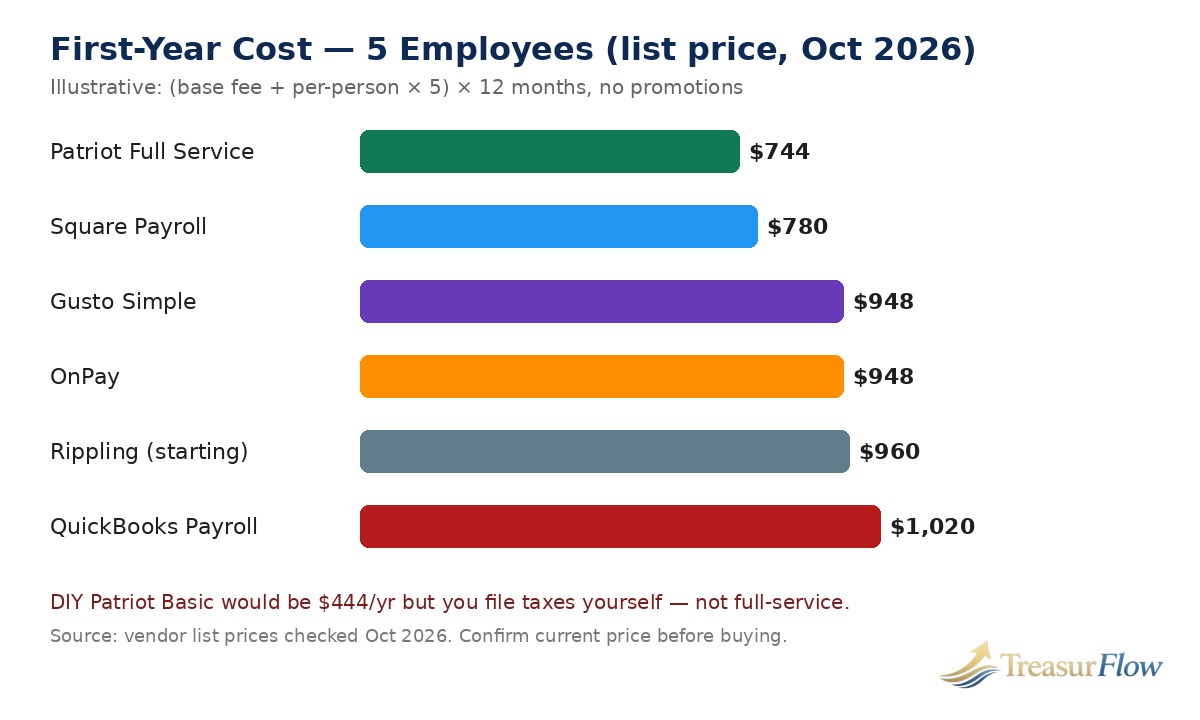
Headline prices hide the real comparison because every vendor uses the same two-part formula with different numbers: a monthly base fee plus a per-employee (or per-person-paid) fee. To compare fairly, fix the business and do the arithmetic the same way for everyone.
Our illustrative business: five W-2 employees, paid all twelve months, single state, no benefits premiums, no time-tracking or HR add-ons, no promotions applied. Prices are list prices as of October 2026. This is an illustration to show the method, not a quote — confirm your exact price on the vendor’s pricing page before you buy, because plan names and rates change.
The Math, Shown
- Patriot Full Service — $37/month + $5 per worker: ($37 + 5 × $5) = $62/month × 12 = $744 in year one. Full-service tax filings and deposits included; year-end filings included at no additional fee on this plan per Patriot’s pricing page. Note the multi-state catch below.
- Square Payroll (Full-Service) — $35/month + $6 per person paid: ($35 + 5 × $6) = $65/month × 12 = $780 in year one. Tax calculations, filings, and payments included; strongest fit if you already run Square for payments or point of sale.
- Gusto Simple — $49/month + $6 per person: ($49 + 5 × $6) = $79/month × 12 = $948 in year one. Full-service tax filing included; single-state payroll only on Simple.
- OnPay Payroll Essentials — $49/month + $6 per worker: ($49 + 5 × $6) = $79/month × 12 = $948 in year one. One flat full-service plan; multi-state payroll included at the base price in roundups we reviewed, which is why OnPay often wins for small multi-state teams.
- Rippling (starting price) — $40/month base + $8 per employee: ($40 + 5 × $8) = $80/month × 12 = $960 in year one at the starting price. Treat this as a floor, not a total: Rippling is modular, and HR, IT, benefits, and other modules are priced on top and often quoted.
- QuickBooks Workforce Payroll — $50/month + $7 per employee: ($50 + 5 × $7) = $85/month × 12 = $1,020 in year one. Best understood as the price of payroll inside QuickBooks Online; your QuickBooks Online accounting subscription is separate.
- Gusto Plus — $80/month + $12 per person: ($80 + 5 × $12) = $140/month × 12 = $1,680 in year one. This is the Gusto tier that adds multi-state payroll, next-day pay, and time tracking — shown here so you can see what stepping up for multi-state actually costs on Gusto versus OnPay or Patriot.
- QuickBooks Workforce Premium — $88/month + $13 per employee: ($88 + 5 × $13) = $153/month × 12 = $1,836 in year one.
- QuickBooks Workforce Elite — $134/month + $17 per employee: ($134 + 5 × $17) = $219/month × 12 = $2,628 in year one. Elite is the tier with published tax penalty protection up to $25,000 per year, under Intuit’s terms, in the comparisons we reviewed — you are paying partly for that protection and for expert setup.
For contrast, Patriot Basic — $17/month + $4 per worker — comes to ($17 + 5 × $4) = $37/month × 12 = $444 in year one, the lowest number in this guide. It is also not the same product as everything above it: Basic calculates payroll and you deposit and file the taxes yourself. Comparing $444 of DIY calculation with $744 of full-service filing as if they were interchangeable is the single most common pricing mistake in this category.
Promotions, labeled as promotions: Patriot’s pricing page shows 50% off for three months on both plans at the time we checked it. Gusto’s Contractor Only plan shows its $35 base fee discounted to $0 for the first six months. QuickBooks Workforce comparisons show a promotion of 50% off the base fee for three months. Square and OnPay promotions change over time, and OnPay has offered a first month free in roundups. None of those discounts are in the math above. If a promotion saves you $100 in year one and the plan is wrong for you in month thirteen, it was not a saving.
A note on QuickBooks prices and August 1, 2026: Intuit raised QuickBooks Online accounting prices for renewals on or after August 1, 2026 — Essentials moved from $75 to $85 per month, Plus from $115 to $140, and Advanced from $275 to $340, while Simple Start stayed at $38 — according to Intuit’s announcement as reported by multiple resellers and pricing trackers in August and September 2026. That increase is about the accounting subscription, not the payroll add-on rates listed above, but it raises the total cost of a QuickBooks-centered stack. If your books live in QuickBooks Online, add your current accounting plan price to the payroll price before comparing with a standalone payroll product.
What about ADP RUN and Paychex Flex? Both are major, legitimate options for small and growing businesses, and both price by quote rather than publishing a rate card. ADP RUN is built for businesses from one to 49 employees, with tiered packages that add HR help, and Paychex Flex similarly quotes based on pay frequency, headcount, and services. Because no verified published price was available to open and check, we deliberately do not put ADP or Paychex in the dollar table. Get a written quote at your exact headcount and pay frequency, with year-end, off-cycle, and integration fees itemized, and then run it through the same (base + per-person) × 12 math before you compare.
What the Table Does Not Show
Three costs sit outside the tidy monthly formula. First, add-ons: time tracking, HR support, benefits administration, and state tax registration are included in some plans, sold as add-ons in others, and priced per participant for things like health savings accounts and flexible spending accounts. Second, per-person-paid versus per-employee-on-file: Patriot and Square charge for workers actually paid that month, which helps seasonal businesses, while other models charge for everyone on the roster. Third, the cost of your time and your risk. A plan that saves $17 a month and costs you two hours of filing work and one penalty notice a year is not cheaper in any sense that matters to your bank account.
Who Carries the Tax-Penalty Risk?
This is the section most roundups rush, and it is the section that should decide close calls.
Full-Service Filing: The Provider Files, But You Are Still the Employer
With a full-service plan — Gusto, OnPay, QuickBooks Workforce, Square Payroll, Patriot Full Service, and quote-based services from ADP and Paychex — the provider calculates withholding, deposits the taxes, and files the returns using the data in the system. That transfers the operational work and, in practical terms, most of the day-to-day error risk: deadlines are tracked by software, not by a sticky note on your monitor.
It does not transfer your legal identity as the employer. If the underlying data is wrong — a misclassified worker, an incorrect wage, a missing local tax registration — the notice still comes to your business, and you will still spend time supplying records. What changes by plan is how much help and financial protection you get when that happens. QuickBooks Workforce Elite publishes tax penalty protection up to $25,000 per year for penalties and interest, under its terms. Patriot describes a tax filing reliability guarantee on Full Service. Other providers describe help responding to notices without a published dollar cap. Read that language carefully before you need it: does the provider research the notice, draft the response, speak to the agency, and pay a penalty that was its filing error? Or does it simply tell you a notice exists?
Also check the funding workflow. Full-service providers typically debit your account for net pay, taxes, and fees on a set schedule before payday. If the debit fails for insufficient funds, filings can stall — and the penalty clock does not care whose bank balance caused the delay. Keep a payroll buffer in the account the provider debits. That one habit prevents more payroll emergencies than any feature comparison.
DIY Filing: Lower Price, Your Signature, Your Risk
With a DIY or basic plan, the software calculates and you do the rest: you register, you deposit through the federal and state systems, you file Form 941 and state returns, and you produce year-end forms. Patriot Basic is the clearest example in this guide, and it is a perfectly rational choice for an owner who already files confidently, has a simple single-state payroll, and would rather save the difference than outsource the work.
Be honest about the trade. DIY saves roughly $300 a year against Patriot’s own Full Service plan at five employees in our math — $444 versus $744. One late-deposit penalty on a meaningful tax liability, plus the hours to resolve a notice, can erase several years of that saving at once. DIY also demands calendar discipline every quarter, not just in January. If you travel, get busy in season, or hand payroll to whoever is free that week, full-service is usually the safer buy even when DIY looks cheaper on a spreadsheet.
Worker classification sits above both models. No payroll software, at any price, fixes paying an employee as an independent contractor to save on taxes. If the IRS or your state reclassifies that worker, back taxes, penalties, and amended forms follow regardless of which logo is on the pay stub. Use the IRS employer resources linked at the top of this article and, for a borderline role, get advice before the first payment — not after a year of 1099s.
Best Payroll Software 2026: Picks by Business Stage
There is no single winner for every business, because businesses at different stages have different bottlenecks. A solo owner needs a correct paycheck and a filed return. A 30-person company needs approvals, time tracking, multi-state rules, and reports a manager can actually use. Use the stage that sounds like you today — and check the stage you will be in within a year, because switching payroll twice in eighteen months is nobody’s idea of fun.
Solo and First Hire: Keep It Full-Service and Simple
If you are paying yourself through an S corporation or hiring your first W-2 employee, your risks are inexperience and forgetting a step, not scale. Choose a published-price, full-service entry plan you can set up online without a sales call.
Gusto Simple at $49 plus $6 per person and OnPay at $49 plus $6 per worker are the straightforward starting points for a first hire who wants onboarding, self-service, and filing handled in one place. Patriot Full Service at $37 plus $5 per worker is the lower-cost full-service alternative if your payroll is simple and you are comfortable with a leaner HR feature set. Square Payroll at $35 plus $6 per person paid makes sense if the business already runs on Square and you want tips and timecards to flow in from the point of sale.
What to avoid at this stage: a DIY plan as your very first payroll system, unless you have filed employer returns before; a top-tier HR suite you will not use; and any long contract. Month-to-month, published pricing, and free setup help are worth more to a first-time employer than a discounted first quarter on the wrong plan.
2 to 10 Staff: The Sweet Spot for Flat, Published Pricing
Most small businesses live here, and this is where the five-employee math above is directly useful. Your decision usually comes down to three questions. Do you need multi-state payroll now? Do you need time tracking tied to payroll? And does your accounting software pull you toward one ecosystem?
If everyone works in one state and your needs are pay, taxes, forms, and basic HR records, Gusto Simple, OnPay, Patriot Full Service, and Square Payroll all do the core job at $62 to $79 a month for five people at list price. OnPay stands out in this band for including multi-state payroll without forcing a tier jump, based on the roundups we reviewed. Gusto stands out for the polish of its employee onboarding and self-service experience and for how easily it connects to different accounting platforms. Patriot stands out on price and on publishing its add-on prices, including time and attendance and its HR add-on, on its own pricing page. Square stands out if Square is already your cash register.
At this size, also start valuing your January. Ask how W-2s and 1099s are delivered, whether corrections are easy, and whether support is reachable in the busiest filing weeks — not just whether the product demo looked clean in October.
10 to 50 Growing: Buy the Workflow, Not Just the Run
Between ten and fifty employees, payroll stops being a single task and becomes a workflow across people: managers approve hours, new hires start mid-period, pay rates differ by role and location, and finance wants labor cost by department or project. This is where tier jumps happen, and where you should price them honestly.
On Gusto, that usually means Plus at $80 plus $12 per person for multi-state payroll, next-day pay, and time tracking, or Premium at $180 plus $22 for dedicated support and HR expertise. On QuickBooks Workforce, Premium at $88 plus $13 and Elite at $134 plus $17 add setup help, HR workflows, and — on Elite — the published penalty protection described earlier. Rippling becomes a serious contender here if you want payroll connected to HR and IT workflows, such as automatically provisioning accounts and devices when someone is hired and removing them when someone leaves; price it as a modular quote starting from the $40 base plus $8 per employee figure, not as that figure alone. ADP RUN and Paychex Flex also belong on a growing company’s shortlist precisely because they quote and staff for complexity — dedicated support, broader HR services, and room to grow past fifty — but insist on an itemized written quote so you can compare total cost, not a bundled verbal number.
For a growing business, test two scenarios before signing: a messy payroll (overtime, a bonus, a final paycheck, and a new hire in a second state, all in one run) and a support scenario (a tax notice for a prior quarter). The vendor that handles both calmly is worth a higher monthly fee.
Contractors-Heavy: Pay People Without Pretending They Are Employees
If most of the people you pay are independent contractors, your needs invert: lots of payments and 1099s, few or no W-2s, and a strong reason not to pay an employee-plan base fee for a contractor workflow.
Gusto’s Contractor Only plan is $35 per month plus $6 per person at list price, with the base fee discounted to $0 for the first six months as a promotion at the time pricing was checked. It covers domestic contractor payments and Form 1099 creation and filing. Square’s contractor-only option is even simpler on price: $6 per contractor paid per month with no base fee, with 1099-NEC generation and e-filing described in its contractor coverage. OnPay charges the same $49 plus $6 structure for employees and contractors, which is less specialized but very clean if you pay a changing mix of both and want one system and one filing workflow. Patriot lets you pay contractors within its payroll plans at the per-worker rate.
Two cautions. First, contractor-only plans generally do not handle backup withholding or every state contractor requirement — confirm your specific situation. Second, keep contractor records as carefully as employee records: agreements, invoices, and Forms W-9 collected before payment, not chased in January. And repeat the classification warning from the risk section: a contractor plan is a payment tool, not a classification opinion.
Multi-State Teams: Where Tier Traps Cost Real Money
Multi-state payroll is where otherwise similar products separate by hundreds of dollars a year. Each work state can mean withholding registration, unemployment insurance accounts, local taxes in some cities and counties, and a separate quarterly wage report. The software must withhold based on where work is performed and where the employee lives, under the applicable rules, and file in each jurisdiction.
OnPay’s appeal here is structural: multi-state payroll is included at its flat base price in the sources we reviewed, so a five-person team across three states still starts from $79 a month before any add-ons. Patriot Full Service includes filing in one state and charges $12 per month for each additional state, per its own multi-state pricing page — transparent, and easy to model: our five-employee example in two states would be $62 plus $12, or $74 a month, $888 a year. Gusto requires Plus for multi-state payroll, which moves a five-person team from $79 to $140 a month — a $732 annual difference that may be worth it for Gusto’s HR tools, but should be a conscious purchase, not a surprise at checkout. QuickBooks Workforce, Square Payroll, ADP RUN, Paychex Flex, and Rippling all support multi-state payroll in their full-service offerings, with the exact cost depending on tier or quote.
Before you sign for any multi-state setup, list every state where anyone will work, including remote employees and temporary travel, and ask who registers the business in each new state, what that registration service costs, and how long it takes. Hiring first and registering later is how multi-state notices are born.
Accounting Integration: QuickBooks, Xero, and Keeping the Books Clean
Payroll is not finished when employees are paid. Every run creates accounting entries: gross wages as an expense, employer taxes as an expense, withholdings as liabilities until they are remitted, and net pay and tax payments clearing through the bank. If those entries are typed into your accounting software by hand, you have built a second, quieter payroll job — one that produces books that do not match your filings.
If You Already Use QuickBooks Online
QuickBooks Workforce has the obvious advantage: payroll lives inside QuickBooks Online, so wage and tax data posts to the same ledger without a separate sync, and Intuit sells payroll bundled with accounting plans. For a business whose bookkeeper lives in QuickBooks and whose main wish is one login and one bill, that integration is a genuine reason to pay QuickBooks’ slightly higher per-employee price — $7 on the entry Payroll plan versus $6 at Gusto and OnPay.
Remember the total-stack math from the cost section. Your QuickBooks Online subscription rose for many plans on renewals from August 1, 2026, and it is billed separately from payroll unless you buy a bundle. Compare (accounting + payroll) against (your current accounting + a standalone payroll product) over twelve months, not payroll line against payroll line.
Gusto also integrates with QuickBooks Online, as do OnPay and Patriot with their own accounting connections, so choosing Gusto does not mean abandoning QuickBooks books. The difference is operational: native payroll posts automatically as part of the same product, while an integration syncs between two products and occasionally needs a mapping fix when you add a new pay type or deduction.
If You Use Xero or Another Ledger
Gusto is the natural starting point for Xero users in this guide, because its published integrations include Xero and FreshBooks alongside QuickBooks, so payroll can stay independent of the ledger. That independence has a second benefit: if you change accounting software later, you do not have to change payroll in the same month. OnPay and Rippling also connect to major accounting platforms, and Rippling advertises a broad integration catalog — verify your exact ledger, chart-of-accounts mapping, and whether the sync posts in summary or per-employee detail before you rely on it for job costing.
Whichever pairing you choose, do a mapping session once, properly. Decide which account each wage type, employer tax, benefit, and garnishment posts to; whether payroll posts by department, location, or project; and who reviews the sync after the first two runs. Then reconcile monthly: payroll register totals should agree with the ledger, and quarterly Form 941 totals should agree with both. Most integration horror stories are not software failures — they are a deduction added in payroll in March that nobody mapped in accounting until December.
Switching Payroll Mid-Year: A Migration Checklist
You do not have to wait for January 1 to change payroll providers. Mid-year switches are common after a price rise, a support failure, or a move into a new state. They are safe when the year-to-date data moves completely and dangerous when it moves approximately. A quarter boundary is the cleanest cutover point, because the old provider can finish a complete Form 941 period and the new provider can start the next one cleanly.
Use this checklist in order:
- Fix the cutover date. Choose the first payroll of a new quarter where possible. Confirm who files the quarter that just ended, who files the quarter you are entering, and who produces year-end W-2s and 1099s for the full year. Get that division in writing from both providers.
- Export everything from the old system. Company details, employer identification number, state withholding and unemployment account numbers and rates, employee records, addresses, Social Security numbers, Forms W-4, pay rates, deductions, garnishments, and direct deposit details.
- Pull year-to-date payroll history per employee. Gross wages, each tax withheld, employer taxes, deductions, and taxable wage totals, employee by employee and quarter by quarter. This is the data that prevents Social Security and unemployment wage bases from restarting at zero in the new system and over-withholding or under-withholding for the rest of the year.
- Collect prior filings. Copies of quarterly Forms 941, state returns, deposit confirmations, and any open agency notices. A new provider cannot answer a notice about a quarter it never filed unless you hand it the paperwork.
- Verify tax registrations and rates. Confirm each state and local account is active, the unemployment tax rate assigned to your business for this year is entered correctly, and deposit schedules are set. New-provider setup reviews — included or offered on higher QuickBooks tiers and in guided setups elsewhere — are worth using here.
- Load and proof the new system before money moves. Compare every employee’s year-to-date totals in the new system against the old system’s reports, line by line. Have employees confirm their own details and bank information through self-service.
- Run a parallel or test calculation. For the first live run, compare the new system’s gross-to-net results against a hand check or the old system’s calculation for the same hours. Investigate every difference before approving, even small ones — small differences reveal mapping and rate errors.
- Confirm funding and timing. Check the new provider’s debit schedule and direct deposit lead time, fund the payroll account with a buffer, and tell your team if payday timing or pay stub access will look different for one cycle.
- Close the old account carefully. Do not cancel until the old provider confirms its final filings are complete and you have downloaded final reports and year-end documents. Keep payroll records for at least four years after the relevant return due date or payment date, following IRS record-keeping guidance.
- Reconcile the first quarter under the new provider. Match the first Form 941 and state returns the new provider files against your payroll registers and your accounting ledger. Catching a mismatch in the first quarter is a correction; catching it at year-end is a project.
Budget real time for this. A clean switch for a small team is days of elapsed time and a few focused hours of work, not an afternoon of clicking — and rushing step three is the error that follows you to January.
Hidden-Fee Traps That Inflate a Low Headline Price
The subscription is the visible price. These are the charges and conditions that most often surprise owners after signup. Ask about each one, in writing, before you choose.
Per-Run and Pay-Frequency Fees
Some providers price by pay frequency or charge per payroll run, so weekly payroll costs materially more than biweekly, and an extra run costs extra money. Others — Gusto, Patriot, and Square among the published-price products in this guide — advertise unlimited payroll runs in the plan price. If your team is paid weekly, or you regularly run separate bonus or commission runs, per-run pricing can quietly become your largest payroll cost. Model your actual number of runs per year, not a tidy monthly assumption.
Year-End Form Fees
Ask whether W-2 and 1099 filing is included, whether there is a per-form charge, and what mailed paper copies cost. Patriot includes year-end filings at no additional fee on Full Service. Square provides digital forms and charges a small per-form fee for mailing paper copies in the pricing summaries we reviewed. Quote-based providers have historically itemized year-end services separately in some packages. None of these charges is large per person; all of them are annoying when discovered in January, and per-form fees scale with headcount and contractor count.
Off-Cycle, Correction, and Same-Day Fees
Life generates off-cycle payrolls: a missed hour, a final paycheck required quickly under state law, a bonus the owner approves on a Friday. Check whether off-cycle runs are included, what same-day or instant deposit costs if you need it, and what a void, a reversal, or an amended return costs. Gusto’s published add-on pricing, for example, treats same-day and instant pay as paid features on lower tiers and includes them on Premium. An amendment fee is not a reason to avoid a provider — amendments take work — but you should know the price before you need one urgently.
Multi-State, Registration, and Integration Add-Ons
As shown in the multi-state section, an extra state can mean a tier upgrade on one platform, a flat $12 per month on another, and included coverage on a third. State tax registration help, time tracking, HR add-ons, benefits administration, and workers’ compensation setup can each carry their own per-person or per-month charges. Patriot publishes several of these add-on prices on its pricing page, which makes modeling easier. Where a vendor will not publish an add-on price, ask for it in the quote.
Promotions That Expire and Prices That Reset
A discounted base fee for three or six months is a promotion, not a price. So is a percentage off that applies to the base fee only while the per-employee fee — the part that grows with your team — stays at full price. Before signing, write down two numbers: what you will pay in month one, and what you will pay in the first full-price month at the headcount you expect then. Choose based on the second number. Also ask how price increases are communicated and whether your plan is month-to-month, because the easiest protection against a bad renewal is the ability to leave using the checklist above.
How to Decide in One Afternoon
If you have read this far, you do not need more features lists — you need a decision method. Here is the short version that follows from everything above.
First, decide who files. If nobody in the business has filed employer returns before, or nobody has reliable time every quarter, eliminate DIY plans from your shortlist no matter how attractive the monthly saving looks. Second, fix your stage and your states. Write down your headcount today, your likely headcount in twelve months, and every state where someone works. Price each finalist at both headcounts, including the tier or per-state fee your states trigger, using the (base + per-person) × 12 formula. Third, follow your ledger. If your books are in QuickBooks Online and staying there, give QuickBooks Workforce a serious look and price the full stack; if you are on Xero or might change ledgers, favor a payroll product that integrates broadly and stands alone. Fourth, interrogate the traps: per-run, year-end, off-cycle, amendment, and add-on fees, plus what happens when a tax notice arrives. Fifth, run one messy test payroll during any trial or guided setup, and call support once with a real question. The answers you get before you are a customer are the best answers you will ever get.
On that method, the shortlist writes itself for most readers. Patriot Full Service is the value pick for a simple, price-sensitive, single-state business. OnPay is the flat-rate pick for a small team that wants everything in one plan, especially across states. Gusto is the all-round pick for a growing team that wants the strongest onboarding and self-service experience and broad accounting integrations. Square Payroll is the pick when Square already runs your sales. QuickBooks Workforce is the pick when QuickBooks Online runs your books. Rippling, ADP RUN, and Paychex Flex enter the conversation when workflow complexity, scale, or hands-on support matters more than a published price — priced by quote, compared on total cost, and chosen on the strength of the itemized proposal.
Payroll Questions Owners Ask Before the First Run
What is the cheapest full-service payroll software in 2026?
At list prices as of October 2026, Patriot Full Service is the cheapest full-service option in this guide at $37 per month plus $5 per worker paid, or $62 per month for five employees. Square Payroll is next at $35 per month plus $6 per person paid. Cheapest is not always best value, because multi-state fees, time tracking, and HR add-ons can change the total.
Does payroll software file and pay my payroll taxes for me?
Full-service plans do. Gusto, OnPay, QuickBooks Workforce, Square Payroll, and Patriot Full Service calculate, withhold, deposit, and file federal, state, and local payroll taxes on the plans described in this guide. DIY plans such as Patriot Basic calculate payroll only, and you must deposit and file the taxes yourself.
How much does payroll software cost for a 5-employee business per year?
Using list prices as of October 2026 and no promotions, a five-employee business pays about $744 per year for Patriot Full Service, $780 for Square Payroll, $948 for Gusto Simple or OnPay, and $1,020 for QuickBooks Workforce Payroll. Higher tiers, add-ons, and extra states raise those totals, so model your own headcount and states before you buy.
Can I switch payroll software in the middle of the year?
Yes. Mid-year switches are common, and a quarter boundary is the cleanest time to move because each provider can own complete filing periods. Your new provider needs complete year-to-date wages, taxes withheld, and deduction totals for every employee before the first live run, or wage bases and withholdings can restart incorrectly.
What is the difference between paying employees and paying contractors in payroll software?
Employees are paid through payroll with income tax and Social Security and Medicare taxes withheld, and they receive a Form W-2 at year-end. Independent contractors are paid without that withholding in most cases and receive a Form 1099-NEC. Contractor-only plans from Gusto and Square cost less because they handle payments and 1099 filing without full employee payroll.
Who is responsible if my payroll taxes are filed late or incorrectly?
You remain the employer and remain legally responsible, even when a full-service provider deposits and files on your behalf. Providers differ in how much help and financial protection they offer for notices and penalties, and QuickBooks Workforce Elite publishes tax penalty protection up to $25,000 per year under its terms, so read that coverage carefully before you rely on it.
Conclusion: The Best Payroll Tool Is the One Nobody Notices
The best payroll software 2026 is the product that does the whole job — gross-to-net calculation, withholding, deposits, filings, year-end forms, direct deposit, and new-hire reporting — at a total cost you have actually computed, with a clear answer to who helps you when a tax notice arrives. For a simple single-state business, that is often Patriot Full Service or OnPay. For a growing team that lives in its onboarding and integrations, it is often Gusto. For a business built on Square or QuickBooks Online, it is often the payroll product inside that ecosystem. And for a business whose complexity has outgrown a published price, it is a carefully itemized quote from Rippling, ADP RUN, or Paychex Flex, compared on the same twelve-month math.
Do not choose on a promotion, a demo, or a per-employee number in isolation. Choose on the first full-price year, at your real headcount, in your real states, with the filing risk assigned to the party you actually trust to carry it. Payroll is the promise you make to your team every pay period and to the government every quarter. Buy the software that helps you keep both promises without thinking about them every week — and then go run the part of your business that actually makes the money to pay people with.

Muhammad Zakir is the founder of Treasurflow and the author of its personal finance guides. He researches consumer banking, credit, and personal loans, and every guide cites primary sources such as the CFPB, FDIC, FTC, and IRS. His content is educational and is not personalized financial advice.