
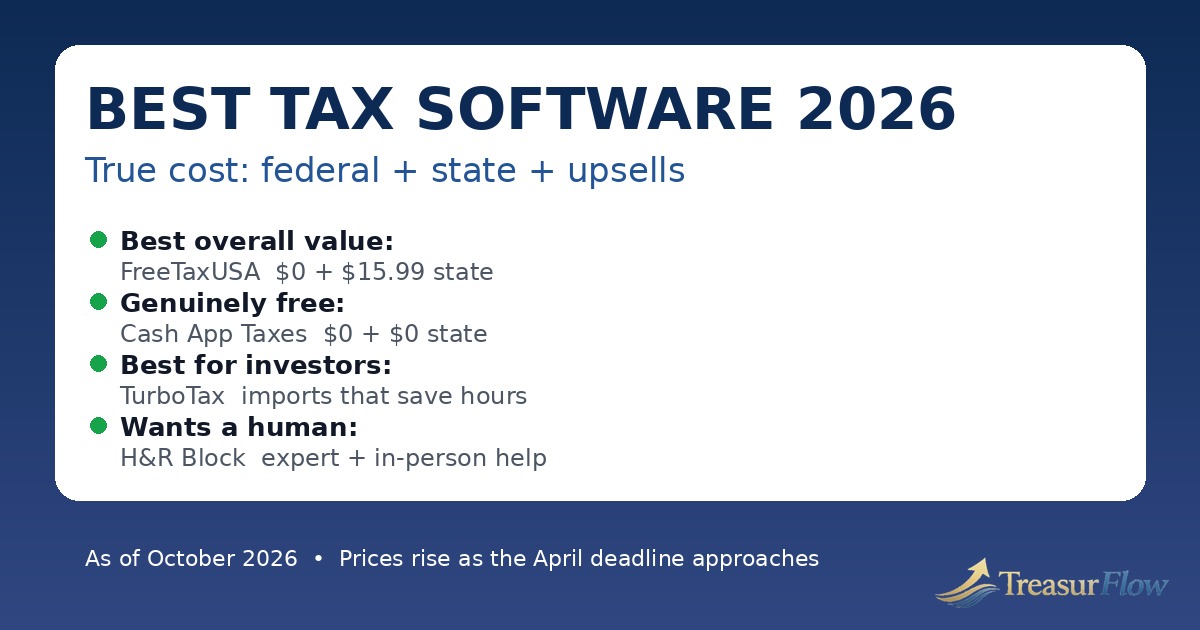
The most expensive tax software mistake is not picking the wrong brand. It is picking a brand by its headline price — $0, free, or a low starting price — and then discovering the real bill for the best tax software 2026 at checkout, after you have already typed in your W-2, your dependents, and half your financial life.
As of October 2026, that gap between the advertised price and the true price is still the central fact of consumer tax software. A product can be free for a simple federal return and still charge you for a state return. It can be free for a W-2 and then require a paid upgrade the moment you add investment sales, rental income, self-employment income, an HSA, or itemized deductions. It can add expert help, audit protection, or paying your fee out of your refund — each one a separate line item that appears late, when you are least likely to start over somewhere else.
This guide is built differently. It starts with true cost — federal plus state plus the upsells you are actually likely to meet — and then matches software to filer profiles: the simple W-2 filer, the genuinely free filer, the investor, the self-employed or gig worker, and the person who wants a human to check or do the work. Prices in this article are date-stamped as of October 2026, attributed to the vendor or to a dated 2026 roundup where a vendor page did not confirm a stable tier price, and they should be rechecked before you file. Tax software pricing is seasonal. Prices typically rise as the April deadline approaches, so a price quoted in January can be materially lower than the same tier in March or October.
One more honest warning before the picks: you may not need to pay at all. For the 2026 filing season — that is, for 2025 tax returns filed in 2026 — the IRS continued IRS Free File for eligible taxpayers, while IRS Direct File will not be available. That combination confuses a lot of people, and we explain it in full below, because starting in the wrong place can turn a free return into a paid one.
Related guides
Helpful Official Resources
The True-Cost Warning: Federal Is Only Half the Bill
When a tax program says a tier costs, for example, $79, that is almost always the federal price only. Most filers also need a state return, and on paid tiers the state return is usually a separate charge per state. File in two states because you moved or worked across a state line, and that state charge can apply twice.
Then come the complexity upgrades. The tier names sound like lifestyle choices — Deluxe, Premium, Premier, Self-Employed — but in practice they are form gates. Need Schedule C for freelance income? Need Schedule D for stock sales? Need Schedule E for a rental? On most tiered products, the form decides the tier, not you. You do not discover that gate when you are shopping. You discover it mid-return, after the software has your data and your time.
Then come the support upsells. Live expert help is rarely included in the base DIY price at the big brands. Audit-related products are sold separately, and — as we explain later — audit support and audit defence are not the same thing at all. Then come the checkout extras: paying your software fee out of your refund usually carries its own processing charge, refund advance products have their own terms, and printed or bound copies, prior-year returns, and amended returns can all cost extra.
That is why this article compares products on a true-cost basis wherever we can verify the numbers: the federal tier a profile actually needs, plus one state return, before optional extras. Where sources disagreed on a tier price — and in 2026 they disagreed often, because prices moved during the season — we say so and attribute the figure instead of presenting it as settled. Do not treat any price in any roundup, including this one, as a promise. Treat it as a dated snapshot, and confirm the total on the checkout screen before you e-file.
There is also regulatory history behind the word “free.” The Federal Trade Commission barred Intuit, TurboTax’s maker, from advertising products as free unless they are free for all taxpayers or the share who actually qualify is clearly disclosed. Reporting on that order, and TurboTax’s own disclosures in recent seasons, put the share of filers who qualify for its Free Edition at roughly a third. That does not make TurboTax a bad product. It makes the word “free” a claim you should translate, every time, into a specific question: free for whom, for which forms, and including state or not?
Picks by Filer Profile: Start With Your Return, Not the Brand
There is no single best tax software for everyone, because returns are not alike. The software that is perfect for a single W-2 is wasteful for an active investor, and the software that saves an investor two hours of manual entry is an expensive way for a simple filer to do a ten-minute job. The College Investor’s January 2026 ranking made the same underlying point by naming different winners by need: FreeTaxUSA as best overall, Cash App Taxes as best for free filing, TaxSlayer for side hustlers and small business owners, TurboTax for investors, and H&R Block for virtual tax preparation. Our profiles below follow that filer-first logic, with the true-cost reasoning filled in.
Profile 1: The Simple W-2 Filer
Your return: One or two W-2s, the standard deduction, maybe bank interest, student loan interest, or the Child Tax Credit. No stock sales, no rental, no business income.
First check — do not pay yet: If your adjusted gross income was $89,000 or less for tax year 2025, start with IRS Free File, described in detail below. You may get guided brand-name software for $0 federal, and some partners include a state return. Starting at IRS.gov matters, because starting on a vendor’s commercial site can land you in the paid version of a similar product.
Best paid-or-free commercial picks: H&R Block Free Online and TurboTax Free Edition both target exactly this profile, with free federal and free state filing for qualifying simple returns in the roundups checked as of October 2026. H&R Block’s free tier has generally been described in 2026 reviews as covering a somewhat broader set of common situations than the narrowest free tiers — for example student loan interest and unemployment income are frequently cited in its favour — while TurboTax’s free tier is tightly limited to simple Form 1040 returns. TaxSlayer Simply Free and TaxAct Free also serve simple returns, but read their eligibility limits carefully: Simply Free has historically restricted dependents, credits, and income types, and TaxAct’s free tier has charged for state filing in roundups even when federal was $0.
Best genuinely free pick: Cash App Taxes, if you file in only one state. It charges $0 for federal and $0 for one state, with no paid tier to be upsold into. For a simple return, paying $60 to $140 for polish you do not need is hard to justify. The trade-off is support: there is no deep bench of tax experts to call, and if your return turns out to fall outside what Cash App Taxes supports, there is no paid upgrade path — you start over elsewhere.
What to avoid: Do not accept a mid-return upgrade without checking whether the form that triggered it is free at FreeTaxUSA or Cash App Taxes. A simple filer who gets bounced into a Deluxe tier for a common credit or an HSA form can pay for a whole tier to unlock a single schedule.
Profile 2: The Filer Who Wants It Genuinely Free
Your return: Could be simple or surprisingly complex — but your priority is a $0 or near-$0 total, and you are willing to do more of the work yourself.
Best overall value: FreeTaxUSA. This is the pick most 2026 roundups converged on, and the reasoning is price structure, not marketing. As verified in The College Investor’s FreeTaxUSA review for the 2026 season, federal filing is $0 for all filers and all supported forms, and a state return costs $15.99 per state. The optional Deluxe upgrade costs $7.99 and Pro Support costs $44.99 in that same review, with audit defence listed as a separate add-on. In plain English: a self-employed filer, an investor, or a landlord pays the same $0 federal price as a W-2 filer. There is no form gate to fall through.
That structure matters more than any single discount. On a tiered product, complexity is taxed. On FreeTaxUSA, complexity is not — support is. You pay if you want live chat priority, unlimited amended returns, or a tax professional on the phone, not because you sold stock or drove for a delivery app.
Best $0 total: Cash App Taxes. Federal $0, one state $0, no upsells, as confirmed across multiple 2026 roundups. Its limits are structural and must be checked first: it does not support filing in multiple states, part-year or nonresident state returns, or married filing separately in a community property state, and it does not support some less common situations such as foreign earned income. It supports many common schedules, including Schedule C for self-employment in reviews, but it has no brokerage import integrations and no expert tier to upgrade to. If you fit inside its box, it is the cleanest free deal in consumer tax software. If you do not fit, you will find out by exclusion, not by upgrade.
The official free route: IRS Free File. If you qualify on income, this should be checked before any commercial free tier, because the partners must follow Free File rules when you arrive through IRS.gov, and some include free state preparation. The full eligibility and the crucial “start at IRS.gov” warning are in the free options section below.
Also consider: Jackson Hewitt Online if “free” keeps failing you. It is not free — it is a flat $25 for federal plus state filing, including multiple states, according to The College Investor’s 2026 review and other 2026 roundups. For a multi-state filer who is excluded from Cash App Taxes and pushed into expensive tiers elsewhere, a known $25 total can beat a supposedly free start that ends at $150.
Profile 3: The Investor
Your return: Brokerage accounts, stock or crypto sales, dividends, capital gains and losses, maybe a K-1 or a home sale. Your real cost is time and error risk from manual entry.
Best pick: TurboTax Premium. The College Investor named TurboTax best for investors in 2026 for a specific, practical reason: imports. TurboTax can import or upload tax data from employers, banks, and many brokerage firms, and it supports importing crypto-related data and Form 8949 information from crypto tax tools. If you have dozens or hundreds of transactions across several accounts, that import capability is not a luxury feature. It is the difference between reviewing numbers and retyping them, and retyping is where transposed digits and missing cost basis create notices later.
You will pay for it. Dated October 2026 comparisons listed TurboTax Deluxe at $79 federal and Premium at $139 federal, with state filing extra per state — one October comparison listed $64 per state. Do the true-cost maths before you start: Premium plus one state can pass $200 before any expert add-on. For an active investor, that may still be rational. For someone who sold shares twice in one brokerage account, it almost certainly is not.
Runner-up: H&R Block Premium. H&R Block was listed in October 2026 comparisons at $105 federal for Premium, with state extra on paid tiers. Reviews note it can import 1099 forms including 1099-B and calculate capital gains, though its integrations are not as deep as TurboTax’s. If you have one or two brokerage accounts, the time saving may be similar and the bill lower.
Budget alternative: FreeTaxUSA or TaxAct Premier. FreeTaxUSA supports investment forms at its $0 federal price, but you should expect more manual entry and no direct brokerage import comparable to TurboTax — The College Investor specifically noted the lack of bank and brokerage import as FreeTaxUSA’s trade-off. TaxAct Premier was listed on TaxAct’s own site as $99.99 federal as of October 2026, positioned for selling stocks or crypto, selling a home, and rental income, with state pricing to confirm at checkout because TaxAct state figures varied across roundups. Either can produce a correct return. The question is how much of the data assembly you are willing to do yourself.
Investor warning: Software accuracy guarantees cover calculation errors by the software. They do not fix wrong cost basis you imported without checking, missing wash-sale adjustments from accounts the software cannot see, or crypto held across exchanges and wallets that no single import captures. Import is a starting point, not a review.
Profile 4: The Self-Employed, Gig, and Side-Hustle Filer
Your return: 1099-NEC or 1099-K income, Schedule C, expenses, mileage, home office, quarterly estimates, maybe a W-2 job on top of freelance work.
Best value pick: TaxSlayer Self-Employed — with a pricing caution. The College Investor named TaxSlayer its pick for side hustlers and small business owners in 2026, citing all major forms at an accessible price and self-employed guidance. That recommendation still makes sense on features. Pricing, however, is the clearest example in this article of why you must date-stamp tax software prices. Early-season 2026 reviews listed TaxSlayer Classic at about $22.99, Premium at about $42.99, and Self-Employed at about $52.99, with state at about $39.99. Later 2026 comparisons, including an October 2026 comparison checked for this article, listed Classic at $44.99, Premium at $64.99, and Self-Employed at $74.99, with state at $47.99. We use the later figures in our comparison table and flag the earlier figures here, because presenting either set without a date would mislead you. Either way, TaxSlayer’s pitch is the same: its Classic tier already covers all major tax situations in reviews, and its Self-Employed tier adds guidance and support aimed at Schedule C filers, at well below TurboTax and H&R Block self-employed pricing.
Cheapest correct answer for confident filers: FreeTaxUSA, again. Schedule C does not trigger a federal charge. A gig worker who keeps decent records — income, mileage log, receipts, estimated payments — can file federal for $0 and pay $15.99 for one state, as of October 2026 pricing cited above. What you give up is hand-holding: deduction-finding interviews, expense categorisation help, and a human who will ask what you forgot. First-year freelancers often under-claim or mis-claim because they do not know which expenses are ordinary and necessary for their work. If that is you, one year in a more guided product can function as an education, even if you move to a cheaper product later.
Most guided options: TurboTax Premium and H&R Block Self-Employed. TurboTax merged its investor and self-employed positioning into Premium in recent seasons, and its guidance, import, and expense help are the most polished in the market — at the highest true cost. H&R Block Self-Employed was listed at $130 federal in October 2026 comparisons, with state extra, and its distinguishing advantage is not the software alone: it is the option to move from online filing toward help from its large network of physical offices. TaxAct Self-Employed was listed on TaxAct’s own site at $109.99 federal as of October 2026, positioned for contract, freelance, and rideshare work, with Xpert Assist sold separately.
Gig-worker warning: No consumer software fixes missing records. If a platform paid you and no form arrived, the income is still reportable. If you did not track mileage during the year, software cannot recreate a contemporaneous log for you. Keep records in the year, not at filing time — this is where budgeting and expense-tracking habits pay off at tax time.
Profile 5: The Filer Who Wants a Human
Your return: Maybe complex, maybe not — but you want a professional to review it, answer questions, or prepare it for you, because the cost of a mistake feels higher than the cost of help.
Best pick: H&R Block. The College Investor named H&R Block best for virtual tax preparation in 2026, and the logic is breadth of human options. You can start DIY online, add expert help, use its online expert products, or move toward in-person help at a physical location. That off-ramp matters. A filer who discovers mid-return that they have a multi-state issue, a rental depreciation question, or a letter from the IRS they do not understand does not have to abandon the return and start again with a stranger. Reviews also note H&R Block’s free in-person audit support positioning — read the exact terms of the product you buy, because what is included varies by how you file.
Understand what you are buying, though. “File with help” products differ: in some, an expert answers questions and reviews a return you prepared; in others, you upload documents and a professional prepares and signs the return. Those are different levels of responsibility, different prices, and different expectations. H&R Block’s and TurboTax’s top assisted and full-service prices are set by complexity and are not the DIY tier prices in our table — confirm the quoted total before you upload everything.
Runner-up: TurboTax Live / Expert products. TurboTax offers expert assistance and full-service preparation as upgrades from its DIY flow, with strong import underneath. For an investor or self-employed filer who mainly wants a professional second set of eyes on a data-heavy return, that combination is compelling — and expensive. Get the expert price in writing in the flow before you proceed.
Budget human help: FreeTaxUSA Pro Support and TaxAct Xpert Assist. FreeTaxUSA Pro Support was listed at $44.99 in The College Investor’s 2026 review, on top of the $0 federal / $15.99 state base — far less than the big brands’ expert products, for access to a tax professional by phone and screen-sharing in that review’s description. TaxAct sells Xpert Assist separately from its tiers; its site promotes one-to-one advice and a pre-filing review, but the assist price varied across 2026 sources, so we do not state a single hard number for it here — check it in the product before you buy. Neither budget option is the same as hiring a local CPA or enrolled agent who knows your full financial picture. For a business with employees, a major life or entity change, or an IRS dispute, a credentialed local professional — not software support — is the right comparison.
Free human help exists too. The IRS’s VITA and TCE programs provide free basic return preparation by IRS-certified volunteers to qualified individuals, and MilTax provides free filing help for eligible service members and veterans. The IRS’s 2026 filing season announcement lists both alongside Free File. If you qualify, a trained human for $0 beats a chatbot upsell at any price.
True-Cost Comparison Table (Verified Prices Only, as of October 2026)
The table below compares one federal return plus one state return for the tier a typical filer in that row would actually need. It uses prices verified from vendor sites or dated 2026 roundups checked in October 2026. It does not include optional expert help, audit defence, refund-transfer fees, or printed copies. Prices typically rise as the April deadline approaches, and promotional prices can be lower early in the season — confirm your total at checkout.
| Software | Best for | Federal (as of Oct 2026) | State (per state) | True cost, federal + 1 state |
|---|---|---|---|---|
| Cash App Taxes | Genuinely free, single-state filers | $0 | $0 for one state | $0 |
| FreeTaxUSA | Best overall value, all profiles | $0, all forms | $15.99 | $15.99 |
| Jackson Hewitt Online | Flat price, multi-state filers | $25 flat, federal + states included | Included | $25 |
| TaxSlayer Classic / Self-Employed | Side hustlers, value guided filing | $44.99 Classic / $74.99 Self-Employed (Oct 2026 comparison; early-season prices were lower) | $47.99 | $92.98 / $122.98 |
| TaxAct Deluxe / Premier / Self-Employed | Mainstream guided filing, business bundle options | $59.99 / $99.99 / $109.99 (TaxAct’s own site, Oct 2026) | Confirm at checkout — state figures varied across 2026 roundups | Federal plus state as quoted at checkout |
| H&R Block Deluxe / Premium / Self-Employed | Want-a-human and in-person backup | $65 / $105 / $130 (Oct 2026 comparison) | $49 on paid tiers in that comparison | $114 / $154 / $179 |
| TurboTax Deluxe / Premium | Investors, most polished imports and guidance | $79 / $139 (Oct 2026 comparisons) | $64 in an Oct 2026 comparison | $143 / $203 |
Sources for this table, in brief: FreeTaxUSA federal, state, Deluxe, and Pro Support pricing from The College Investor’s 2026 FreeTaxUSA review; Cash App Taxes $0 federal and state and its single-state limitation from multiple 2026 reviews including The College Investor and SmartAsset; Jackson Hewitt Online $25 flat from The College Investor’s 2026 review; TaxAct tier prices from TaxAct’s own pricing page checked in October 2026; TurboTax, H&R Block, and TaxSlayer October figures from dated October 2026 comparisons, with TaxSlayer’s lower early-season figures disclosed in the text above because the two sets conflict. That conflict is exactly why no table should be read without its date.
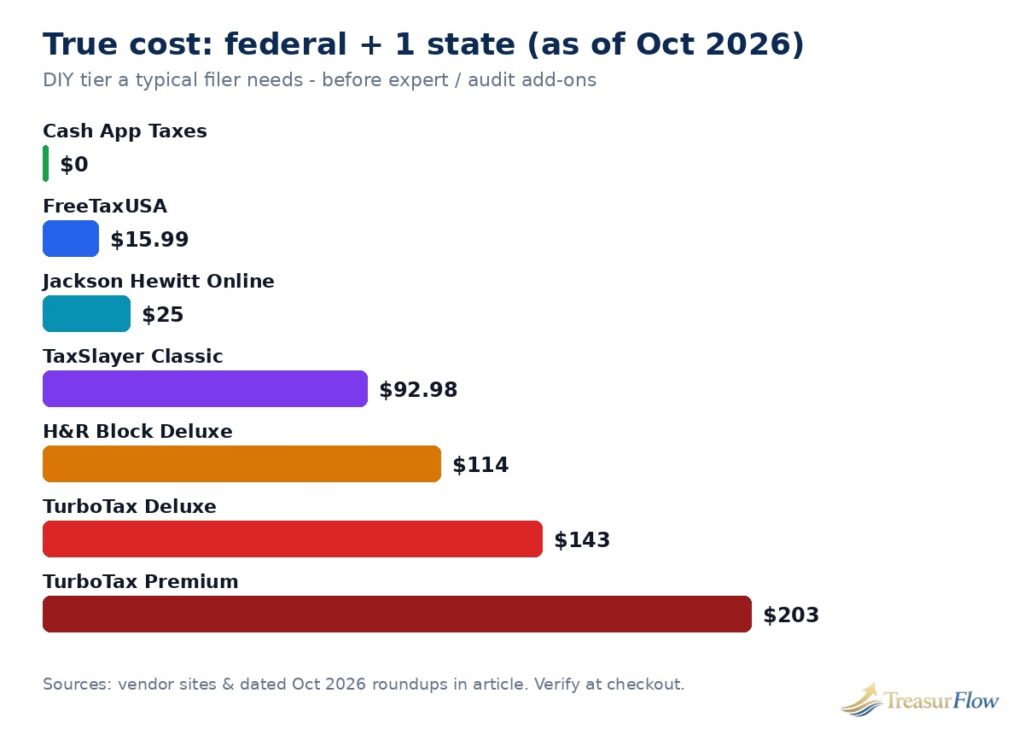
Read the table by profile, not by the smallest number. Cash App Taxes at $0 is unbeatable if you fit its limits. FreeTaxUSA at $15.99 is the cheapest option that does not exclude most complex situations. Jackson Hewitt at $25 is the cheapest predictable option for multi-state filers. TaxSlayer, TaxAct, H&R Block, and TurboTax charge progressively more for progressively more guidance, import, and human access. Whether that extra guidance is worth $90 to $185 more depends entirely on whether you would otherwise miss deductions, mistype investment data, or file anxious and unsupported.
You May Not Need to Pay at All: The Free Options, Honestly
This is the section that can save you the whole software bill, so read it before you create an account anywhere.
IRS Free File: Guided Software for $0, If You Qualify and Start in the Right Place
IRS Free File is a public-private partnership between the IRS and the Free File Alliance, a coalition of tax preparation companies. For the 2026 filing season, the IRS states in its March 20, 2026 reminder, IR-2026-38, that taxpayers whose adjusted gross income is $89,000 or less can use guided tax preparation software at no cost through Free File. The IRS’s Free File page, checked for this article, confirms the $89,000 AGI threshold in its partner eligibility guidance and explains how the program works.
Three rules decide whether Free File is actually free for you:
First, you must start at IRS.gov. The IRS says this explicitly: taxpayers must begin their return from the IRS Free File page on IRS.gov to ensure free access, and its Free File page warns that you will not get IRS Free File if you go directly to a partner’s commercial website. This is the single most common way a free return becomes a paid return. The same company can offer a Free File product through the IRS portal and a commercial product on its own homepage with a similar name and different pricing.
Second, each partner sets its own additional eligibility rules on top of the AGI cap — based on factors such as age, state residency, filing status, military status, or specific credits, as the IRS page describes. So “AGI $89,000 or less” gets you into the program, but the partner-matching tool on IRS.gov decides which specific offers you qualify for. Use the IRS’s “Find your trusted partner” tool rather than guessing.
Third, federal free does not automatically mean state free. The IRS notes that some Free File providers offer free state tax preparation and filing, and some do not. Check the state term in the partner offer before you start, not after you finish the federal return.
Above the AGI cap, you still have a free federal option: Free File Fillable Forms. The IRS describes these as electronic versions of paper forms, available regardless of income, for taxpayers comfortable preparing their own returns. There is no guided interview, limited calculation help, and no state return. It is free in the way a blank form is free — genuinely $0, and entirely on you to get right.
The IRS’s January 26, 2026 filing season announcement, IR-2026-12, frames the season clearly: the IRS opened the 2026 season on January 26, 2026, expected about 164 million individual returns, and set the federal deadline at Wednesday, April 15, 2026. That same announcement lists Free File, Fillable Forms, and VITA/TCE — and notably does not list Direct File as a filing option for the season. That absence matches the bigger change below.
IRS Direct File: Not Available for Filing Season 2026
If you used IRS Direct File in 2024 or 2025, or you read about it as the government’s own free filing tool, do not plan around it for this season.
The IRS notified state revenue departments on November 3, 2025, that “IRS Direct File will not be available in Filing Season 2026. No launch date has been set for the future.” That notification was reported by the Associated Press and by tax professional organisations, and the IRS’s own 2026 filing season materials point taxpayers to Free File, Fillable Forms, VITA/TCE, and commercial options instead. As of October 2026, no return or replacement launch date for Direct File has been announced.
A note on a confusing detail you may run into: the IRS’s Direct File information page still describes the earlier pilot — participating states for tax year 2024, the income types it supported, and how it worked. A live description of how the pilot worked is not evidence that the program is open for filing season 2026. It is a leftover description of a program that has been discontinued for this season. If a third-party site tells you to “just use Direct File in 2026,” that advice is out of date.
What should former Direct File users do instead? Work down this list in order: IRS Free File if your AGI is $89,000 or less; Cash App Taxes if you file in one state and fit its supported situations; FreeTaxUSA if you need broader form support at $15.99 total for one state; Fillable Forms if you are above the AGI cap and confident doing forms yourself; VITA/TCE or MilTax if you qualify for free human help.
Cash App Taxes and FreeTaxUSA: The Commercial Free Options
These two are covered in the profiles above, but they belong in the free-options conversation too, because for many filers they are simpler than navigating Free File partner rules.
Cash App Taxes is $0 federal and $0 for one state, with no income cap stated in the 2026 reviews and no paid tier. Its deal-breakers are coverage limits — single state only, no part-year or nonresident state returns, no married filing separately in community property states, and some unsupported situations — so check its supported-forms list before you invest time.
FreeTaxUSA is $0 federal for all supported situations and $15.99 per state. It is not $0 total for most people, because most people need a state return. Call it what it is: near-free, transparent, and for complex returns dramatically cheaper than tiered competitors. It is also a Free File partner through its TaxHawk brand in the Free File program in some listings — but remember, the Free File version and the commercial version are accessed differently, and the starting point decides the terms.
Features That Actually Matter (and the Ones That Are Mostly Upsell)
After price structure, only a handful of features change outcomes for most filers. Rank them in this order.
1. Import: The Feature Investors and Switchers Actually Feel
Import has three distinct levels, and marketing blurs them. Prior-year import brings in your name, address, dependents, and last year’s structure — almost every major product does some version of this, including importing a prior return prepared elsewhere, usually from a PDF. Document import reads a W-2, 1099, or PDF and fills fields from it, which saves typing and reduces transcription errors. Live brokerage import connects to your financial institution and pulls transaction data directly — this is the premium capability, strongest at TurboTax, present in more limited form at H&R Block, and notably absent at FreeTaxUSA, where The College Investor noted filers must enter tax form details manually.
Match the level to your return. A W-2 filer gains minutes from document import. An investor with three brokerages gains hours and accuracy from live import. A landlord gains little from either and should care more about depreciation guidance and prior-year carryforward handling.
2. Audit Support vs Audit Defence: Read These Two Labels Very Carefully
This distinction is the most misunderstood purchase in tax software, so here it is plainly.
Audit support — sometimes called audit assistance or audit guidance — means the company will help you understand an IRS notice, explain what is being asked, and help you prepare a response. You remain the person dealing with the IRS. This level is sometimes included, sometimes sold as part of a higher tier, as with TaxSlayer’s Premium positioning in reviews.
Audit defence — sometimes called audit representation — means a credentialed professional can represent you before the IRS: communicating on your behalf and handling the audit process for the covered return, under the product’s terms. That is a materially bigger promise, and it is almost always a separate paid add-on. FreeTaxUSA, for example, listed audit defence as a $19.99 add-on in 2026 reviews, separate from its Deluxe and Pro Support upgrades. Cash App Taxes promoted free audit defence in The College Investor’s coverage — check its current terms, because included audit products have conditions and time limits.
Neither product is insurance against your own records. If the underlying deduction was not real or not documented, representation does not create documentation. Buy audit defence for representation value if your return has genuine grey areas. Do not buy audit support thinking you bought representation.
3. State Pricing: The Quiet Decider
State pricing ranges from $0 to amounts that rival a federal tier, and it is quoted per state. As of October 2026: Cash App Taxes charges $0 for one state but cannot do a second; FreeTaxUSA charges $15.99 per state; Jackson Hewitt Online includes states in its $25 flat price; H&R Block paid tiers were listed with $49 per state in October comparisons; TurboTax was listed with $64 per state; TaxSlayer paid tiers were listed with $47.99 per state. TaxAct state pricing varied across sources, which is why our table tells you to confirm it at checkout rather than trusting a single figure.
If you moved states, worked in one state and lived in another, or file a nonresident return, multiply before you choose. A product that looks $40 cheaper on federal can be $30 more expensive once two state returns are added — and a flat-price or low-state-price product can win outright.
4. Guidance Style: Interview vs Forms
TurboTax and H&R Block lead with an interview that translates life events into tax questions. FreeTaxUSA and TaxAct are more form-aware: efficient if you know your situation, less forgiving if you do not know what you do not know. TaxSlayer sits between, guided but leaner. There is no virtue in either style by itself. First-time filers, filers with a new life event — first child, first home, first freelance year, first stock sales — benefit most from interviews. Repeat filers with a stable, understood return benefit most from speed and price.
5. Guarantees: Useful, Narrow, and Not Interchangeable
Maximum refund guarantees promise that another product will not find a larger refund for the same return, with a remedy defined in the terms. Accuracy guarantees promise the vendor will reimburse penalties or interest caused by its calculation error, sometimes up to a stated cap — TaxAct promotes a $100,000 accuracy guarantee on its site. Both are worth having. Neither guarantees that you entered everything, chose the right filing status, or qualified for a credit you claimed. Read guarantees as protection against software maths errors, not as a verdict that your return is correct.
Features that matter least for most filers: refund advance marketing, paying fees from your refund (convenient, usually for an extra charge, and it does not make the refund faster in the way advertising implies), printed and bound copies, and storage or identity add-ons you may already have elsewhere. Decline them by default and add only what you can name a specific need for.
The Mid-Season Price-Rise Warning: When You File Changes What You Pay
Tax software is one of the few consumer products where the same checkout can cost meaningfully more in week ten than in week two. Early-season promotional pricing is real, deadline pricing is real, and roundups written in January describe a market that may no longer exist in March.
You can see it in this article’s own research. TaxSlayer’s paid tiers were listed at roughly $23 to $53 federal early in the 2026 season and at $44.99 to $74.99 in October 2026 comparisons. TaxAct figures in different 2026 roundups ranged from roughly $30 to $75 for tiers that its own site listed at $59.99 to $109.99 in October. Those are not necessarily errors by the people who wrote them. They are snapshots of a moving price, taken at different times — which is why every price here carries an “as of October 2026” stamp and an instruction to verify at checkout.
Practical rules that follow from this:
File early if your documents are complete. Early filing usually means lower promotional pricing, faster refund processing — the IRS notes most refunds are issued within 21 days for e-filed returns with direct deposit — and more time to fix a rejected return. Do not file early with incomplete documents, though. Filing before a corrected W-2 or a late 1099 arrives trades a pricing saving for an amended return.
If you start a return at a promotional price, check whether the product locks that price or charges the price in effect when you file. Policies differ, and a started return is not automatically a locked price.
If you cannot file by April 15, 2026, file an extension rather than rushing a wrong return — but understand, as the IRS states, that an extension moves the filing deadline, generally to October 15, not the payment deadline. Tax owed is still due by April 15, and interest and penalties can apply to late payment even with a valid extension.
Finally, if a price jumps mid-return because a form triggered an upgrade, you are allowed to stop. Export or note your work, price the same return at FreeTaxUSA, Cash App Taxes, and through IRS Free File if you qualify, and switch if the maths favours switching. Sunk time is not a reason to pay a tier you do not need. The best time to make that comparison is before you pay — every major product lets you prepare before you pay to file.
How to Choose in Ten Minutes: A Short Decision Path
If you read nothing else, work through these steps in order. First, check IRS Free File on IRS.gov if your 2025 AGI was $89,000 or less — start there, not on a vendor homepage, and confirm whether the partner offer includes your state. Second, if you file in one state and your situation is supported, price Cash App Taxes at $0 total. Third, price FreeTaxUSA at $0 federal plus $15.99 per state, and treat that total as the benchmark every other product must beat on value, not just on price. Fourth, only move up to TaxSlayer, TaxAct, H&R Block, or TurboTax if you can name what the extra money buys you — self-employed guidance, brokerage import, a human review, in-person backup — in one sentence. If you cannot name it, you are buying polish. Fifth, if you need multiple states, price Jackson Hewitt Online’s $25 flat total against the per-state maths of everything else. Sixth, before you pay anywhere, read the checkout screen line by line: federal, state per state, expert add-ons, audit products, and any fee for paying out of your refund. That screen, on that day, is the only price that is fully true.
Protect yourself while you do it. The FTC’s tax identity theft guidance is blunt and worth following: protect your Social Security number, file as early as you reasonably can, use a secure connection if you file electronically, and research any preparer thoroughly before handing over personal information. The IRS does not initiate contact by text or social media demanding payment, and any preparer who will not sign your return, asks you to sign a blank return, or bases their fee on the size of your refund is showing you red flags the IRS itself warns about with “ghost” preparers.
Tax Software Questions Filers Ask Every Season
What is the best tax software in 2026 for most people?
For most people, FreeTaxUSA is the best tax software in 2026 because federal filing is free for all supported forms and a state return costs $15.99 per state, as of October 2026. Filers who want the most polished guidance and brokerage imports may prefer TurboTax, and filers who want a human or in-person backup may prefer H&R Block, but both cost much more for federal plus state filing.
Is there really free tax software in 2026, or is free always limited?
Yes, there is really free tax software in 2026, but you have to know which kind of free you are looking at. Cash App Taxes is free for federal and one state return with no paid tier, FreeTaxUSA is free for federal filing with a $15.99 state fee, and IRS Free File offers free guided federal filing to eligible taxpayers. By contrast, the free editions from TurboTax, H&R Block, TaxAct, and TaxSlayer are limited to certain simple returns and can require a paid upgrade when your forms change.
Is IRS Direct File available for the 2026 filing season?
No. IRS Direct File will not be available in Filing Season 2026, and no launch date has been set for the future. The IRS notified state revenue departments of that decision on November 3, 2025. If you used Direct File before, use IRS Free File if you qualify, or another free or low-cost option such as Cash App Taxes or FreeTaxUSA for the 2026 filing season.
Who qualifies for IRS Free File in 2026, and how do you avoid landing on a paid product?
Taxpayers with adjusted gross income of $89,000 or less for tax year 2025 can use IRS Free File guided software at no cost for their federal return, although each partner sets additional eligibility rules. To avoid landing on a paid product, always start at IRS.gov and go through the IRS Free File page, because going directly to a partner’s commercial website will not give you the Free File offer. Check the partner offer before you start to see whether a state return is included for free.
What is the difference between audit support and audit defense?
Audit support means the company helps you understand an IRS notice and prepare a response, but you still deal with the IRS yourself. Audit defense, also called audit representation, means a credentialed professional can represent you and communicate with the IRS on your behalf for a covered return, under the product terms. Audit defense is the stronger protection and is usually sold as a separate add-on, so do not assume audit support includes representation.
When do tax software prices go up, and how can you avoid paying more?
Tax software prices typically rise as the April filing deadline approaches, so the same tier can cost more later in the season than it did in January. You can avoid paying more by filing early once your documents are complete, checking whether a started return locks your price, and comparing your true federal plus state total at more than one product before you pay. If a mid-return upgrade raises your price, stop and price the same return through IRS Free File, Cash App Taxes, or FreeTaxUSA before you accept it.
Conclusion: Pay for Help or Imports, Not for Forms
The best tax software 2026 choice is rarely the one with the biggest ad or the loudest free claim. It is the one whose price structure matches your return. If your forms are the reason a product wants more money, FreeTaxUSA and Cash App Taxes have already answered that charge with $0 federal pricing — and, in Cash App Taxes’ case, a $0 state return for single-state filers. If your time, your transaction count, or your need for a human is the reason, then TurboTax’s imports, H&R Block’s human and in-person network, TaxSlayer’s self-employed value, TaxAct’s mainstream tiers, or Jackson Hewitt Online’s flat $25 total can each be the right purchase — as long as you buy them with the true federal-plus-state total in front of you.
Start free, on purpose. Check IRS Free File on IRS.gov first if your income qualifies, remember that Direct File is not an option for filing season 2026, and use $15.99 at FreeTaxUSA as the benchmark every paid upgrade has to justify itself against. File as early as your complete documents allow, before deadline pricing and deadline pressure do their work. And read the checkout screen like it is part of your tax return — because in every way that affects your wallet, it is.

Muhammad Zakir is the founder of Treasurflow and the author of its personal finance guides. He researches consumer banking, credit, and personal loans, and every guide cites primary sources such as the CFPB, FDIC, FTC, and IRS. His content is educational and is not personalized financial advice.