
If you are still running your business out of a spreadsheet, a shoebox of receipts, and a bank app you check at midnight, you are not alone — and you are also not saving money. You are spending time. Every invoice you retype, every expense you hunt for at tax time, and every payroll calculation you double-check by hand is work that accounting software was built to do in minutes.
The hard part in 2026 is not finding software. It is choosing the right software for the stage your business is actually in right now. A freelancer who sends eight invoices a month does not need the same system as a five-person shop carrying inventory, running payroll in two states, and selling through an online store. Pay for the second system while you are still the first business, and you waste hundreds of dollars a year. Stay on the first system after you have become the second business, and you waste something worse: accuracy, visibility, and sleep at tax time.
That is why this guide is organized differently. Instead of ranking every product from “best” to “worst” in one long list, we organize the best accounting software 2026 by business stage: freelancers and solopreneurs first, then growing small businesses, then inventory and e-commerce sellers, then the best free option, then businesses that need payroll built in, and finally the tools accountants and bookkeepers prefer to work in. Inside each stage you will find verified plan pricing as of October 2026 with the source named, what each plan actually includes, and — just as important — the honest limitations that vendor sales pages tend to put in small print.
We also do something most roundups skip: we add up the true cost of ownership. The sticker price is never the whole bill. Base plan plus payroll add-on plus per-employee fees plus extra users is the real number, and later in this guide we work a complete example for a five-employee business on two different platforms, line by line, so you can copy the math for your own business.
Prices change often, and promotions are common in this category. Every price in this article is a list price as of October 2026 unless we specifically label it as a limited-time promotion, and we name the source we checked. Always confirm the current price on the vendor’s own pricing page before you buy, because a promotion that saves you money for three months should never be the reason you choose a system you will use for three years.
Related Guides
- Best Budgeting Apps 2026 — for the personal side of your money, alongside your business books.
- How to Use ChatGPT to Make a Budget — a practical way to build a monthly budget you will actually follow.
- Best Cash Back Credit Cards 2026 — if you put business spending on a card, make sure the rewards are working for you, and keep that card separate from personal spending.
Helpful Official Resources
- U.S. Small Business Administration (SBA) — guidance on starting, financing, and managing a small business, including recordkeeping basics for new owners.
- IRS — Small Businesses and Self-Employed Tax Center — federal tax guidance, forms, and recordkeeping rules for small businesses.
- IRS — Recordkeeping for Businesses — how long to keep records and what your books need to support at tax time.
- Consumer Financial Protection Bureau (CFPB) — consumer guidance on bank accounts, cards, and financial products that sit alongside your business finances.
Who Actually Needs Accounting Software — and Who Can Stay on a Spreadsheet?
A spreadsheet is not a moral failure. For a brand-new side business with a handful of transactions a month, no employees, no inventory, and one bank account, a simple spreadsheet plus a separate business bank account can work for a short season. You can track income, list expenses, and hand a tidy file to a tax preparer. The U.S. Small Business Administration consistently advises new owners to separate business and personal finances and keep organized records from day one, and a disciplined spreadsheet can meet that bar — briefly.
The problem is that spreadsheets do not scale, do not connect to your bank, do not send invoices or chase late payments, do not calculate sales tax or payroll taxes, and do not warn you when a number is wrong. They also depend entirely on you remembering to update them. Miss two weeks, and “catching up the books” becomes a weekend project. Miss two months, and it becomes guesswork.
You have outgrown a spreadsheet when any of the following are true. You send invoices regularly and need to know, at a glance, who has paid and who is overdue. You have more than one person touching the money — a partner, a bookkeeper, an employee, or an accountant. You carry inventory, even a small amount, and need to know what you have, what it cost, and what is running low. You run payroll, or you pay contractors and need to track payments for year-end forms. You sell in more than one state or channel and sales tax is getting complicated. You want a loan, a line of credit, or outside investment, and a lender asks for a clean profit and loss statement and balance sheet. Or, simplest of all, you spend more than an hour or two a month just maintaining the spreadsheet itself.
According to the SBA Office of Advocacy figures cited in current small-business reporting, the United States had 34.8 million small businesses in 2024, accounting for 46.4% of private-sector employment. That is an enormous range of businesses, from a one-person design studio to a 40-person distributor, and no single product serves all of them well. Stage, not brand name, is the right place to start.
One more distinction matters before we name picks. There is a difference between invoicing-first tools and full double-entry accounting platforms. Invoicing-first tools, such as FreshBooks and Wave in their entry tiers, are built around getting paid: create an invoice, track time, record expenses, and see a simple profit picture. Full double-entry platforms, such as QuickBooks Online, Xero, and Zoho Books on their paid tiers, maintain a complete general ledger, chart of accounts, balance sheet, and bank reconciliation behind the scenes. Neither approach is wrong. A freelancer may never need a balance sheet conversation with anyone. A business with inventory, loans, or partners absolutely does. As you read the stage picks below, notice which side of that line each product sits on, because upgrading later usually means moving from the first group to the second.
Best for Freelancers and Solopreneurs: FreshBooks
If your business is you — plus maybe a subcontractor here and there — and your main financial job is billing clients cleanly and getting paid on time, FreshBooks is the easiest place to start in 2026. It was built for service businesses first, not adapted down from a larger accounting system, and that shows in the parts freelancers use every day: invoices that look professional, time tracking that flows straight onto an invoice, expense capture from a phone photo, and proposals and retainers for project work.
Verified pricing as of October 2026 (source: FreshBooks’ own 2026 price-change FAQ, freshbooks.com): Lite is $23 per month, Plus is $43 per month, and Premium is $70 per month on USD plans, with annual billing priced at $248.40, $464.40, and $756.00 per year respectively — a 10% discount for paying annually. A fourth tier, Select, is custom-priced. FreshBooks frequently runs introductory promotions, including deep discounts for the first several months; those are limited-time promotions, not list prices, so budget on the list prices above.
The tier differences matter more than the prices suggest. Lite covers up to 5 billable clients and includes invoicing, expenses, and time tracking, but it does not include the double-entry accounting reports or bank statement matching that a bookkeeper will eventually ask for. Plus raises the limit to 50 billable clients and adds accountant access, double-entry reports, and bank reconciliation — for most working freelancers, Plus is the real starting point, not Lite. Premium removes the client limit and adds accounts payable and project profitability tracking. Every paid plan includes one user; each additional team member costs $11 per person per month, according to FreshBooks pricing reviews checked in July 2026 (source: Maxim Liberty / bookkeeping-services.com FreshBooks review, pricing per freshbooks.com). Payroll is not included; FreshBooks Payroll is an add-on at $40 per month plus $6 per employee, powered by Gusto in the United States, per the same source.
Honest limitations. The billable-client limit is the trap. A freelancer who lands a sixth active client on Lite must upgrade, even if total revenue is still small. The one-user default is the second trap: the moment a partner, virtual assistant, or accountant needs their own login, the $11-per-person fee appears. FreshBooks also has no real inventory management, so product sellers should skip ahead to the inventory section. And while Plus and above offer proper double-entry accounting, the reporting depth still trails QuickBooks Online and Xero for businesses with loans, multiple revenue lines, or class and location tracking.
Who should pick it: a solo consultant, designer, writer, coach, photographer, or agency-of-one whose income comes from billing time or projects, who wants the cleanest invoicing experience in the category, and who does not carry inventory. Who should skip it: anyone who needs inventory, anyone who already knows their accountant will demand a full QuickBooks or Xero file, and anyone whose client count will blow past 50 within the year — you will pay for Premium and still have a lighter ledger than the platforms in the next section.
Zoho Books deserves a mention in this stage too, especially for freelancers who already use other Zoho apps. Its free plan and low-cost Standard tier, covered in detail under the free-option section below, give a solo operator real double-entry accounting for less money than FreshBooks, in exchange for a less polished invoicing experience. If budget is the deciding factor, read that section before you decide.
Best for Growing Small Businesses: QuickBooks Online and Xero
Once you have employees, multiple people in the books, a bookkeeper or CPA in the picture, and reports you actually make decisions from, the conversation narrows to two names for most U.S. small businesses: QuickBooks Online from Intuit, and Xero. Both are full double-entry, cloud-based platforms. Both connect to your bank, reconcile transactions, produce a real balance sheet, and integrate with hundreds of other apps. They differ in philosophy, pricing structure, and where they quietly charge you more.
QuickBooks Online: the default your accountant probably already knows
QuickBooks Online’s biggest advantage is not a feature. It is familiarity. A very large share of U.S. bookkeepers and CPAs work in QuickBooks every day, which means hiring help is easier, handing off your file at tax time is smoother, and finding a tutorial for any task takes seconds. If you know you will hire a bookkeeper in the next two years, that ecosystem is a genuine financial advantage, not marketing.
Verified pricing as of October 2026 (source: NerdWallet’s Best Accounting Software for Small Business listing, corroborated by CostBench, verified August 24, 2026): Simple Start is $38 per month for 1 user, Essentials is $75 per month for up to 3 users, Plus is $115 per month for up to 5 users, and Advanced is $275 per month for up to 25 users. Intuit also lists lower solo tiers in some channels, including a Solopreneur plan around $20 per month. NerdWallet lists the common new-customer promotion as 50% off for 3 months or a free 30-day trial — that is a limited-time promotion, not the list price, and your budget should use the list prices above. Note that some October 2026 price-tracking articles report higher list prices after mid-2026 increases, so confirm the exact price on Intuit’s pricing page on the day you buy; do not be surprised if the figure you are quoted is above the one printed here.
What separates the tiers in practice: Simple Start covers invoicing, expense tracking, bank connections, and basic reports for a single user. Essentials adds bill management, time tracking, and up to three users. Plus — the tier most growing businesses actually land on — adds inventory tracking, purchase orders, project profitability, and class tracking, with up to five users. Advanced adds custom user roles, workflow automation, batch transactions, enhanced reporting, and up to 25 users.
Honest limitations. User caps are hard caps. QuickBooks does not sell you one extra seat for a small fee; when a sixth person needs access on Plus, you upgrade the whole business to Advanced, which is a large jump in monthly cost. Payroll is never included — see the payroll section below for what that add-on really costs. Payment processing through QuickBooks Payments is convenient but not free, and per-transaction card fees add up for high-volume invoicers. Finally, QuickBooks Online has a history of regular price increases, so a plan that fits your budget today should still fit if it costs 10% to 15% more in two years. If it only fits at today’s promotional price, it does not fit.
Xero: unlimited users and a cleaner collaborative model
Xero takes the opposite approach to people. Every Xero plan includes unlimited users, which sounds like a small detail until you have an owner, an office manager, a salesperson who needs to raise invoices, and an outside accountant all needing access at once. On Xero, you never make an upgrade decision just because a person needs a login. For collaborative, service-based, and multi-location teams, that single policy can save hundreds of dollars a year compared with a per-user-capped rival.
Verified pricing as of October 2026 (source: U.S. pricing reported by The Ledger AI Xero Review 2026 and Landlord Studio’s Xero comparison, both reporting Xero’s U.S. plans after its 2026 plan rebrand): Starter is $20 per month, Standard is $47 per month, and Premium is $80 per month. Xero commonly advertises deep introductory discounts for new subscribers — for example, NerdWallet lists a promotion of 90% off for 6 months in its accounting software listing — but those are limited-time promotions; budget on the list prices. Xero offers a 30-day free trial. Note that older comparisons still in circulation show higher Xero prices ($25 / $55 / $90); Xero’s plan names and prices have changed, so check xero.com for the price in your country on the day you sign up.
Starter is tightly capped: about 20 invoices and quotes and 5 bills per month, with bank reconciliation included. That is enough for a very light business and not much else — most active businesses should expect to be on Standard, which removes the invoice and bill limits and adds bulk reconciliation. Premium adds multi-currency accounting, expense claims, and project tracking. All plans include Hubdoc for receipt and bill capture, according to Xero pricing coverage checked in September 2026.
Honest limitations. Xero has no built-in U.S. payroll. In the United States, payroll runs through an integration, most commonly Gusto, which is a separate subscription with its own per-employee fees — we cost that combination in the worked example below. Xero’s inventory is functional for light stock needs but is not a warehouse system; high-volume product businesses will add a dedicated inventory app, which is another subscription. Its U.S. support and accountant network, while growing, are thinner than QuickBooks’ in many local markets, so ask your own CPA directly whether they work in Xero before you assume they do. And the Starter caps are real: a business that sends its twenty-first invoice in a month has already outgrown the cheapest tier.
How to choose between them. Choose QuickBooks Online if your accountant recommends it by name, if you need its deeper reporting, class tracking, and inventory in Plus, or if you want payroll sold and supported inside the same product family. Choose Xero if several people need access, if you work in multiple currencies, if you value a cleaner bank-reconciliation workflow, or if QuickBooks’ user-cap upgrade jumps would hit you early. Either choice is defensible. The indefensible choice is paying for one while your bookkeeper works in the other and you pay someone to rebuild your file at year-end. Ask your accountant first. That five-minute conversation is worth more than any feature chart, including the one in this article.
Best for Inventory and E-Commerce: QuickBooks Online Plus, Zoho Books Professional and Above, and Xero With an Inventory App
Selling products changes the accounting job completely. It is no longer just “money in, money out.” Now every sale has a cost of goods sold behind it, every return reverses it, stock sitting on a shelf is an asset on your balance sheet, and the number in your accounting system had better match the number in your storeroom — or your profit figures are fiction.
For a small product business that also wants mainstream accounting, QuickBooks Online Plus is the usual starting point, because inventory tracking, purchase orders, and project and class tracking arrive at the Plus tier ($115 per month as of October 2026, source as above), without forcing an upgrade to the $275 Advanced tier. It tracks quantities on hand, average cost, and reorder points, and it connects to major e-commerce and point-of-sale channels through its app ecosystem. Its limitation is depth: multi-warehouse management, serial and batch tracking, and complex manufacturing or assembly are beyond what Plus was built for, and businesses that need those should budget for a dedicated inventory platform on top of, or instead of, a general ledger.
Zoho Books is the value alternative in this stage, and for many online sellers it is the smarter buy. Verified pricing as of October 2026 (source: CPA Advisor Zoho Books review, U.S. list prices as of September 2026): Standard is $20 per month billed monthly or $15 per month billed annually, Professional is $50 per month or $40 billed annually, Premium is $70 per month or $60 billed annually, Elite is $150 per month or $120 billed annually, and Ultimate is $275 per month or $240 billed annually. Item lists exist on every plan; stock tracking, reorder points, and price lists start at Professional, while advanced inventory — warehouses, composite items, serial and batch tracking, and bin locations — starts at Elite, according to the same review. Professional also adds purchase orders and sales orders, and Elite adds connections to marketplaces and store platforms including Shopify store connections described in that review. For a seller who lives inside the Zoho ecosystem or sells through an online store, Professional at $50 per month (or $40 on annual billing) undercuts QuickBooks Online Plus by a wide margin while covering the inventory basics most small shops need.
Xero sits in a third position for this stage: excellent core accounting, light built-in inventory. Xero can track inventory items and quantities, and for a business with a short product list that may be enough. Most growing e-commerce sellers on Xero add a dedicated inventory or order-management app from Xero’s app store and pay for it separately. That is not a failure — it is a modular approach — but you must include that app’s subscription in your cost comparison, or you will conclude Xero is cheaper when, fully loaded, it is not.
Honest limitations for this whole stage. No small-business accounting platform in this price range is a true warehouse management system. If you have multiple warehouses, lot or serial tracking for compliance, kitting and assembly, or thousands of SKUs moving daily, you are shopping for an inventory or ERP system with accounting attached, not an accounting system with inventory attached — and at the top of that ladder sit products like QuickBooks Enterprise and Oracle NetSuite, which use custom or annual pricing well above the plans in this guide. We have deliberately left specific Enterprise and NetSuite prices out of our comparisons where we could not verify a current, like-for-like U.S. list price from a primary source in October 2026, rather than repeat figures copied from older roundups. Get a written quote for those products; do not budget from a blog post, including this one.
A practical test before you buy any of them: create a trial, load your real product list, process one purchase, one sale, one return, and one damaged-stock write-off, and then run the inventory valuation report and the profit and loss statement. If those two reports agree with a hand count and a hand calculation, the system fits. If they do not, no discount will fix it.
Best Free Option: Wave and Zoho Books Free
“Free” in accounting software splits into two very different offers. One is a permanently free product that earns its money from payments and payroll instead. The other is a full product with a revenue ceiling, free until your business earns past a threshold. Both are legitimate starting points. Neither is free in the sense of “no cost ever,” and the differences decide which one fits you.
Wave: free accounting and invoicing for service businesses
Wave is the classic free pick for a U.S. or Canadian service business: real double-entry accounting, invoicing, receipt scanning, and bank connections on the free tier, with the company earning money when you take payments through it or run payroll. For a solo consultant, a tradesperson, a tutor, or a small agency billing time and materials, Wave covers the essentials without a monthly subscription, and its reporting is honest double-entry bookkeeping your accountant can work with at tax time — not a toy.
Verified pricing as of October 2026 (source: Wave’s official pricing FAQ, waveapps.com, checked for this update): Wave’s Starter plan is $0, and the Pro plan is $19 per month billed monthly or $16 per month billed annually. Wave’s own FAQ explains the difference plainly: Starter includes unlimited invoices, estimates, bills, and bookkeeping with bank connections offered on a set number of refreshes per connected bank account, while Pro adds automatic bank imports with unlimited refreshes, automatic transaction imports, and the ability to auto-merge and auto-categorize transactions, along with the option to remove Wave branding from receipts. In other words, the free plan’s main friction is manual work — fewer automated bank refreshes — and the $19 Pro plan is mostly buying automation back.
Payments and payroll are where Wave earns its money, so price them before you commit. Card and bank payment processing carries per-transaction fees, as it does everywhere — Wave has historically charged in line with the standard market rates for card payments, and you should confirm the current per-transaction rates on Wave’s pricing page the day you enable payments, because those rates change. Wave Payroll is an add-on subscription with a monthly base fee plus a per-employee fee; the current U.S. charge is $40 per month plus $6 per employee in tax-service states, a figure we also use in the payroll comparison below, drawn from Wave’s published payroll pricing. None of this makes Wave a bad deal. It makes it a deal you should read: the accounting is free, the money movement is not.
Honest limitations. Wave has no inventory management worth the name, no project profitability tracking at the level growing firms need, and a smaller integration and accountant ecosystem than QuickBooks or Xero. Its multi-currency support is limited compared with Xero or Zoho. If you sell products, hold stock, or expect to hire a bookkeeper who will ask for “real” software in year two, Wave may become a migration project. If you are a service business with simple needs, it may be all you ever need — many owners run on it for years.
Zoho Books Free: real double-entry accounting under a revenue ceiling
Verified pricing as of October 2026 (source: CPA Advisor Zoho Books review, reporting Zoho’s U.S. plans as of September 2026, and Zoho’s published plan details): Zoho Books is free for businesses with revenue under $50,000 per year. Under that ceiling you get the full accounting engine — invoicing, expenses, bank reconciliation, and reporting — from the same system whose paid tiers scale up to advanced inventory at Elite. Cross the ceiling and you move onto a paid plan; the natural landing spot is Standard at $20 per month billed monthly or $15 per month billed annually.
The strategic advantage of starting on Zoho Books Free is that growth does not force a migration. Your chart of accounts, your history, your customer and vendor records all stay in the same system; you simply start paying when the revenue ceiling or a feature — stock tracking at Professional, for example — requires it. Compare that with starting on a free product you will definitely leave, where every month of history makes the eventual move heavier. For a new business that expects to cross $50,000 within a year or two and likes the Zoho ecosystem, the free tier is less a discount than a head start.
How to choose your free option. Pick Wave if you are a U.S. or Canadian service business that wants invoicing and accounting free with no revenue ceiling and you are comfortable paying for payments and payroll as you use them. Pick Zoho Books Free if you want a fuller accounting system from day one, your revenue is under $50,000, and you can see yourself growing into Zoho’s paid tiers — especially if you will need inventory later, because Zoho’s upgrade path keeps your data in one place. Either way, set a calendar reminder: the day your needs outgrow the free tier is a good day — it means the business grew — but it should be a planned upgrade at a month-end, not a surprise lockout in the middle of invoicing.
Best for Payroll Built In: QuickBooks Online With QuickBooks Payroll, and Patriot-Style All-in-One Thinking
Payroll is where accounting software stops being a convenience and becomes a compliance obligation. Miss a deposit deadline or misfile a quarterly form and the IRS penalties arrive with interest, whether your software “usually handles it” or not. So this section is not really about features. It is about who calculates, who files, who pays the taxes, and who is responsible when something is wrong.
The simplest route for a QuickBooks Online business is QuickBooks Payroll, sold as an add-on to the accounting subscription. Verified pricing as of October 2026 (source: NerdWallet’s QuickBooks Payroll review, prices as of October 6, 2026, and QuickBooks’ published plan changes reported by Fit Small Business): Payroll Core is $50 per month plus $6.50 per employee per month, Payroll Premium is $88 per month plus $10 per employee per month, and Payroll Elite is $134 per month plus $12 per employee per month. All three tiers calculate paychecks, handle direct deposit, and file and pay federal and state payroll taxes; Premium adds same-day direct deposit and time tracking, and Elite adds expert setup review and tax-penalty protection, under which Intuit covers penalties up to a stated cap if its error causes them. Because the payroll lives inside the same company file, wage and tax entries post straight into your books with no import step and no second login — that integration is the real product you are paying for.
The alternative philosophy is to keep payroll with a specialist and let it sync to your accounting. The most common specialist pairing in this guide is Gusto with Xero (or with QuickBooks, for owners who prefer Gusto’s employee experience). Verified pricing as of October 2026 (source: Gusto’s official plans and pricing page, gusto.com, checked for this update): Gusto Simple is $49 per month plus $6 per person per month, Gusto Plus is $80 per month plus $12 per person per month, and Gusto Premium is $180 per month plus $22 per person per month; Gusto also lists a Contractor Only plan at $35 per month plus $6 per person per month for businesses paying only contractors. The figures above reflect Gusto’s published price change effective for billing periods starting on or after December 1, 2026, which Gusto lists alongside its current $49 base — when we ran the numbers in October 2026 the live Simple base was quoted at $49 per month plus $6 per person on Gusto’s own page, and we use those figures in the worked example below. Gusto files and pays payroll taxes in all 50 states, handles new-hire reporting, and its higher tiers add HR tools, time tracking, and performance management. Its accounting integrations post payroll journals into Xero and QuickBooks automatically, so the “separate system” penalty is smaller than it used to be — but it is still a second vendor, a second bill, and a second support queue when something breaks on payday.
Two more built-in options deserve a line each for smaller teams. Wave Payroll, at $40 per month plus $6 per employee in tax-service states (source: Wave’s published payroll pricing, October 2026), keeps payroll inside Wave’s free accounting for U.S. businesses in states where Wave provides full tax service; in self-service states the base fee is lower and you file your own taxes, which is a meaningful difference to check before you choose it. FreshBooks Payroll, powered by Gusto, is $40 per month plus $6 per employee per month (source: FreshBooks payroll pricing coverage, October 2026), which lets a FreshBooks freelancer who hires a first employee stay inside one invoice-centered workflow while Gusto’s engine does the payroll work underneath. And the “Patriot-style” approach in this section’s heading refers to budget-first, full-service payroll specialists — Patriot Software’s full-service payroll is widely listed in the low-$40s per month plus a small per-employee fee — for owners whose accounting is simple but who want tax filing handled; verify the current figure on the vendor’s site before budgeting, as we could not confirm a single primary-source U.S. list price for Patriot during this October 2026 check.
Honest limitations. Built-in payroll locks you deeper into one vendor: leaving QuickBooks later means migrating accounting and payroll history together, usually at year-end to keep tax records clean. Per-employee fees mean your payroll cost rises with every hire even when revenue does not, and the headline base price in advertising often reflects a temporary discount. Also check the fine print on tax filing: “full service” should mean the provider files and deposits federal, state, and local payroll taxes and takes responsibility for accuracy on the tiers that promise penalty protection — if a plan makes you file state forms yourself, it is not the same product at a lower price.
Who should pick built-in payroll: a QuickBooks Online business that wants one login, one bill, and payroll posting automatically into the books, and whose owner values a single support call. Who should pick a separate provider like Gusto: a Xero business (which has no built-in option), a business planning to change accounting software in the next two years and wanting payroll to stay put, or any team that needs real HR features — benefits administration, onboarding documents, time off — beyond what accounting-vendor payroll offers.
Best for Accountants and Bookkeepers: QuickBooks Online, Xero, and Sage 50
This section exists because the person reading your books most carefully is not you. It is your bookkeeper month to month and your CPA at tax time, and the software that serves them well serves you well — in faster closes, fewer cleanup bills, and tax returns prepared from clean data instead of reconstructed data.
QuickBooks Online is the professional default in the United States. Accountants get their own free access to client files through QuickBooks Online Accountant, clients do not consume a user seat for their accountant, and the sheer size of the trained workforce means almost any bookkeeper you hire can start on day one. If you plan to outsource bookkeeping, staying inside the QuickBooks ecosystem keeps your options widest and your onboarding shortest.
Xero is the strong second professional platform, and in many firms the preferred one. Xero’s partner program gives accountants and bookkeepers practice-wide tools, its bank reconciliation workflow is genuinely faster for high-volume transaction cleanup, and the unlimited-user model means firm staff never trigger a client upgrade. If your firm is Xero-based, that preference is a feature, not an inconvenience: a bookkeeper who loves the platform will keep cleaner books in it.
Sage 50 (formerly Peachtree) is the third name in this section for a specific reason: it is a mature, desktop-rooted accounting system with deep job costing, strong inventory and payroll heritage, and a loyal base among established small businesses and their long-time accountants. Verified pricing as of October 2026 (source: Software Finder and Software Connect listings of Sage 50’s 2026 plans, checked for this update): Pro Accounting is about $69 per month, Premium Accounting is about $114.33 per month, and Quantum Accounting is about $198.42 per month, with pricing that varies by user count and billing term. Sage 50 fits businesses that have run on it for years, need its job-costing depth, or work in industries where its desktop data model is the norm. For a brand-new business choosing fresh in 2026, the cloud ecosystems above are usually the easier recommendation, but dismissing Sage 50 entirely would ignore the many profitable businesses — and the accountants who serve them — that run on it happily.
The owner’s takeaway from the professional section is not a product. It is a sequence. First ask your accountant or bookkeeper what they work in. Then choose from the platforms they named. Then optimize price and features inside that shortlist. Reversing the order — buying first and informing your CPA later — is how owners end up paying twice: once for the software they liked, and again for the cleanup or migration into the software their accountant actually uses.
The True Cost of Ownership: Base Plan + Payroll + Per-Employee Fees
Now the part most comparisons skip. An accounting subscription is rarely one price. It is a stack: the base accounting plan, the payroll add-on, the per-employee charge multiplied by your headcount, the payment-processing fees on the invoices you send, and the occasional extra app for inventory, time tracking, or expenses. Comparing base plans alone is how a “$38 plan” quietly becomes a $200 month.
Think of the stack in five layers. Layer one is the accounting plan itself, billed monthly or annually. Layer two is payroll: a base fee plus a per-employee, per-month fee, which means your cost scales with hiring. Layer three is payments: taking card payments on invoices typically costs a percentage of every paid invoice, so a business that invoices $20,000 a month through its software gives back a meaningful slice in processing. Layer four is add-on apps — inventory, advanced time tracking, expense management — each with its own monthly fee. Layer five is people time: an hour a month of bookkeeper cleanup at professional rates can cost more than the software, which is why a slightly pricier platform your bookkeeper knows can be cheaper overall than a bargain platform nobody on your team understands.
One more trap before the arithmetic: promotions. Intuit, Xero, FreshBooks, and Zoho all run introductory offers — half off for a few months, deeper discounts for the first half-year. Those discounts are real money, but they expire, and your second-year cost is the list price. Budget and compare on list prices, treat any discount as a signing bonus, and you will never be surprised by a renewal.
Worked example: a 5-employee business, two platforms, 12 months
Take a service-and-light-retail business with five employees, one owner-operator who also needs access, a bookkeeper who logs in monthly, and a need for inventory tracking and payroll with tax filing. Prices are the verified U.S. list prices from the sections above, October 2026, monthly billing, no promotional discounts, no annual-billing savings. Here are the two realistic stacks.
Option A — QuickBooks Online Plus with QuickBooks Payroll Core, 5 employees.
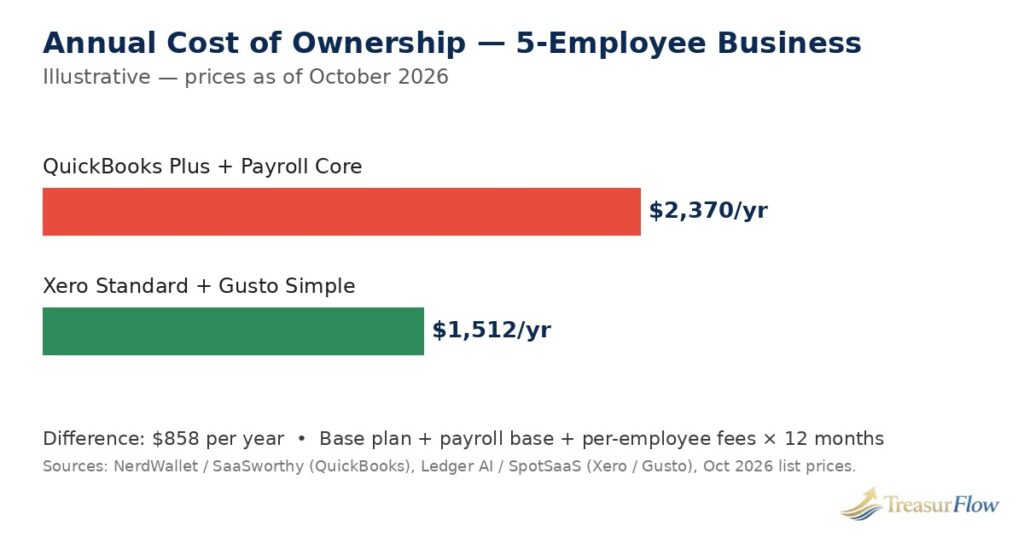
QuickBooks Online Plus: $115 per month. Plus includes up to 5 users, which covers the owner plus key staff, with the accountant’s access not counting against the cap. QuickBooks Payroll Core: $50 per month plus $6.50 per employee per month. For 5 employees that is $50 + (5 × $6.50) = $50 + $32.50 = $82.50 per month. Total stack: $115 + $82.50 = $197.50 per month, which is $2,370 per year. What you get for it: accounting, inventory, class and project tracking, and payroll with tax filing in one vendor, one login, one bill, and payroll posting directly into the books.
Option B — Xero Standard with Gusto Simple payroll, 5 employees.
Xero Standard: $47 per month, with unlimited users, so the owner, staff, and bookkeeper all log in without a tier jump. Gusto Simple payroll: $49 per month plus $6 per person per month. For 5 employees that is $49 + (5 × $6) = $49 + $30 = $79 per month. Total stack: $47 + $79 = $126 per month, which is $1,512 per year. What you get for it: accounting with unlimited seats, bulk reconciliation, and a specialist payroll and HR platform that files taxes in all 50 states, with payroll syncing into Xero automatically.
The difference is $858 per year — $71.50 per month — in Xero-plus-Gusto’s favor for this particular business. Read that result carefully, because it is narrower than it looks and it can flip. If the business needed QuickBooks’ deeper inventory or its accountant works only in QuickBooks, Option A is worth the premium. If headcount grows to 15, both stacks rise by their per-employee fees — $6.50 versus $6 per head — so the gap barely moves; the base fees are what separate them. If the owner instead chose Xero Premium for multi-currency ($80) the Xero stack rises to $159 per month and the gap shrinks to $462 a year. And if the business dropped to Xero Starter it would save more but hit the 20-invoice cap almost immediately — a false economy we do not recommend. The lesson is not “Xero wins.” The lesson is that the honest comparison is stack versus stack, at your real headcount, on list prices — and on that basis, for this business, the modular stack costs about 36% less per year.
Notice also what the example reveals about structure. In Option A, 58% of the monthly cost is the accounting plan and 42% is payroll. In Option B, payroll is 63% of the total. Whichever platform you choose, payroll — not accounting — becomes your largest software line item the moment you hire, which is why choosing payroll deliberately, rather than accepting whatever is bundled, matters more than squeezing $10 a month out of the accounting plan.
Feature Comparison Table
The table below compares the five core platforms at the tiers a typical small business actually buys, using the verified October 2026 list prices and plan details cited in the sections above. Read it as a map, not a ranking: the right column for you depends on your stage, your headcount, and your accountant.
| Feature | QuickBooks Online | Xero | FreshBooks | Zoho Books | Wave |
|---|---|---|---|---|---|
| Starting list price (Oct 2026, monthly billing) | $38/mo (Simple Start) | $20/mo (Starter) | $23/mo (Lite) | Free under $50k revenue; $20/mo (Standard, or $15 annual) | $0 (Starter); $19/mo (Pro) |
| Invoicing | Yes, all plans | Yes; ~20/mo cap on Starter | Yes; core strength; 5 billable clients on Lite | Yes, all plans incl. Free | Yes, unlimited |
| Expense tracking | Yes, all plans | Yes; Premium adds expense claims | Yes | Yes, all plans | Yes |
| Inventory | Plus ($115/mo) and Advanced | Light built-in; apps for depth | No | Stock tracking from Professional ($50/mo); advanced at Elite | No |
| Payroll | Add-on: Core $50/mo + $6.50/employee | Via Gusto integration: $49/mo + $6/person | Add-on (Gusto-powered): $40/mo + $6/employee | Via Zoho Payroll / integrations (varies) | Add-on: $40/mo + $6/employee (tax-service states) |
| Bank feeds / reconciliation | Yes, all plans | Yes; bulk reconciliation on Standard+ | Yes | Yes, all plans | Starter: limited refreshes; Pro: automatic imports |
| User limits | 1 / 3 / 5 / 25 by tier | Unlimited on all plans | Team members on higher tiers | Role-based; varies by plan | Single user focus |
| Integrations | Very large app ecosystem | Large app store (1,000+ apps) | Moderate | Zoho ecosystem + marketplace | Limited |
| Best-fit stage | Growing businesses; accountant-led | Collaborative teams; multi-currency | Freelancers and solopreneurs | Budget-conscious; inventory value pick | Free for U.S./Canada services |
Two rows deserve emphasis. The user-limits row is where budgets quietly break: a QuickBooks business that grows from 3 users to 6 pays for two tier jumps, while a Xero business pays nothing extra for people — over three years that difference alone can exceed $2,000. And the payroll row is where “price” becomes “stack”: no column in this table includes payroll in the base price, so every real-world budget must add the payroll line from the worked example before comparing totals.
Switching and Migration Checklist: Move Once, Move Cleanly
Switching accounting software is a small project with a long tail: done well, it takes a focused week and nobody notices; done badly, it corrupts two tax seasons. The difference is almost never the software. It is whether you moved at a clean boundary, with complete exports, and ran both systems side by side before trusting the new one.
Work through this checklist in order. Do not skip the boring steps — they are the ones that protect you.
1. Export and archive everything from the old system first. Before you cancel or downgrade anything, export your full general ledger, trial balance, customer and vendor lists, item and inventory lists, open invoices and bills, and payroll history, in both CSV and PDF where the system allows it. Store the archive somewhere outside the old software. If the old vendor deletes data after cancellation — many do after a retention window — this archive is your only copy, and your tax records must survive for years after the subscription ends.
2. Choose your cutover date: a month-end, ideally a year-end. The cleanest switch happens at the start of a new fiscal year, when opening balances are simply the prior year’s closing balances. A mid-year switch is doable but means entering year-to-date totals and reconciling a partial year across two systems at tax time. Never switch in the middle of a payroll quarter if you run payroll — finish the quarter in the old system so its filings stay whole.
3. Rebuild the chart of accounts deliberately. Do not import years of accumulated clutter. Map each old account to the new system’s chart, merge duplicates, retire dead accounts, and agree the structure with your accountant before the first transaction posts. A migration is the one free chance you get to fix your chart; owners who skip this step drag a decade of mess into a clean system.
4. Enter and prove your opening balances. Enter the closing trial balance from the old system as the new system’s opening position, then run the new system’s trial balance and compare it line by line with the old one. They must match to the cent. Then reconcile every bank and credit card account in the new system up to the cutover date. Do not enter new transactions until the opening position is proven — errors compound from here if you let them.
5. Move open items individually, not as totals. Open invoices, unpaid bills, unapplied credits, and outstanding checks and deposits should be entered one by one with their real dates and references, so aging reports in the new system are true from day one. Entering a single lump-sum “accounts receivable” figure feels faster and breaks collections, statements, and cash-flow reporting for months.
6. Reconnect the money plumbing. Re-link bank and card feeds and confirm transactions flow in. Reconnect payment processing so invoices can be paid online, re-issue any recurring invoice templates, reset sales-tax rates and jurisdictions, and re-enter payroll employee records, year-to-date wages, and tax elections before the first new pay run. Then send one test invoice and process one test payment end to end.
7. Run both systems in parallel for one month. Keep entering (or importing) the month in the old system while you work in the new one, then compare the profit and loss statement and balance sheet from both. When they agree, close the old system to read-only, note the cancellation and data-retention dates in your calendar, and keep your step-1 archive. Skipping the parallel month is the single most common cause of migration regret — it is also the cheapest insurance in this entire article.
When to switch, in one paragraph. The best time is the start of a fiscal year. The second-best is the start of any quarter, with payroll aligned. The worst times are mid-quarter, mid-tax-season, and the week before a loan application or audit that will rely on your reports. If your current system is actively failing you — missed filings, wrong inventory, a bookkeeper who refuses to touch it — switch at the next month-end anyway and follow the checklist; a planned imperfect switch beats an unplanned perfect one that never happens.
Accounting Software Questions Owners Ask First
What is the best accounting software for a brand-new small business in 2026?
Start with the stage you are in, not the brand you have heard of. A freelancer billing clients should start on FreshBooks Lite ($23 per month) or Zoho Books Free if revenue is under $50,000. A service business that wants free accounting should start on Wave. A business with employees, inventory, or an accountant already involved should start on QuickBooks Online or Xero, whichever its accountant recommends. The best first system is the one that fits today’s stage and has a clean upgrade path to the next one.
How much does small business accounting software really cost per month?
More than the advertised plan price, because payroll and per-employee fees sit on top. Standalone accounting runs from $0 (Wave Starter, Zoho Books Free under its revenue ceiling) to $20–$38 per month for entry paid plans, $47–$75 for the mid tiers most growing businesses land on, and $115 or more once inventory and advanced reporting matter. Add payroll — typically a $40–$50 base plus about $6 per employee per month — and a five-employee business realistically pays between about $126 and $197.50 per month all-in, as the worked example in this guide shows, before payment-processing fees.
Can I use free accounting software instead of paying for a plan?
Yes, if your needs are simple. Wave’s free Starter plan covers real double-entry accounting and unlimited invoicing for a U.S. or Canadian service business, earning its money from payments and payroll instead. Zoho Books is free while revenue stays under $50,000 a year and gives you the full Zoho accounting engine with a clean paid upgrade path. Free stops working when you need inventory, multiple team members with permissions, advanced automation, or a bookkeeper who requires a specific platform — then a paid plan is cheaper than the workaround.
Does accounting software include payroll, or is payroll always extra?
Payroll is extra in almost every mainstream platform. QuickBooks Online adds QuickBooks Payroll (Core $50 per month plus $6.50 per employee per month). Xero has no built-in U.S. payroll and pairs with Gusto ($49 per month plus $6 per person per month). Wave Payroll is $40 per month plus $6 per employee in tax-service states, and FreshBooks Payroll, powered by Gusto, is $40 per month plus $6 per employee per month. Always confirm that the tier you pick includes full tax filing and deposits, and note any penalty-protection terms, before you rely on it.
When is the best time to switch accounting software?
At the start of a fiscal year, when opening balances are simply last year’s closing balances. The second-best time is the start of a quarter, with payroll switched between quarters so filings stay whole. Avoid mid-quarter switches, tax season, and the week before a loan application or audit. Whenever you switch, export and archive everything from the old system first, enter opening balances and prove them against the old trial balance to the cent, move open invoices and bills individually, and run both systems in parallel for one month before you cancel the old one.
Do I still need an accountant if I use accounting software?
Yes — software records and organizes; an accountant interprets, plans, and is accountable. Accounting software will categorize transactions, reconcile accounts, and produce reports, but it will not choose your entity structure, time your equipment purchases for deductions, set your estimated taxes, or represent you to the IRS. Most owners get the best value from the combination: software doing the daily recording, a bookkeeper keeping it clean monthly, and a CPA reviewing quarterly and filing annually. Clean software data is also how you stop paying your accountant to do data entry at professional rates.
Conclusion: Buy for the Business You Will Be in 12 Months
The best accounting software in 2026 is not one product. It is a match between your stage and a platform’s strengths: FreshBooks for the freelancer whose job is billing time, QuickBooks Online for the growing business that needs seats, reporting, and its accountant’s blessing, Xero for the collaborative team that wants unlimited users and multi-currency, Zoho Books for the budget-conscious business — free under $50,000 in revenue, with inventory waiting at the Professional tier — and Wave for the U.S. or Canadian service business that wants solid free books.
Decide on total cost, not sticker price. Add the plan, payroll ($40–$50 per month base plus $6–$6.50 per employee in the mainstream options), per-employee fees, and payment processing, then compare that 12-month number across your finalists. Remember the worked example: the same 5-employee business paid $2,370 per year on QuickBooks Online Plus with QuickBooks Payroll Core and $1,512 per year on Xero Standard with Gusto Simple — and remember also that the cheaper stack was cheaper for that business’s shape, not for every shape.
Start there, start at a month-end or year-end, work the migration checklist in order, and keep your CPA in the loop from the first conversation. Your books are the one system every other decision — pricing, hiring, borrowing, selling — reads from. Buy the software that gives you numbers you can trust at the stage you are actually in, at a total cost you have actually added up, and the rest of the business gets easier to run.

Muhammad Zakir is the founder of Treasurflow and the author of its personal finance guides. He researches consumer banking, credit, and personal loans, and every guide cites primary sources such as the CFPB, FDIC, FTC, and IRS. His content is educational and is not personalized financial advice.