The work is done. The client is happy. And then the money sits — for days, sometimes weeks — because the invoice went out late, went out as a blurry PDF attachment nobody opened, or went out with no easy way to pay it. For most small businesses, late payment is not a client problem first. It is a workflow problem first. The best invoicing software 2026 buyers should shortlist is not the tool with the longest feature list. It is the tool that moves an invoice through five steps — create, send, track, remind, reconcile — with the fewest stalls, the fewest manual touches, and the lowest total cost once payment processing is counted.
That is how this guide ranks seven widely used tools: Zoho Invoice, Wave, Square Invoices, FreshBooks, QuickBooks Online, Xero, and Stripe Invoicing. Instead of scoring logos, we follow a single invoice through its whole life in each product and note where that product speeds the journey up and where it quietly breaks it. A freelancer sending eight invoices a month, a contractor collecting deposits and milestone payments, and a growing agency with three people touching accounts receivable do not need the same winner — and at several stages of business, the right answer genuinely costs $0 a month.
Every price in this article is a list price checked against vendor pricing pages and the leading comparison coverage in October 2026, and every price is date-stamped “as of October 2026.” Where a vendor is running a promotion — and in this category someone always is — we label it promotional pricing and budget on the list price instead, because the promotional months end and the list price is what your second year actually costs. Payment processing fees are treated separately from subscription prices throughout, because for most businesses the processing line is bigger than the software line, and confusing the two is how a “free” tool ends up costing more than a paid one.
Here is the short version before the detail. If you want capable invoicing and nothing else, Zoho Invoice is free and genuinely good. If you want invoicing plus basic bookkeeping for free, Wave is the natural starting point. If you already take payments in person with Square, Square Invoices keeps everything in one place at no monthly cost. If you bill for time and live or die by polite, automatic follow-up, FreshBooks earns its subscription. If invoicing is one part of a full accounting system your bookkeeper will live in, QuickBooks Online is the default for a reason. If several people need access without per-seat charges and you expect to grow, Xero is built for that. And if your customers are spread across countries and currencies, or your billing is usage-based, Stripe Invoicing charges no monthly fee and instead takes a small percentage of what you actually collect.
Related Guides
- Best Budgeting Apps 2026 — the personal-finance side of keeping money organized once client payments land.
- How to Give Credit on Price to a Client — how to offer payment flexibility to a client without training them to pay you late.
- Best Expense Tracking Methods for Students — simple systems for tracking money out, which pairs with the invoicing habits in this guide.
Helpful Official Resources
- SBA — Manage Your Finances — the U.S. Small Business Administration’s guide to accounting for revenue and expenses, cash flow, and basic business bookkeeping.
- IRS — Small Business and Self-Employed Tax Center — the Internal Revenue Service hub for recordkeeping, filing, and paying business taxes, including why invoices count as supporting documents for gross receipts.
- IRS — Starting or Ending a Business (FAQ) — IRS answers pointing new owners to recordkeeping and accounting basics.
- FTC — Scams and Your Small Business — the Federal Trade Commission’s guide to fake invoices and invoice fraud, including how to verify invoices before paying them — worth reading from the receiving side before you design your own billing process.
The Picks at a Glance (Prices as of October 2026)
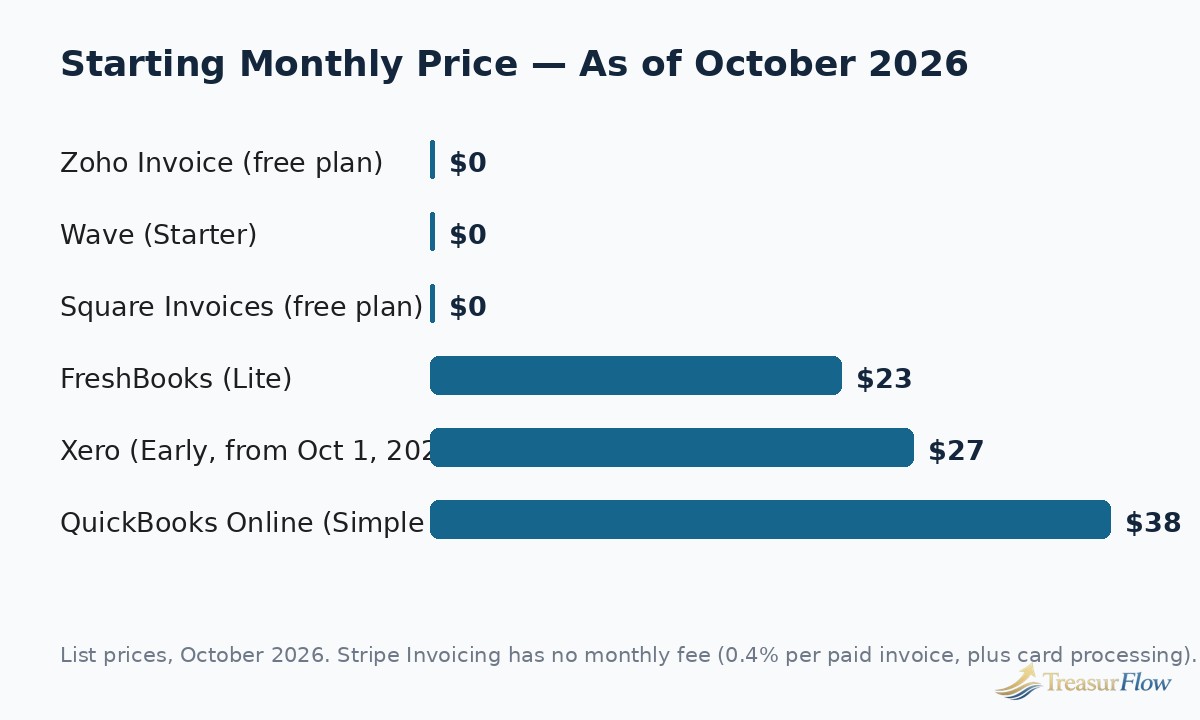
| Tool | Best for | Starting price (list, as of Oct 2026) | The catch to know upfront |
|---|---|---|---|
| Zoho Invoice | Invoicing only, done well, for free | $0 | Capped at 2 users and 500 invoices per year; no accounting built in |
| Wave | Free invoicing plus basic bookkeeping | $0 (Starter); Pro is $19/mo | Automation such as bank imports and auto-reminders sits in the paid Pro plan |
| Square Invoices | Businesses already using Square for payments | $0 | Card payments on invoices cost 3.3% + 30¢ on the free plan — above the standard benchmark |
| FreshBooks | Service businesses that bill time and need strong reminders | $23/mo (Lite) | Plans are capped by billable clients: 5 on Lite, 50 on Plus |
| QuickBooks Online | Full accounts receivable inside full accounting | $38/mo (Simple Start) | You are paying for an accounting platform, not just an invoicing tool |
| Xero | Growing teams that need unlimited users | $27/mo (Early, from Oct 1, 2026) | Early caps you at 20 invoices and 5 bills per month |
| Stripe Invoicing | International and usage-based billing | No monthly fee; 0.4% per paid invoice | The percentage fee stacks on top of normal card processing on every paid invoice |
The Get-Paid Workflow: Five Steps Between “Job Done” and “Money Banked”
Most invoicing comparisons open a feature grid. Real businesses do not experience features; they experience a pipeline. An invoice is created, it is sent, its status is tracked, somebody (or something) reminds the client when it is due or overdue, and when the money arrives it has to be matched — reconciled — against the right invoice and the right bank deposit. Every day of delay and every error in a small business’s cash cycle hides in one of those five steps. So before the individual reviews, here is how the pipeline works, what breaks at each step, and which of the seven tools handle each step best.
Step 1: Create — Turn Finished Work Into an Accurate Invoice in Minutes
Creation is where errors are born. A wrong rate, a missing purchase order number, a forgotten expense, or sales tax applied inconsistently does not just look unprofessional; it gives the client a legitimate reason to pause payment while the invoice is corrected and reissued, and the payment clock restarts. Good creation tools reduce that risk with saved client records, saved items and rates, templates that carry your terms by default, and — for service businesses — a direct pipe from tracked time and expenses into the invoice itself.
FreshBooks is the strongest creator for service work because time tracking, expenses, and retainers live in the same product, so an invoice can be assembled from work already recorded instead of retyped. Zoho Invoice is a close second and is free: it handles recurring invoices, time and project billing, and multi-currency invoices without charging anything. QuickBooks Online and Xero create invoices perfectly well, but creation there is one screen inside a large accounting system, which is power you may not need at this step. Wave creates clean, professional invoices with no volume limits on its free plan, though it has no time tracking at all — hourly billers have to bring their hours in from somewhere else. Square Invoices is fast for simple, product-and-project billing, especially deposits and milestones, but offers less customization. Stripe Invoicing creates polished, payment-ready invoices and handles tax and currency complexity well, but it assumes you are comfortable in a payments dashboard rather than a bookkeeping one.
The creation step also decides your payment terms, and terms are a cash-flow lever, not boilerplate. Net 14 instead of Net 30, a deposit up front on project work, and a stated late fee all belong in the template, set once, rather than negotiated invoice by invoice. Every tool in this guide supports default terms; the ones that win the step are the ones that make the right defaults effortless.
Step 2: Send — Get the Invoice Into the Client’s Hands With a Way to Pay It
An invoice sitting in your drafts folder earns nothing, and an invoice sent as an attachment the client has to download, print, and manually pay through their own bank earns slowly. The modern standard — and the standard every tool here meets at least adequately — is an emailed invoice with a hosted payment page: the client clicks, sees the amount, and pays by card or bank transfer without creating an account or calling you for details.
Where tools differ is in what surrounds that send. Square Invoices and Stripe Invoicing send the most payment-native invoices, because payments are the companies’ core business: the pay button, the stored card options, and the checkout experience are the product, not an add-on. Stripe additionally sends invoices that handle 135-plus currencies and local payment methods, which matters the moment a client pays from another country. FreshBooks and QuickBooks Online both send branded invoices with pay-now buttons through their own payments services, and both let you see the send status. Wave sends unlimited invoices free, but note that on the free Starter plan the surrounding automation is thinner. Zoho Invoice sends through your choice of payment gateways — flexible, but you set the gateway up yourself, and Zoho’s free plan carries “Powered by Zoho Invoice” branding on what your client receives.
One sending habit matters more than any of these differences: send the invoice the day the work is delivered, from the system, every time. Software cannot fix an invoice that waits until Friday. What software can do — and the better tools here do — is make sending a two-click act you can finish from your phone in the client’s parking lot, and turn estimates and deposits into invoices without re-entering anything.
Step 3: Track — Always Know Who Owes You What, and for How Long
Tracking is the step spreadsheets fail. A spreadsheet knows what you typed into it; invoicing software knows what actually happened: sent, viewed, partially paid, paid, overdue, and by how many days. The single most useful screen in any of these products is the accounts receivable aging view — current, 1–30 days overdue, 31–60, 61–90, and older — because it converts a vague feeling (“clients pay slowly”) into a specific list you can act on this morning.
QuickBooks Online tracks the deepest, because the invoice is tied directly to the customer balance, the general ledger, and the aging report your bookkeeper already uses; nothing exists in a separate silo. Xero matches most of that depth and presents outstanding invoices cleanly on the dashboard, which is one reason growing teams like it. FreshBooks shows viewed and outstanding status clearly and is easy for a non-accountant to read. Wave’s dashboard shows what is owed and is entirely adequate at low volume. Zoho Invoice tracks status well for a free tool, including aging-style reporting. Square Invoices tracks payment status inside the Square ecosystem — fine if all your money flows through Square, limiting if it does not. Stripe Invoicing tracks payment state precisely, as you would expect from a payments company, but the view is a payments view, not an accounts receivable management view; there is no broader picture of a customer’s total relationship unless you build it.
Viewed-status deserves a specific mention because it changes conversations. When a client says “I never received that,” a tool that can show the invoice was opened on Tuesday ends the dispute in one sentence. FreshBooks, QuickBooks Online, Zoho Invoice, and Stripe all expose some form of this. If your clients are chronic “never got it” payers, weight this feature heavily.
Step 4: Remind — Follow Up Automatically, Politely, and on Schedule
This is the step where invoicing software pays for itself, and it is not close. Most late payment is not malice; it is inbox burial. A reminder sent the day before the due date, on the due date, and at set intervals after it — automatically, in a consistent tone, with the payment link included again — recovers money that a busy owner would otherwise chase late, awkwardly, or not at all. Manual chasing also has a real cost: your time, at your rate, spent writing “just following up” emails.
FreshBooks is the standout here, which is why it so often tops service-business shortlists: scheduled reminder sequences and automatic late fees are core to the product, and they are the main reason to pay its subscription over free rivals. QuickBooks Online sends automatic reminders and has been adding smarter, payment-focused follow-up tooling. Xero sends automatic payment reminders you can schedule around due dates. Wave includes basic reminders on the free plan, but automated late-payment reminders are a Pro-plan feature — one of the clearest lines between Wave’s free and paid tiers. Zoho Invoice includes automatic payment reminders in its free plan, which is unusually generous and part of why it leads the free category. Square Invoices supports reminders and is particularly good at the related job of scheduling deposits and progress payments so less money is ever “late” in the first place. Stripe Invoicing automates reminders and, for recurring billing through Stripe Billing, automatic retries of failed card payments — a different and valuable kind of follow-up for subscription-style revenue.
Set reminders up once, with a firm-but-friendly sequence: a courteous note a few days before the due date, a reminder on the day, a firmer note a week after, and a final notice at 30 days that mentions the late fee your terms already state. Then let the machine do the uncomfortable part.
Step 5: Reconcile — Match the Money to the Invoice and Close the Loop
Reconciliation is the invisible step, and skipping it is how businesses end up with books that say they are owed money already sitting in the bank — or worse, pay tax on income recorded twice. When a payment arrives, it must be matched to the correct invoice, the processing fee recorded, and the bank deposit agreed to the accounting records. Tools that contain both the invoice and the ledger do this almost automatically. Tools that only invoice leave you to do it by hand somewhere else.
This is the structural advantage of QuickBooks Online, Xero, Wave, and FreshBooks (on its Plus plan and above, where double-entry accounting and bank reconciliation live): the payment, the fee, and the bank feed meet in one system. QuickBooks Online is the most complete here — invoices, payments, bank feeds, and reporting are one workflow, which is the core of its top ranking in most comparisons. Xero’s bank reconciliation is famously fast and is a genuine reason teams choose it. Wave reconciles adequately for simple books, with automatic bank imports gated to Pro. Zoho Invoice, Square Invoices, and Stripe Invoicing all break at this step by design: they are invoicing and payment tools, not ledgers. Each integrates or exports to accounting software — Zoho Invoice most naturally toward Zoho Books, Stripe toward everything via its ecosystem — but the reconciliation itself happens elsewhere, and you should choose them knowing that.
The verdict of the workflow test, then: no tool wins all five steps. FreshBooks wins create-and-remind for services. QuickBooks Online wins track-and-reconcile. Stripe wins send for international work. Zoho and Wave win on price at the early steps without embarrassing themselves later. The right question is not “which is best?” but “which step is currently costing me money?” — and the picks below are organized by exactly that.
Invoicing-Only vs. Full Accounting: Pick the Right Category First
Treasurflow’s existing guides cover full accounting software and bookkeeping software in depth, so this article deliberately does not re-review these products as accounting suites. The distinction matters because it decides what you should pay for.
Invoicing-only tools — Zoho Invoice, Square Invoices, and Stripe Invoicing in this guide — do the create-send-track-remind pipeline and take payments, and stop there. They do not keep your general ledger, reconcile your bank account as your system of record, or produce a balance sheet. They are the right buy when your accounting is handled elsewhere (a bookkeeper with their own system, a separate accounting app, or very simple taxes) and your actual pain is getting invoices out and money in.
Full accounting platforms — QuickBooks Online, Xero, Wave, and FreshBooks (Plus and above) — contain invoicing as one module inside double-entry bookkeeping: bank feeds, reconciliation, financial statements, sales tax reporting, and year-end tax preparation. They are the right buy when the invoicing pain and the bookkeeping pain are the same pain, which for most businesses past the solo stage they eventually become.
The expensive mistake is paying accounting-platform prices for an invoicing-only problem — $38 a month and up, forever, to send six invoices. The opposite mistake is outgrowing an invoicing-only tool and discovering at tax time that a year of payments was never reconciled anywhere. Buy for the problem you have this year; every tool here lets you export your data and move when the problem changes.
The Best Invoicing Software 2026, Pick by Pick
Zoho Invoice — The Best Free Invoicing-Only Tool
Starting price: $0 (free), as of October 2026. Limits: 2 users, 500 invoices per year, 3 projects.
Zoho Invoice has been completely free since 2021, and it is not a trial, a demo, or a crippled tier designed to upsell you — all of its invoicing features are in the free plan. Through the workflow, it performs like a paid product: creation is strong, with recurring invoices, estimates that convert to invoices, time and project billing, and multi-currency support across many languages. Sending works through your choice of payment gateways, so clients can pay online while Zoho itself adds no processing fee on top of the gateway’s. Tracking covers invoice status and client balances well for the price (which is zero). Most unusually for a free tool, automatic payment reminders are included, so the remind step does not break the way it does on some free rivals. Reconciliation is where it stops: Zoho Invoice is not an accounting system, and Zoho’s clear intention is that businesses which outgrow it graduate to Zoho Books.
The limits are real but generous for the stage it serves. Five hundred invoices a year is roughly ten a week — more than most freelancers and many small service businesses send. Two users covers an owner and a helper or bookkeeper with view access. Three projects is the tightest cap for project-based work. The free plan also carries “Powered by Zoho Invoice” branding on invoices, a small professionalism trade-off most early businesses can accept. Choose Zoho Invoice if your problem is purely invoicing, your volume fits the caps, and your bookkeeping lives somewhere else. It is the easiest recommendation in this guide.
Wave — Free Invoicing With Basic Bookkeeping Attached
Starting price: $0 (Starter plan), as of October 2026. Pro plan: $19/mo list (promotional pricing of $9.50/mo for the first 3 months for new monthly subscribers has been advertised — promotional, not list).
Wave’s proposition is different from Zoho’s: invoicing plus actual double-entry bookkeeping, free. Creation is unlimited — unlimited estimates, invoices, bills, and bookkeeping records on the Starter plan — and invoices look clean and professional. Sending includes online payment acceptance, and tracking through the Wave dashboard is simple and honest. Because the ledger is in the same product, reconciliation exists here in a way it does not in Zoho or Square — though automatic bank imports, automatic categorization, and automatic late-payment reminders have moved into the $19/mo Pro plan, so the free tier asks for more manual work at the track, remind, and reconcile steps than it once did. Receipt scanning is also a paid add-on.
Wave’s economics live in its payment fees, and you should know them precisely: on Starter, card payments cost 2.9% + 60¢ per transaction (3.4% + 60¢ for American Express) and ACH costs 1% with a $1 minimum. That 60¢ fixed fee is double the 30¢ standard benchmark, which barely matters on a $1,000 invoice and matters a great deal on a $40 one — Pro reduces it by waiving the fixed fee on the first 10 card transactions each month. There is no time tracking and no multi-currency invoicing, which rules Wave out for hourly billers and international sellers respectively. Choose Wave if you are a US or Canada-based solo business that wants invoices and books in one free place and can live with manual bank entry until Pro is worth $19.
Square Invoices — Free, and Already Where Your Payments Are
Starting price: $0, as of October 2026. Paid Square plans (Plus, $49/mo per location) lower some processing rates.
Square Invoices makes the most sense for a business already inside Square’s world — a shop, salon, food business, or contractor taking card payments in person with Square and sending invoices for the rest. Creation is quick, with a genuine strength the others do not match as naturally: deposits, estimates, and milestone or progress payments built for project work, so a kitchen remodel or a wedding booking can be billed in stages instead of one anxious final invoice. Sending is payment-native, with next-business-day standard payouts. Recurring invoices and reminders are supported, and tracking is clear inside the Square dashboard.
Two weaknesses define it. First, price at the payment step: on the free plan, card payments through invoices cost 3.3% + 30¢, noticeably above the 2.9% + 30¢ standard benchmark, while ACH invoice payments cost 1% with a $1 minimum. On the model business in our true-cost section below, that single rate difference costs more per year than several paid subscriptions. Paid Square plans bring the invoice card rate down to 2.9% + 30¢, but at $49/mo the plan only pays for itself at meaningful volume. Second, there is no accounting here at all — reconciliation happens in whatever bookkeeping tool you pair it with. Choose Square Invoices if Square already runs your payments and your invoice volume is modest; run the processing math before choosing it on volume alone.
FreshBooks — The Service-Business Specialist, Built Around Reminders
Starting price: $23/mo (Lite, list), as of October 2026. Plus: $43/mo. Premium: $70/mo. Annual billing saves 10% (Lite is $248.40/year). Promotional introductory discounts are frequent — budget on list.
FreshBooks was built for people who sell time and expertise, and the workflow shows it. Creation is its home turf: track time and expenses in the same app, convert an estimate or proposal into an invoice, and bill retainers without workarounds. Sending produces some of the most polished, client-friendly invoices in this comparison. Tracking shows viewed, outstanding, and overdue status in language a non-accountant immediately understands. And reminders are the headline: scheduled reminder sequences and automatic late fees are central features, and they are the concrete reason a service business pays FreshBooks instead of using a free tool — the follow-up system runs while you do billable work.
The pricing model is the thing to understand before you buy: FreshBooks charges by billable clients, not invoices. Lite’s $23/mo covers only 5 billable clients, which an active freelancer can outgrow in a single good quarter; Plus at $43/mo covers 50 and is also where full double-entry accounting, bank reconciliation, and free accountant access arrive — making Plus the realistic entry point for most buyers. Premium at $70/mo removes the client cap. Extra team members cost $11/mo each, and payment processing runs at the standard 2.9% + 30¢ for cards and 1% for ACH. Reconciliation is solid on Plus and above. Choose FreshBooks if you bill services by time or project, your client count fits the tier, and late-paying clients — not bookkeeping depth — are your expensive problem.
QuickBooks Online — Full Accounts Receivable Inside the Default Accounting Platform
Starting price: $38/mo (Simple Start, list), as of October 2026. Essentials: $85/mo. Plus: $140/mo. Advanced: $340/mo. A 50%-off-for-3-months offer for new subscribers is commonly advertised — promotional pricing; budget on list.
QuickBooks Online is the most common answer to “what should I invoice with?” in the United States, and in workflow terms its strength is the back half of the pipeline. Creation and sending are fully capable — customizable invoices, pay-now buttons for cards and bank transfers, estimates that convert, recurring invoices — without being the most elegant in this group. Tracking is where it pulls ahead: every invoice lives against the customer record, the accounts receivable aging, and the general ledger at once, so “who owes me what” is always also “what do my books say,” with no second system to agree or disagree. Reminders are automatic and increasingly assisted. Reconciliation is the best in this comparison, because bank feeds, payments, processing fees, and invoices all resolve in one place — the exact step where invoicing-only tools hand you manual work.
The honest cautions are about fit and price trajectory, not capability. You are buying an accounting platform: Simple Start’s $38/mo includes a great deal a pure invoicer does not need, and plan prices above Simple Start rose again for renewals in 2026, continuing a pattern of annual increases worth budgeting for. User caps apply — 1 user on Simple Start, 3 on Essentials, 5 on Plus, 25 on Advanced — and QuickBooks Payments prices card acceptance at 2.99% with ACH at 1%, around the standard benchmark. The counterweight is ecosystem: most US bookkeepers and accountants work in QuickBooks daily, and that shared fluency is worth real money at tax time. Per our scope note above, we are not re-reviewing QuickBooks as an accounting suite here — judged on invoicing within a full AR workflow, it is the safest default for a growing US business that wants invoicing and books to be the same system. Choose it when reconciliation and your accountant’s workflow matter more than shaving the subscription.
Xero — The Multi-User, Grow-With-You Option
Starting price: $27/mo (Early, list, from October 1, 2026; $25/mo before that date), as of October 2026. Growing: $59/mo (was $55). Established: $97/mo (was $90).
Xero’s defining structural advantage appears the moment a second or third person needs the books: unlimited users on every plan, where QuickBooks caps users by tier and FreshBooks charges per extra team member. In workflow terms, creation is clean and fast, with an interface many owners find less intimidating than larger rivals; sending works through connected payment services such as Stripe, so clients get a modern pay-now experience; tracking is strong, with a clear outstanding-invoices view; reminders can be automated around due dates; and reconciliation is a genuine highlight — Xero’s bank reconciliation is quick, learns as you use it, and is frequently the feature converts cite.
The catch sits in the entry plan. Early’s $27/mo caps you at 20 invoices and quotes and 5 bills per month, which a healthy business outgrows quickly; Growing at $59/mo removes the caps and is the realistic plan for most, with Established at $97/mo adding multi-currency, expenses, and project tracking. Because payments run through a connected provider rather than Xero itself, your processing cost is that provider’s — typically Stripe’s 2.9% + 30¢ for US cards — and payout timing follows the provider too. Xero also raised US prices on October 1, 2026 (Early $25 to $27, Growing $55 to $59, Established $90 to $97), a reminder to budget this category with annual increases in mind. Choose Xero if more than one person touches the money, you expect to grow into it, or you bill internationally at the Established tier — and price Growing, not Early, in your comparison.
Stripe Invoicing — No Monthly Fee, Percentage Pricing, Built for Borders
Starting price: no monthly fee; Invoicing Starter costs 0.4% per paid invoice, on top of payment processing, as of October 2026.
Stripe Invoicing inverts the pricing model. There is no subscription to budget and no plan to outgrow; you pay 0.4% of each paid invoice (the invoicing fee) plus Stripe’s normal processing — 2.9% + 30¢ for US cards, 0.8% capped at $5 for ACH Direct Debit, with international cards adding 1.5% and currency conversion adding 1% where they apply. In workflow terms, sending is its triumph: invoices are hosted payment pages backed by a payments network spanning 135-plus currencies and local payment methods, so a client in London, Toronto, or Sydney pays the way locals pay. Creation handles taxes, discounts, and one-off or recurring charges well, and for subscription or usage-based revenue, Stripe Billing extends the same system to metered and tiered pricing — the one tool here genuinely built for “we charge by usage.” Tracking of payment state is precise, reminders are automated, and failed recurring card payments are retried automatically.
What Stripe does not do is accounting: no ledger, no bank reconciliation as your books, no financial statements. Reconciliation happens in your accounting software, fed by Stripe’s data and integrations. The percentage model also cuts both ways — at low volume it is the cheapest serious option in this guide; at high volume the 0.4% invoicing fee plus processing quietly exceeds a flat subscription, as the cost model below shows. Choose Stripe Invoicing if your clients are international, your billing is usage-based or subscription-shaped, or you are a developer-led business already living in Stripe — and model the percentage fee against your actual annual billings before assuming “no monthly fee” means cheapest.
The Processing-Fees Reality: The Subscription Is the Small Number
Here is the number this category markets around: accepting cards costs money on every invoice, at roughly the same rate almost everywhere. The standard US benchmark, as of October 2026, is 2.9% + 30¢ per card transaction — the rate you will find at Stripe, at FreshBooks, at Xero through Stripe, and as the anchor rate across most of the industry. ACH and bank payments are consistently cheaper: typically 1% (QuickBooks, FreshBooks, Wave, Square) or 0.8% capped at $5 per payment at Stripe, which makes ACH dramatically cheaper on large invoices.
Verify the exceptions before you commit, because the exceptions are where money leaks. Square Invoices on its free plan charges 3.3% + 30¢ for invoice card payments — 0.4 percentage points above benchmark, which is $40 extra per $10,000 collected, every year, forever, until you upgrade. Wave’s free Starter charges 2.9% + 60¢, doubling the fixed fee; on a $50 invoice that extra 30¢ is 0.6% of the whole payment. QuickBooks Payments lists card acceptance at 2.99%. Stripe adds its 0.4% invoicing fee on top of processing. International cards add roughly 1% to 1.5% at most providers, and currency conversion can add another 1%. Instant payouts, where offered, cost extra again.
Do the arithmetic for your own business once, in this order: (your average invoice) × (the percentage rate) + (the fixed fee) = your cost per paid invoice. Then multiply by invoices per year. On a $600 invoice, the benchmark cost is $17.70. On a $60 invoice, it is $2.04 — a much larger share. Two habits follow. First, steer large payments to ACH wherever the client will accept it: on a $5,000 invoice, a card at benchmark costs about $145.30 while Stripe ACH hits its $5 cap — a $140 difference on a single invoice. Second, never choose invoicing software on subscription price alone: a $0 plan with above-benchmark processing can cost more than a $38 plan at benchmark, which is exactly what the next section demonstrates.
First-Year True Cost: What a Solo Business Actually Pays
To compare fairly, we modeled one business across all seven tools: a solo service business sending 12 invoices per month (144 per year) at an average of $600, billing $86,400 per year, with all invoices paid by card. Subscription figures use list prices as of October 2026; promotional pricing is shown separately and labeled. Processing uses each vendor’s published US card rates cited above. Your numbers will differ — the method matters more than the model.
| Tool (entry plan) | Year-1 subscription (list) | Processing on $86,400 (144 card payments) | Year-1 true cost |
|---|---|---|---|
| Zoho Invoice (Free) | $0 | $2,548.80 via a gateway at the 2.9% + 30¢ benchmark (gateway-dependent) | $2,548.80 |
| Wave (Starter) | $0 | $2,592.00 at 2.9% + 60¢ | $2,592.00 |
| FreshBooks (Lite, $23/mo) | $276 | $2,548.80 at 2.9% + 30¢ | $2,824.80 |
| Xero (Early, $27/mo) | $324 | $2,548.80 via Stripe at 2.9% + 30¢ | $2,872.80 |
| Square Invoices (Free) | $0 | $2,894.40 at 3.3% + 30¢ | $2,894.40 |
| Stripe Invoicing (no monthly fee) | $0 | $2,894.40 (2.9% + 30¢ processing = $2,548.80, plus 0.4% invoicing fee = $345.60) | $2,894.40 |
| QuickBooks Online (Simple Start, $38/mo) | $456 | $2,583.36 at 2.99% | $3,039.36 |
Promotional pricing, labeled as such: QuickBooks Online’s commonly advertised 50% off for the first 3 months would reduce its first-year subscription to $399 (3 months at $19 plus 9 months at $38), a first-year true cost of $2,982.36 — before returning to $456 in year two. FreshBooks billed annually costs $248.40 for Lite instead of $276. Wave Pro, if you upgrade for automation, adds $228 per year at list. None of these change the ranking’s lesson.
Three takeaways from the model. First, processing is 84% to 100% of the true cost for every tool — the subscription fight that dominates marketing is the small fight. Second, the “free” tools do not tie: Zoho plus a benchmark-rate gateway is the cheapest route for this business, while Square’s free plan and Stripe’s no-monthly-fee model land at identical true cost, above two paid subscriptions, because of their payment pricing. Third, scale changes everything: double the billing to $172,800 and Stripe’s 0.4% fee alone becomes $691.20, while subscriptions stay flat — percentage pricing favors the small, flat pricing favors the growing. Re-run this table with your own invoice count and average before you decide; it takes five minutes and it is the most valuable five minutes in the buying process.
How to Choose in 15 Minutes
Work through five questions, in order. (1) Is your pain invoicing only, or invoicing plus bookkeeping? Invoicing only points to Zoho, Square, or Stripe; both together points to Wave, FreshBooks, QuickBooks, or Xero. (2) How many invoices and clients do you have? Check the caps: 500 invoices a year at Zoho, 20 invoices a month on Xero Early, 5 billable clients on FreshBooks Lite. (3) How do your clients pay, and where are they? Card-heavy and domestic means benchmark rates decide; international or usage-based means Stripe; in-person plus invoices means Square. (4) Who else needs access? Multiple users argue for Xero’s unlimited seats or QuickBooks’ higher tiers. (5) What does the true-cost table say at your volume? Run it. The tool that wins your five answers is your tool — and if two tie, take the one your accountant prefers, because you will meet them in it at tax time.
Invoicing Questions Owners Ask Before the First Invoice Goes Out
Do I really need paid invoicing software, or is a free plan enough to start?
For most new and solo businesses, a free plan is enough to start. Zoho Invoice covers invoicing, recurring billing, and automatic reminders for free up to 500 invoices a year, and Wave adds basic bookkeeping at no cost. Move to a paid plan when you hit a cap, need automatic bank imports or stronger reminder automation, or need full accounting and reconciliation in the same system as your invoices.
What is the difference between invoicing software and full accounting software?
Invoicing software handles creating, sending, tracking, and reminding clients about invoices, and usually taking payment. Full accounting software does all of that inside a complete bookkeeping system with a general ledger, bank reconciliation, financial statements, and tax reporting. If your only problem is getting invoices out and paid, an invoicing-only tool is enough. If your books are also a problem, choose a platform that does both.
How much do payment processing fees actually cost on top of the subscription?
The standard US benchmark is 2.9% plus 30 cents per card payment, as of October 2026. On a $600 invoice that is $17.70, and on $86,400 of annual card billings it adds up to about $2,548.80, which is more than any entry-level subscription in this guide. ACH payments are cheaper, typically 1% or less, so steering large invoices to bank payments is the biggest single saving available.
Can invoicing software really get me paid faster?
Yes, mainly through three habits the software makes automatic: sending the invoice the day work is delivered, including a pay-now link so the client can pay by card or bank transfer in one click, and sending scheduled reminders before and after the due date. None of these requires a premium plan. Free tools cover the first two, and Zoho Invoice includes automatic reminders for free, while Wave places automatic reminders in its paid Pro plan.
Which invoicing tool is best if my clients are outside the United States?
Stripe Invoicing is the strongest choice for international clients because it supports payments in more than 135 currencies and local payment methods, and charges no monthly fee. Xero on its Established plan and Zoho Invoice also support multi-currency invoicing. Budget for extra costs on international payments: cards issued abroad typically add 1% to 1.5%, and currency conversion can add another 1% on top of standard processing.
How long should I keep copies of invoices for taxes?
Keep invoices and the records that support your income and deductions for at least three years, which is the period the IRS generally suggests for business records. The IRS treats invoices as supporting documents for gross receipts, so store them somewhere searchable rather than in an email inbox. Employment tax records should be kept at least four years. When in doubt, keeping digital copies longer costs almost nothing and protects you in an audit.
Conclusion
The best invoicing software 2026 pick for your business is the one that fixes the step where your invoices currently stall. If invoices go out late or not at all, a free tool used the same day — Zoho Invoice for invoicing alone, Wave for invoicing plus simple books — beats a premium subscription you avoid opening. If invoices go out fine but come back paid slowly, FreshBooks and its reminder engine are worth paying for. If the money arrives but your books never quite agree with your bank, that is a reconciliation problem, and QuickBooks Online or Xero is the honest fix. If your clients are everywhere and your billing does not fit flat plans, Stripe’s percentage model was built for you. Whichever you choose, do two things before your first invoice goes out: set your payment terms and reminder sequence as defaults, and run the true-cost math at your own volume, processing included. Software does not get you paid — a workflow does. The right tool just makes that workflow automatic.

Muhammad Zakir is the founder of Treasurflow and the author of its personal finance guides. He researches consumer banking, credit, and personal loans, and every guide cites primary sources such as the CFPB, FDIC, FTC, and IRS. His content is educational and is not personalized financial advice.