
There is no single best stock trading app for everyone in 2026 — and any list that pretends otherwise is selling you a ranking, not helping you make a decision. The best app depends on the trader you are.
Best stock trading apps 2026: A first-time investor buying a fractional share of a broad fund once a month needs something completely different from an options trader watching Level 2 data, and both of them need something different from someone investing across stock markets in several countries. An app that feels beautifully simple to a beginner can feel dangerously limited to an active trader. An app packed with professional charts can overwhelm a new investor into making rushed, emotional decisions. Neither reaction means the app is bad. It means the fit is wrong.
One warning belongs at the very top, before any pick: investing involves risk, including the possible loss of the money you invest. A trading app does not make trading safe. An app makes trading easier, faster and cheaper to start — and easier, faster trading can just as easily increase your losses if you trade impulsively. No app in this guide promises returns, and neither do we. If any platform, influencer or advertisement suggests an app will make you money, treat that as a reason to walk away, not to sign up.
Related Guides
- Best Online Broker 2026: Fees, Features and How to Choose — the wider broker comparison this app guide builds on, including how brokerage accounts work.
- Best Roth IRA Accounts 2026 — if your trading app will also hold your retirement account, compare the retirement side before you decide.
- Best Robo-Advisors 2026 — if reading this guide makes you realise you would rather have your portfolio managed automatically than trade it yourself, start here instead.
Helpful Official Resources
- Investor.gov — Introduction to Investing (U.S. Securities and Exchange Commission) — the SEC’s free, plain-English starting point for new investors, including how to avoid fraud.
- FINRA BrokerCheck — look up any brokerage firm or individual broker before you trust them with money. It is free and takes a few minutes.
- FINRA — Investing Basics — FINRA’s investor guidance on risk, diversification, fees and common investing mistakes.
Start With Your Trader Archetype, Not With a Ranking
Before you compare a single fee, answer three honest questions about yourself. Your answers will eliminate most apps on this list immediately — and that is a good thing, because a short list you understand beats a long list you skim.
First, how often will you actually trade? If the honest answer is “a few times a year, mostly buying and holding,” you are a long-term investor, and research quality, retirement account support and low ongoing costs matter far more to you than charting speed. If the answer is “most days,” you are an active trader, and order tools, data depth and platform stability matter more than a friendly home screen.
- The beginner wants clarity, fractional shares, simple options education if any, and an app that does not punish small balances.
- The active trader wants fast, customisable charts, extended order types, paper trading to test ideas, and a platform that stays usable on volatile days.
- The options trader wants contract pricing, data depth such as Level 2 quotes, and risk tools — and needs to understand that options can expire worthless.
- The global investor wants access to exchanges outside the United States and a mobile app that does not collapse that global access into a toy.
- The long-term and retirement investor wants IRAs and other retirement accounts, strong research and education, automatic investing tools, and a firm likely to still suit them in twenty years.
- The social or copy trader wants to see, follow and automatically copy other investors’ portfolios — while understanding that copying someone else’s past decisions is not a strategy with any guarantee.
- The low-cost investor wants the lowest total cost of ownership, which, as the true-cost section shows, is not the same thing as the lowest headline commission.
Our Picks at a Glance
The table below summarises the picks explained in detail in the next sections. Rankings credited to Money reflect its October 2026 evaluation, in which Money assessed 20 apps on 24 data points for its best overall category. Other category notes are credited to the roundups named in each detailed section.
| Trader type | Pick | Why it fits, in one line | Stock/ETF commission (as of Oct 2026) |
|---|---|---|---|
| Best overall | Fidelity | Widest product range, deep research, fractional shares | $0 |
| Best for beginners | Robinhood | Mobile-first, simplest learning curve, instant deposits per roundups | $0 |
| Best for active traders (charts) | Webull | Free advanced charting and paper trading | $0 |
| Best app for active traders | TradeStation | Named best app for active traders by Money | Check current schedule in app |
| Best for options | moomoo | Free Level 2 data and options focus | $0 on stocks/ETFs/options per Invezz |
| Best for global markets | Interactive Brokers | Global access with a highly customisable mobile app | Varies by market — check in app |
| Best for long-term and retirement | Charles Schwab | thinkorswim, strong research and education, retirement strength | $0 per StockBrokers.com |
| Best for social and copy trading | eToro | CopyTrader and Smart Portfolios | $0 on its listed stocks/ETFs per Invezz |
| Best low-cost | SoFi Invest | Named best low-cost trading app by Money | Check current schedule in app |
| Worth watching for transparency | Public | Order-routing transparency positioning, bonds and cash in-app per Invezz | Check current schedule in app |
Best Overall: Fidelity — For the Investor Who Wants One Account That Can Grow With Them
Fidelity is our starting point because it is the pick that fits the widest range of archetypes without forcing a compromise that hurts. Money named Fidelity its best overall stock trading app and its pick for the best wide range of products in October 2026, after evaluating 20 apps on 24 data points. That breadth is the story here.
As of October 2026, Fidelity charges $0 commissions on stocks, ETFs and options, with options contracts at 65 cents per contract — a specific, firm figure worth noting because options contract fees are one of the real costs the true-cost section below is built around. There is a $0 account minimum, which means a beginner can start without a large deposit, and fractional shares are available for around 7,000 stocks and ETFs, which means a small amount of money can still buy a slice of an expensive share instead of sitting in cash waiting.
Where Fidelity separates itself from simpler apps is research. Its research offering draws on material from more than 20 providers, which matters most to the long-term investor archetype: if you plan to hold investments for years, the quality of the information behind your decisions matters more than the speed of the buy button. Fidelity also offers its proprietary index funds with a 0% expense ratio — index funds whose stated ongoing fund fee is zero — which is relevant to cost-focused, long-term investors, though a 0% expense ratio on a fund does not make the investment risk-free, and the fund’s value will still rise and fall with the market.
The honest drawback, as Money’s evaluation also notes, is that broker-assisted trades — trades placed with the help of a human broker rather than by you in the app — carry high fees at Fidelity. For an app-first investor who never uses that service, this may never matter. For someone who expects to call in trades, it is a real cost to check before opening the account.
Skip Fidelity if: you want the absolute simplest possible first app and find a full-service platform’s menus intimidating, or if social copy trading is your main reason for investing — that is eToro’s territory, covered below. Choose Fidelity if: you want one account that can plausibly serve you as a beginner today and as a more experienced, research-driven investor later, without needing to switch platforms as you learn.
If you are weighing Fidelity against other full-service brokers at the account level rather than the app level, our guide to the best online broker for 2026 compares the underlying brokerage offers in more depth.
Best for Beginners: Robinhood — For the First-Time Investor Who Needs the Simplest Possible Start
Robinhood is the beginner pick in Money’s October 2026 rankings — best for beginners — and the reasoning is consistent across roundups: it is mobile-first, the interface is the least intimidating in this guide, trades in stocks are $0, its options offering is deliberately simple, and roundups highlight instant deposits as part of its appeal for new investors who do not want to wait days for money to settle before their first purchase.
Skip Robinhood if: you want the deepest third-party research library, global market access, or a desktop-class trading platform — Interactive Brokers and Fidelity serve those needs better. Choose Robinhood if: you are opening your first account, your amounts are small, you value an app you can understand on day one, and you are honest with yourself that a simple app still requires a disciplined owner.
Best for Active Traders: Webull and TradeStation — For Investors Who Trade Often and Live in the Charts
Active traders are the archetype most poorly served by beginner apps, because their needs run in the opposite direction: more data, more order control, more customisation, and tools that hold up when markets move fast.
Webull is the pick for active traders who want free advanced charts. As of October 2026, roundups credit Webull with $0 trading in stocks and options, advanced charting at no extra cost, paper trading — so strategies can be tested with virtual money before real capital is exposed — and access to futures. Futures are advanced, leveraged products with substantial risk of loss, and their availability in an app should be read as a tool for experienced traders, not as a recommendation for anyone else. Paper trading deserves emphasis for this archetype in particular: an active strategy that has never been tested without real money is a guess, and Webull’s paper trading lets you find out whether the guess survives contact with realistic prices before your savings do.
TradeStation earns its separate mention because Money named it the best app for active traders in its October 2026 rankings. Where Webull’s pitch is advanced tools made accessible, TradeStation’s identity is a platform built for people for whom trading is a serious, frequent activity. Because active-trader pricing and platform tiers can be more detailed than a single headline commission, check the current fee schedule inside the app before you commit — that instruction applies to every app in this guide, but it matters most in this category, where how often you trade multiplies every small cost.
Skip both if: you buy a few times a year and hold; you would be paying for intensity you never use, in attention if not in fees. Choose Webull if: free advanced charting and paper trading are your priorities. Choose TradeStation if: Money’s best-app-for-active-traders assessment matches the kind of dedicated, frequent trading you actually do.
Best for Options Traders: moomoo — For Data-Driven Options Investors
Money named moomoo its best pick for options in October 2026, and the feature roundups point to is free Level 2 data. Level 2 data shows the queue of buy and sell orders beyond the single best price — the depth of the order book — which options and active traders use to judge liquidity and short-term pressure. On many platforms, that depth of data is a paid extra, so its inclusion is a genuine differentiator for this archetype. Per the Invezz platform roundup, moomoo offers $0 trading in stocks, ETFs and options as of October 2026.
Options need their own paragraph of risk language wherever they appear in this guide, because they are the product where an app’s polish most dangerously understates the underlying danger. An options contract gives you the right — not the obligation — to buy or sell an underlying asset at a set price by a set date. That leverage means a small price move in the stock can produce a large move in the option, in either direction. Options can expire worthless, in which case the entire amount paid for them is lost. Strategies involving selling options can expose you to losses larger than your initial outlay. Free Level 2 data helps you see the market more clearly; it does not change any of those facts. If you cannot explain, in plain words, the maximum you can lose on a trade before you place it, you are not ready to place it — on moomoo or anywhere else.
Skip moomoo if: you do not trade options and do not plan to; its headline advantage is wasted on a buy-and-hold investor, who is better served by Fidelity or Schwab. Choose moomoo if: options are a considered, understood part of your investing, and free Level 2 data and an options-first app design match how you actually trade.
Best for Global Markets: Interactive Brokers — For the Investor Who Refuses to Stop at One Country’s Border
Interactive Brokers is the pick for global investing and for advanced traders in the October 2026 roundups, and its mobile app, IBKR Mobile, is described as highly customisable — a telling detail, because global investing is where customisation stops being a luxury. Different time zones, currencies, exchanges and order types demand a workspace you can shape around the markets you follow, rather than a single feed designed for one country’s trading hours.
Skip Interactive Brokers if: you are a beginner, or you only ever buy United States stocks and funds; its depth will read as complexity, and complexity you do not use is just friction. Choose Interactive Brokers if: you invest across borders, you are an advanced trader who wants a highly customisable mobile platform, and you are willing to invest learning time in proportion to the power on offer.
Best for Long-Term and Retirement Investing: Charles Schwab — For the Investor Playing a Twenty-Year Game
Charles Schwab is Money’s pick for retirement investing in October 2026, and it suits the long-term archetype for three connected reasons: the thinkorswim trading platform, strong research and education, and $0 commissions on stocks as reported by StockBrokers.com as of October 2026.
Thinkorswim is the name long-time active and long-term investors often cite first: a powerful platform, available across devices, that gives a retirement investor room to analyse holdings properly rather than glancing at a phone widget. For this archetype, that power is used differently than an active trader uses it — not to trade more, but to understand more: to examine what you own, test how concentrated you are, and review a portfolio calmly a few times a year.
Skip Schwab if: copy trading or a purely mobile, minimal first experience is your priority. Choose Schwab if: retirement investing is the centre of your plan, you value thinkorswim and strong research and education, and you want a broker whose strengths compound quietly over a long holding period.
Best for Social and Copy Trading: eToro — For the Investor Who Wants to Learn by Following Others
eToro is Money’s pick for social trading in October 2026, built around two features no other pick in this guide centres on: CopyTrader, which lets you automatically copy the trades of another investor, and Smart Portfolios, which group assets around a theme or strategy.
The scale of the offer, per the Invezz platform roundup, is 5,252 stocks and 496 ETFs available at $0, options with no contract fee, and 103 cryptoassets priced with a 1% spread. Two honest caveats belong beside those figures. First, eToro has no desktop platform per that roundup, so if your workflow needs a full desktop trading desk, this is not your app. Second, a 1% spread on cryptoassets is a real, material cost — a reminder, again, that “$0 commission” and “free to trade” are not the same sentence, a theme the true-cost section develops in full.
Copy trading itself needs the clearest risk framing in this entire guide. Copying another trader copies their decisions, not their knowledge, their risk tolerance, or their financial situation. The trader you copy may be taking risks you cannot afford, may change strategy without warning, and — critically — their past results, however they are displayed, are not a promise of their future results or of yours. Your copied account can lose money even while you do everything the app suggests. Treat CopyTrader, if you use it at all, as an educational window into how other people construct portfolios, with amounts you can afford to lose while you learn — never as a substitute for understanding what you own. Smart Portfolios carry the same discipline: a themed portfolio is still a portfolio of risky assets, and a theme you find exciting is not diversification.
Skip eToro if: you need a desktop platform, you want the deepest independent research, or you know that watching other traders would tempt you into trades you do not understand. Choose eToro if: social learning is genuinely how you engage with investing, you have read the copy-trading risks above and accept them, and app-only access is enough for you.
Best Low-Cost App: SoFi Invest — and an Honourable Mention for Public on Transparency
Money named SoFi Invest its best low-cost trading app in October 2026. For the low-cost archetype, that label should be understood in the total-cost sense this guide keeps returning to: not merely a $0 headline commission, but the whole stack of costs and frictions around your investing, considered together. SoFi’s appeal for this archetype is a low-cost trading offer sitting inside a broader money app, which suits investors who want their spending, saving and investing in fewer places and who value a streamlined, app-first experience over a professional trading desk.
Public earns an honourable mention in this section for a different virtue: transparency about how your orders are handled. Per the Invezz roundup, Public positions itself around order-routing transparency and also offers bonds and cash products inside the app. Why does order routing deserve a mention in a consumer guide? Because it connects directly to payment for order flow, explained neutrally in the next section. A broker that talks openly about where your orders go and why is giving you information most investors never think to ask for. If that transparency matters to you, Public is worth examining alongside the headline picks.
Skip SoFi Invest if: you need advanced charting, options depth or global markets — Webull, moomoo and Interactive Brokers respectively serve those archetypes better. Choose SoFi Invest if: low total cost and an integrated, app-first money experience are your priorities, and your investing is straightforward stocks and funds. Consider Public if: understanding exactly how your trades are executed matters as much to you as the commission line.
Detailed Comparison: Every Pick Side by Side
| App | Best for | Standout verified strength | Watch out for |
|---|---|---|---|
| Fidelity | Overall / growing investors | Research from 20+ providers; fractional shares for ~7,000 stocks/ETFs; 0% expense-ratio proprietary index funds | High broker-assisted trade fees |
| Robinhood | Beginners | Mobile-first simplicity; simple options; instant deposits per roundups | Simplicity can encourage impulsive trading; not the deepest research |
| Webull | Active traders (charts) | Free advanced charts; paper trading; futures access per Invezz | Futures are high-risk; power invites overtrading |
| TradeStation | Active traders | Money’s best app for active traders | Check detailed current fee schedule before committing |
| moomoo | Options | Free Level 2 data; $0 stocks/ETFs/options per Invezz | Options can expire worthless — data does not reduce that risk |
| Interactive Brokers | Global / advanced | Global market access; highly customisable IBKR Mobile | Complexity is real for beginners; margin is risky at any rate |
| Charles Schwab | Retirement / long-term | thinkorswim; strong research and education; $0 commissions per StockBrokers.com | More platform than a minimal mobile-only user needs |
| eToro | Social / copy trading | CopyTrader; Smart Portfolios; options with no contract fee per Invezz | No desktop platform; crypto at 1% spread per Invezz; copying is not a guarantee |
| SoFi Invest | Low-cost | Money’s best low-cost trading app | Fewer advanced trading tools than specialist platforms |
| Public | Transparency-minded | Order-routing transparency positioning; bonds and cash in-app per Invezz | Smaller specialist feature set than the largest brokers |
The True Cost of “$0 Commission”: What Your Trading App Actually Charges You
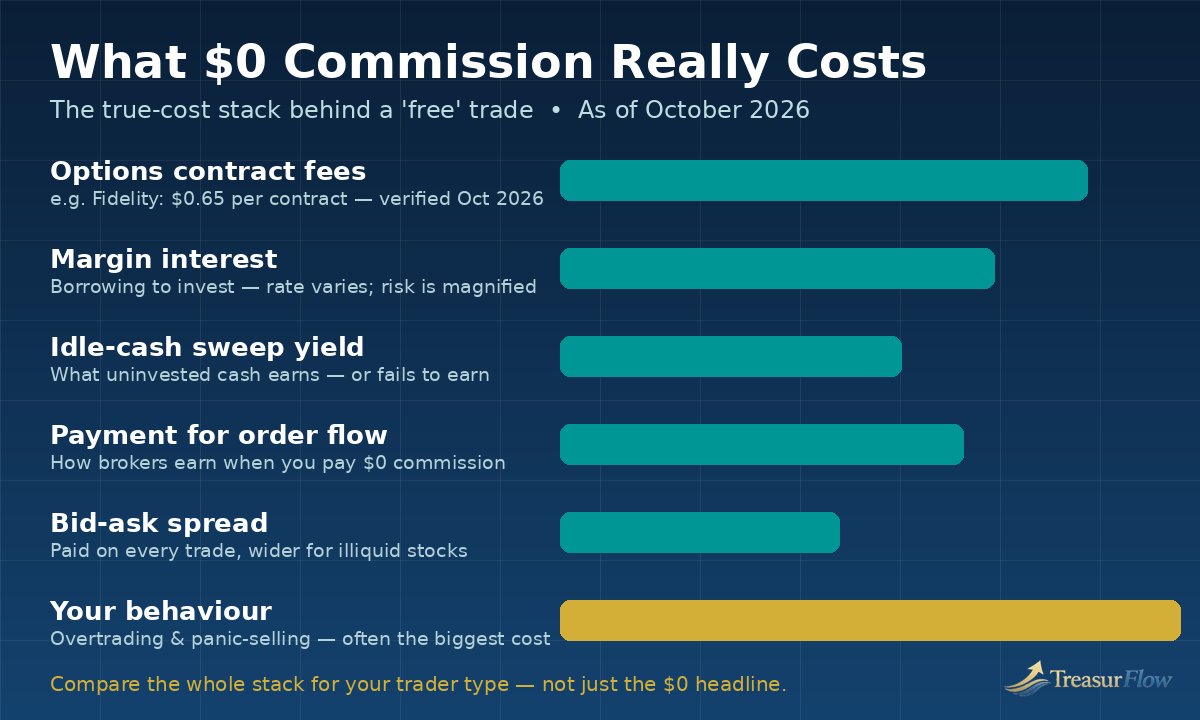
If you take only one section of this guide seriously, take this one. As StockBrokers.com summarises the industry, most stock trading apps are now commission-free. That sentence is true, and it is also incomplete in a way that costs uninformed investors money every day. Brokers are businesses. When the commission line went to $0, the revenue did not disappear — it moved. Understanding where it moved to is the difference between choosing an app and being chosen by one.
Cost 1: Options contract fees
Stock and ETF commissions may be $0, but options are usually priced per contract. Fidelity’s 65 cents per options contract, as of October 2026, is the firm example used in this guide. That sounds trivial until you scale it: a trader who opens and closes positions of ten contracts at a time pays that fee twenty times across the round trip, and an active options trader can pay it hundreds of times a year. At the other end of the verified range in this guide, eToro offers options with no contract fee per the Invezz roundup. Neither fact makes either broker “cheaper” in the abstract — it depends entirely on how much options trading you actually do, which is why the archetype questions come before the picks. Before choosing an app for options, multiply the contract fee by your realistic annual contract volume, both ways, and write the number down. That number, not the $0 headline, is your options cost.
Cost 2: Margin interest
If you borrow from your broker to invest — trading on margin — you pay interest on the loan, and margin rates vary widely between brokers and by how much you borrow. Interactive Brokers’ low-margin-rate positioning is part of why advanced traders favour it, but we are deliberately keeping this guide’s margin discussion qualitative rather than printing specific competitor rates we could not verify from a firm source for this article. What can be stated without a rate table is the risk arithmetic, and it matters more than any percentage: margin interest accrues whether your investments rise or fall, a falling market can trigger a margin call requiring you to deposit more money or have positions sold, possibly at the worst prices, and your possible loss can exceed what a cash investor in the same stock would face. A cheaper rate on a dangerous tool does not make the tool safe. Beginners should not use margin. Experienced investors who do should read the broker’s full margin agreement first — not the app summary, the agreement.
Cost 3: The yield on your idle cash
Between trades, your uninvested cash usually sits in a sweep arrangement, and what that cash earns — or fails to earn — is a silent cost or benefit that compounds. Two investors with identical portfolios at two different brokers can end a year with meaningfully different results purely because one broker’s cash sweep paid competitive interest and the other’s paid close to nothing on the same idle balances. This is the cost almost no advertisement mentions, because it is invisible trade by trade. Check, for any app you are considering: where does my uninvested cash go, what does it currently earn, and what do I have to do — opt in, meet a minimum, hold a premium tier — to earn it? Then check again periodically, because sweep arrangements and rates change.
Cost 4: Payment for order flow, explained honestly
Payment for order flow, usually shortened to PFOF, is the practice at the centre of most arguments about “free” trading, so here is the neutral version, consistent with how StockBrokers.com describes broker economics: brokers can earn revenue by routing your orders to market makers — large trading firms — which pay for the flow of orders. The broker also earns, again per StockBrokers.com’s summary of the model, from securities lending, from interest on idle cash sweeps, from margin lending, and from upsells to other products.
Add the stack together — contract fees, any margin interest, foregone cash yield, execution economics, spreads, upsells, behaviour — and you have your true cost. Compare apps on that stack, for your archetype, and the right choice usually becomes obvious.
App vs Desktop: The Reality Nobody Mentions in the App Store
Every app in this guide is marketed with phone screenshots, but serious investing rarely lives entirely on a phone. Knowing where the app ends and the desktop platform begins will save you from choosing a tool that fails you at the exact moment you need it most.
Where apps run out of road. Multi-window research, complex options analysis, backtesting an active strategy, screening thousands of stocks on layered criteria, and calmly reviewing a large portfolio’s allocation all remain desktop work for most investors. Screen size is only part of it; desktops offer the workspace depth of platforms like Schwab’s thinkorswim and the customisation of Interactive Brokers’ environment in a way a phone cannot replicate. This is also why eToro’s lack of a desktop platform, per the Invezz roundup, is a structural limitation rather than a missing bonus feature: if your investing matures into desktop workflows, an app-only broker forces a future switch.
Safety: What SIPC Covers, What It Does Not, and How to Check a Broker
Safety language in app marketing is often technically true and practically misunderstood, so this section separates the two ideas investors confuse most: protection against a firm failing, and protection against losing money. They are entirely different things.
SIPC: protection if the brokerage fails — not protection against losses
The Securities Investor Protection Corporation, SIPC, protects investors if a SIPC-member brokerage firm fails financially and customer assets are missing. The standard limit is up to $500,000 per customer, including a $250,000 limit for cash. If your broker collapsed and your securities were missing, SIPC protection is the backstop that works to return your assets, up to those limits.
Here is what SIPC does not do, stated as plainly as possible: SIPC does not protect you against market losses. If you buy a stock at $100 and it falls to $40, that $60 loss is yours, entirely. SIPC does not cover bad investment decisions, does not guarantee the value of any security, and does not protect against a decline in the market as a whole. It also does not cover every product an app might show you — cryptoassets, for example, are not securities covered by SIPC in the way brokerage securities are, which is one more reason to keep the crypto portion of any app mentally separate from your protected brokerage assets. Whenever an app displays “SIPC member” as a badge, translate it correctly in your head: it means your assets have a backstop if the firm fails, not if your investments do.
BrokerCheck: the five-minute check that is never wasted
Before opening any brokerage account, look the firm up on FINRA BrokerCheck. BrokerCheck is FINRA’s free tool for researching brokerage firms and individual brokers, including their background and any disciplinary history. Pair it with the SEC’s resources at Investor.gov, which also maintains guidance on spotting investment fraud. A legitimate broker will appear in these systems and will never pressure you to skip checking. Anyone who discourages verification, guarantees returns, contacts you only through social media or messaging apps, or asks you to send money to a personal account is showing you fraud warning signs — end the conversation. No app in this guide will ever do those things, and no legitimate broker will.
Switching Apps — and Placing Your First Trade: A Practical Checklist
Whether you are moving from your first app to a platform that fits the investor you have become, or opening your very first account, work through this checklist in order. It is designed to prevent the small, expensive mistakes — tax surprises, transfer fees discovered too late, trades placed before they were understood — that a rushed signup invites.
If you are switching brokers
- Name your reason first. Write down, in one sentence, what the new app does for your archetype that the old one does not. If you cannot, you are switching out of restlessness, and restlessness is the most expensive motive in investing.
- Check transfer mechanics. Brokers commonly move accounts electronically through the industry’s automated transfer system, typically moving whole shares; fractional shares often cannot transfer and may be sold, which can create a tax event. Confirm, in writing inside the app or help centre, what will move, what will be sold, and how long the transfer is expected to take.
- Ask about fees on both sides. Check whether the old broker charges an outgoing transfer fee and whether the new broker offers any reimbursement — and confirm the current answer rather than relying on any article, including this one, because these policies change.
- Protect your tax records before you move. Download your cost-basis records, trade confirmations and statements from the old broker first. Cost basis — what you originally paid — determines your taxable gain or loss later, and reconstructing it after an account closes is miserable work.
- Keep retirement accounts retirement accounts. If you are moving an IRA, use a direct trustee-to-trustee transfer rather than withdrawing the money to yourself, so the move does not accidentally become a taxable distribution. If account types are part of your decision, revisit our Roth IRA accounts guide before, not after, the transfer.
- Expect a quiet period. Transfers can leave assets temporarily untradeable. Do not start a transfer during a period when you genuinely need immediate access to sell, and never respond to that limbo by opening duplicate positions in the new account.
- Verify, then close. After the transfer, confirm every position and your cost basis arrived correctly in the new account before closing the old one, and keep the old statements you downloaded in step 4 permanently.
If this is your first account and first trade
- Verify the firm on BrokerCheck and read the SEC’s beginner material on Investor.gov. Twenty minutes here outranks any app tutorial.
- Choose the account type deliberately — taxable brokerage, Roth IRA, traditional IRA — because the tax treatment will follow every trade you make inside it. When in doubt, learn the account rules first and trade second.
- Fund small and wait for settlement. Deposit an amount you can afford to leave invested — and afford to see fall on paper without panic. Note how your chosen app handles deposits; roundups credit Robinhood with instant deposits, but instant access is a convenience, not a reason to trade faster.
- Rehearse before you risk. If the app offers paper trading — Webull is the pick in this guide known for it — place your first few trades there and watch how orders, prices and spreads actually behave.
- Make the first real trade boring on purpose. A diversified fund or a small fractional position you understand, sized small, using a limit order so you control the price you pay. Boring is the correct emotional register for a first trade; excitement is a warning sign.
- Write down why you bought it. One or two sentences, saved where you will see them in a year. Investors who record their reasoning make fewer impulsive sales, because future-you can compare the original case against new facts instead of against fear.
- Set your review rhythm and stop. Decide in advance how often you will review — quarterly suits most long-term investors — turn off the notifications that serve no purpose, and let the plan, not the app, run your investing from here.
Trading App Questions New Investors Ask Before Their First Trade
What is the best stock trading app for beginners in 2026?
Money named Robinhood the best stock trading app for beginners in its October 2026 rankings, because it is mobile-first, simple to learn and offers $0 trades and simple options, with instant deposits highlighted in roundups. That said, the best beginner app is the one whose simplicity helps you invest calmly and consistently — and no app makes trading safe, so beginners should start small, favour diversified investments and learn from neutral sources like Investor.gov before trading options or using margin.
Are stock trading apps really free if commissions are $0?
Not entirely. Most major apps charge $0 commission on stocks and ETFs as of October 2026, but brokers earn money in other ways described by StockBrokers.com, including payment for order flow, securities lending, interest on idle cash sweeps, margin lending and upsells. You may also pay options contract fees — 65 cents per contract at Fidelity, for example — spreads on trades, and interest if you borrow on margin. Always compare the total cost stack, not just the commission line.
What does SIPC protection cover — and what does it not cover?
SIPC protection covers up to $500,000 per customer, including $250,000 for cash, if a SIPC-member brokerage firm fails and customer assets are missing. It does not protect you against market losses: if your investments fall in value, SIPC does not repay the difference. It does not cover bad investment decisions, and products such as cryptoassets are not protected the way brokerage securities are. SIPC is a backstop against a firm failing, never a guarantee of investment returns.
Is payment for order flow bad for me as an investor?
Payment for order flow is legal and disclosed, and it is part of the business model that made $0 commissions possible: market makers pay brokers for routing orders to them. Critics argue it creates a conflict of interest because the broker earns from the routing decision and execution prices may be slightly less favourable in some cases, while brokers must follow best-execution obligations. The practical response is not panic but awareness — know the model exists, favour brokers that are transparent about order routing, and focus on your total costs and behaviour, which matter more to most long-term investors.
Can I start trading with a small amount of money?
Yes. Several apps in this guide have low or no account minimums — Fidelity has a $0 minimum as of October 2026 and offers fractional shares for around 7,000 stocks and ETFs, so a small deposit can buy a slice of an expensive share instead of a whole one. Starting small is sensible, but small does not mean risk-free: the percentage you can lose is the same whatever the amount, so invest only money you can afford to leave invested through market falls, and keep an emergency fund outside your brokerage account.
How do I check whether a brokerage firm is legitimate before I open an account?
Look the firm up for free on FINRA BrokerCheck at brokercheck.finra.org, which shows a firm’s background and any disciplinary history, and read the SEC’s investor education and fraud-avoidance guidance at Investor.gov. A legitimate broker appears in these official systems and never guarantees returns, pressures you to act immediately, or asks you to send money to a personal account. If anyone discourages you from checking, treat that as a warning sign and walk away.
Conclusion: Match the App to the Trader, Then Let the Plan Do the Work
The best stock trading apps of 2026 share a headline — $0 commissions on stocks and ETFs almost everywhere — and differ in everything that actually determines your experience. Fidelity is the strongest all-rounder, with research from more than 20 providers, fractional shares across around 7,000 stocks and ETFs, and a wide product range. Robinhood is the gentlest first step. Webull and TradeStation serve active traders who live in the charts. Moomoo gives options traders free Level 2 data. Interactive Brokers opens the world’s markets in a highly customisable app. Charles Schwab, with thinkorswim and its retirement strength, suits the investor playing a twenty-year game. eToro makes social and copy trading its centre, with risks that must be understood before they are enjoyed. SoFi Invest leads on low cost, and Public reminds the whole industry that transparency about order routing is a feature investors should demand.
Investing involves risk, including the possible loss of principal. This article is educational information as of October 2026, not financial advice or a recommendation to buy or sell any security. Fees, features and rankings cited from Money, StockBrokers.com and Invezz roundups can change; confirm current details with the broker and consult a qualified financial adviser about your own situation before investing.

Muhammad Zakir is the founder of Treasurflow and the author of its personal finance guides. He researches consumer banking, credit, and personal loans, and every guide cites primary sources such as the CFPB, FDIC, FTC, and IRS. His content is educational and is not personalized financial advice.